20
Remote Shutter Control – Modifying a remote control
For (almost) all cameras you can buy a standard remote release, which can be connected to the camera
by cable. These can be modified easily and also connected to the Scanner’s control unit. A very
extensive source for various camera models and home-made remote releases is the following page:
http://www.doc-diy.net/photo/remote_pinout/. A modified trigger can be connected to the control
unit similar to the Bluetooth module (see: Remote control - Bluetooth for Android / iOS).
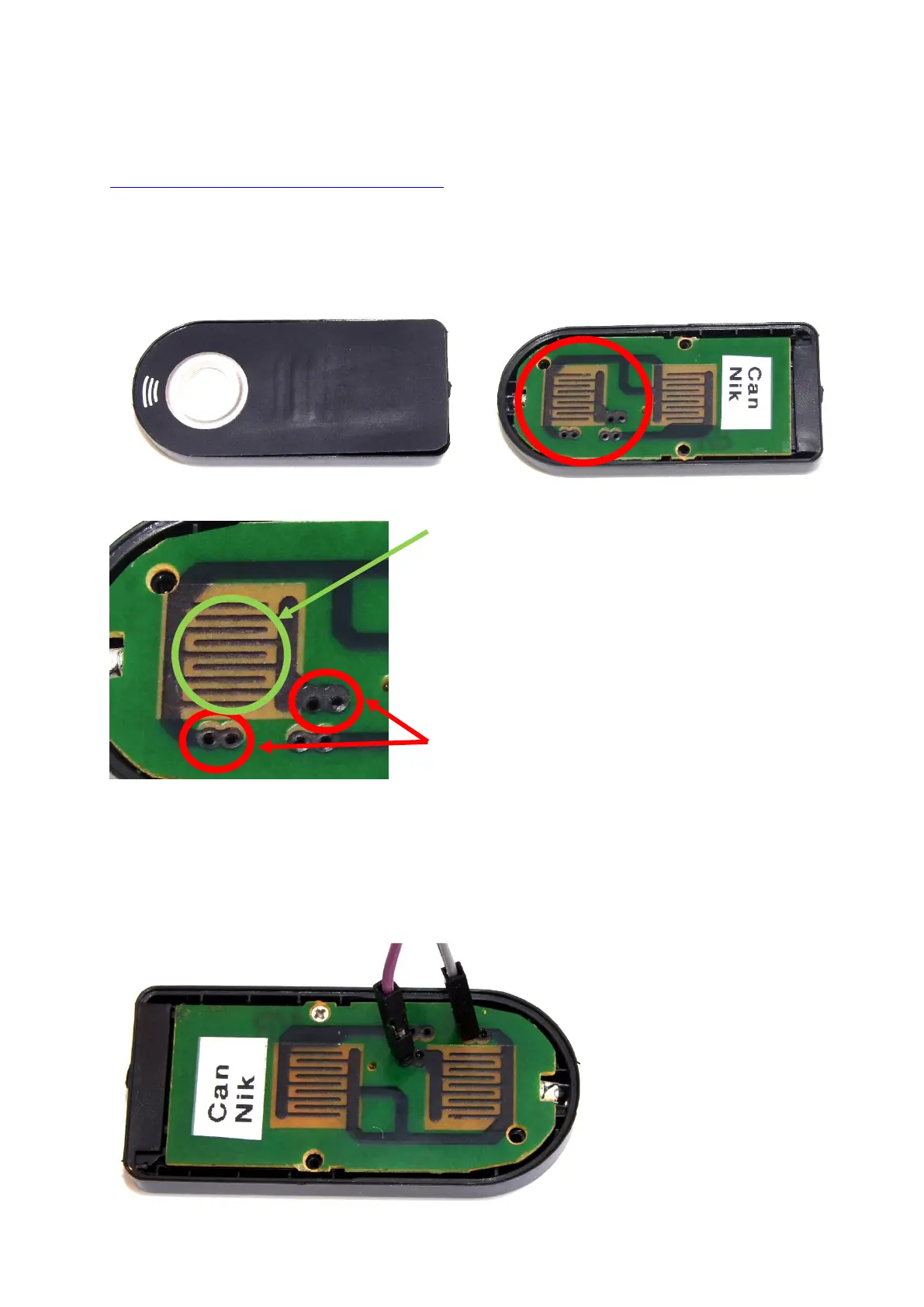
An existing remote release can be modified with minimal soldering skill and a total of two soldering
points. The following pictures describe the basic procedure:
(1)-Remote Control for Nikon/Canon (ca. 5€)
(2) Opening the enclosure
(3) Identification of the connectors
(4) The shown points (red circles) have been contacted with two male jumper wires, that can be
connected to the Scanner. By shortening the two wires the remote will send a pulse to the camera and
trigger the shutter.
These contacts are usually bridged by
pressing the button (see first image)
These contact points can be used to connect
two cables, that can later be connected to
the scanner’s control module.



 To Next Page