54 © Hypercom EMEA Ltd. 2011 Using your terminal
Refund Transactions
You must only use the original card that was used for the Sale transaction
when performing a Refund transaction.
Step 1
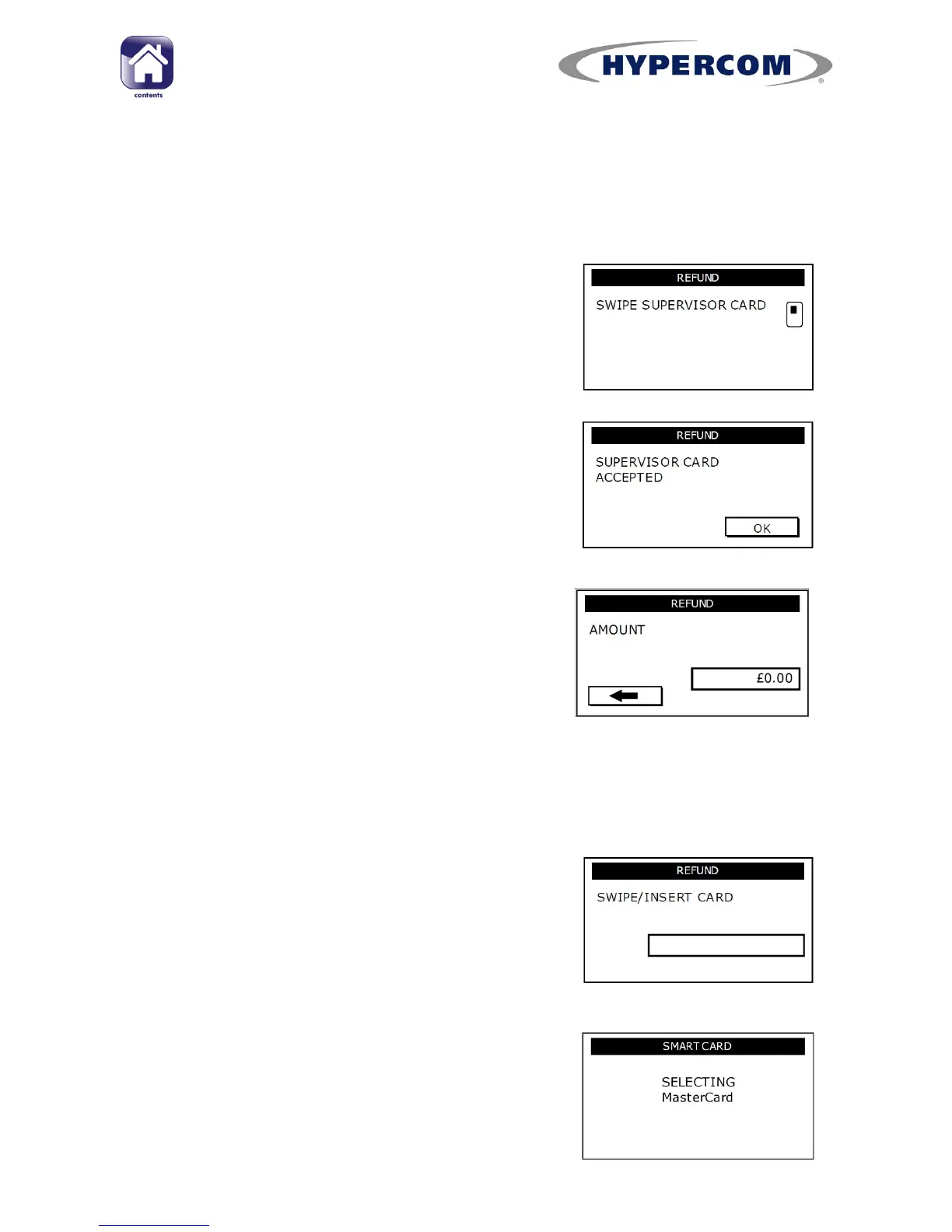
Press REFUND on the idle screen and swipe the
Supervisor Card when prompted.
Step 2
Press OK/Enter to acknowledge that the
terminal has accepted the Supervisor Card.
You may be requested to enter the Merchant
Password at this point.
Step 4
Type in the REFUND AMOUNT in minor
denomination (pence or cents) and press
Enter.
On some software versions and configurations,
the card details entry and amount entry may
be reversed.
Example:
Typing in
1000
would equate to a value of
£10.00 (€10.00 in ROI).
Step 3
Insert the customer‟s Chip Card into the
terminal‟s Chip Card reader or into the optional
PIN Pad.
For a Magnetic Swipe only card, swipe the card
through the terminal‟s magnetic swipe reader.
The terminal will read the card details and
display the card type.
continued...



 To Next Page