76 © Hypercom EMEA Ltd. 2011 Appendices
Appendix D: Set a PABX digit(s)
Terminals with a dial connection come pre-configured with the option to
dial a 9 prefix digit before dialling out. By default, this option is “bypassed”
and therefore not active. To remove the bypass and activate the prefix,
follow the procedure below.
PLEASE NOTE: If you require a digit(s) other than
9
, please call the
helpdesk.
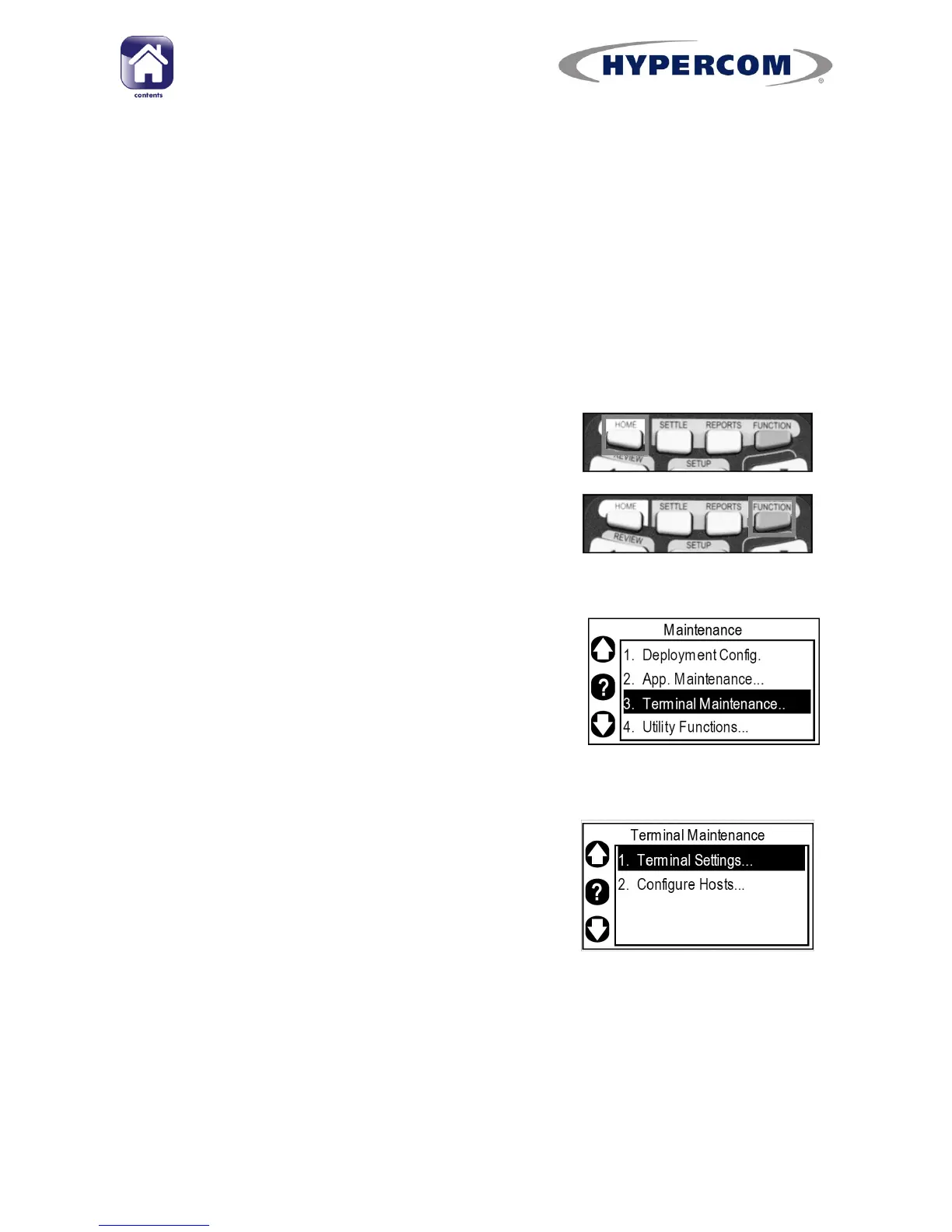
Step 1
If your terminal is showing the idle screen,
press the white HOME button on the keypad to
return to the Desktop.
When the terminal is showing the Desktop,
press the blue FUNCTION button on the keypad
to run the Application Manager.
Step 2
Use the Navigation Buttons to highlight
“Terminal Maintenance..” and press Enter on the
keypad.
Step 3
Highlight “Terminal Settings...” and press Enter
on the keypad.



 To Next Page