84 © Hypercom EMEA Ltd. 2011 Appendices
Step 12
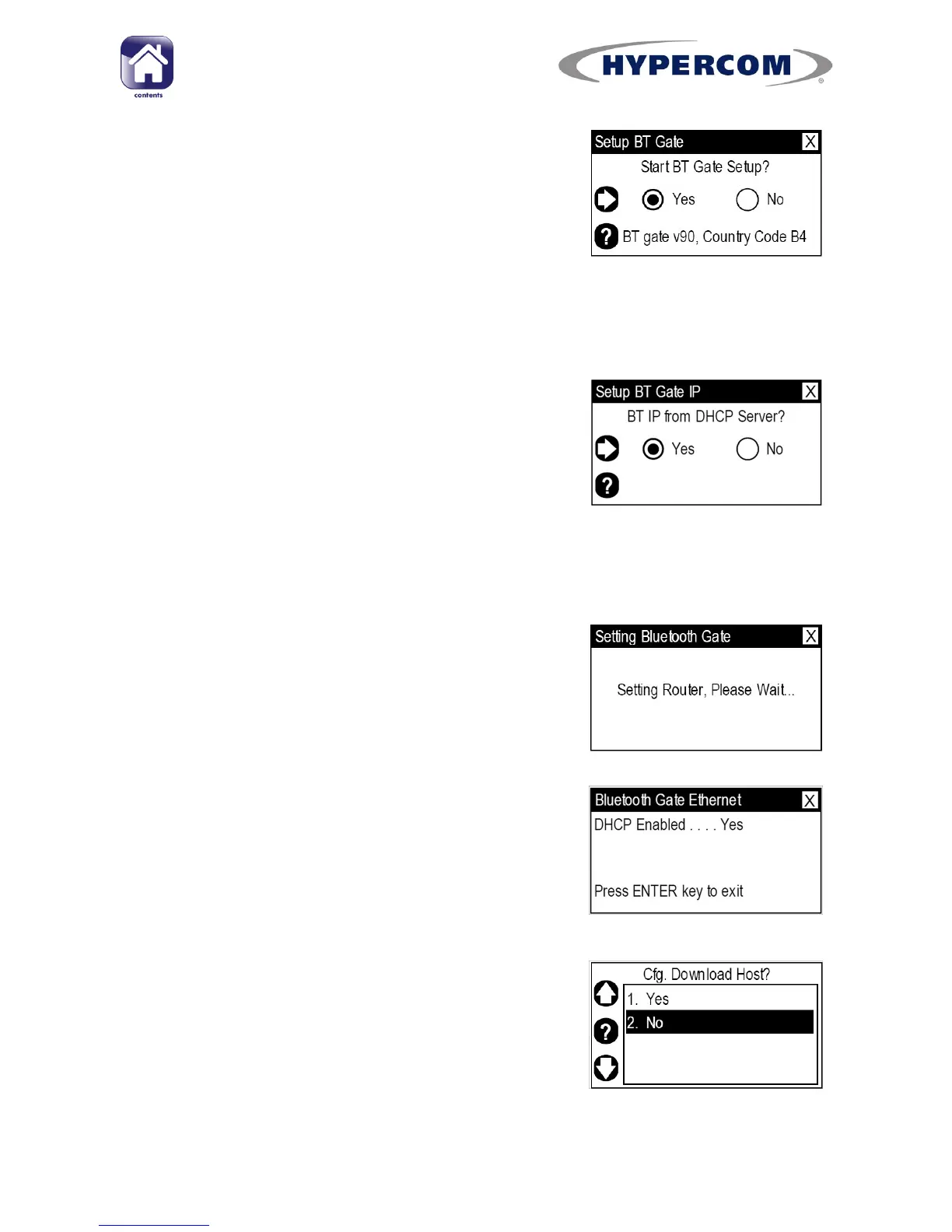
Check that the bottom line of text shows “BT
gate v90, Country Code B4” (57 for Republic of
Ireland). This bottom line of text is shown for
AP100 and AP210 only.
Press Enter on the keypad.
PLEASE NOTE: If country code is incorrect, select “No” and press Enter on
the keypad. Call the helpdesk for further assistance.
Step 13
AP110 only.
Ensure “Yes” Is highlighted and press Enter on
the keypad.
PLEASE NOTE: If your network does not use DHCP, do not attempt this
procedure yourself. Please call the helpdesk for assistance.
Step 14
The terminal will upload its settings to the
Access Point.
The Access Point will sound an audible alert
three times.
Step 15
AP110 only. If DHCP is enabled, the display will
show this. Press Enter on the keypad
Step 16
Highlight “No” and press Enter on the keypad.
The terminal will return to the “Deployment
Config.” screen.



 To Next Page