Delta Elec. Inc. HD86
Company Confidential Optoma___________________ Delta________________
67
2009/08/18
7. Installing or Removing the Optional Lens
Notice:
Do not shake or pIace excessive pressure on the projector or the Iens components as the
projector and Iens components contain precision parts.
When shipping the projector with the optionaI Iens, remove the optionaI Iens before shipping
the projector. The Iens and the Iens shift mechanism may encounter damage caused by
improper handIing during transportation.
Before removing or instaIIing the Iens, be sure to turn off the projector, wait untiI the cooing
fans stop, and turn off the main power switch.
Do not touch the Iens surface when removing or installing the lens
Keep fingerprints, dust or oiI off the Iens surface.Do not scratch the lens surface.
Work on a IeveI surface with a soft cIoth under it to avoid scratching.
If you remove and store the Iens, attach the Iens cap to the projector to keep off dust and dirt.
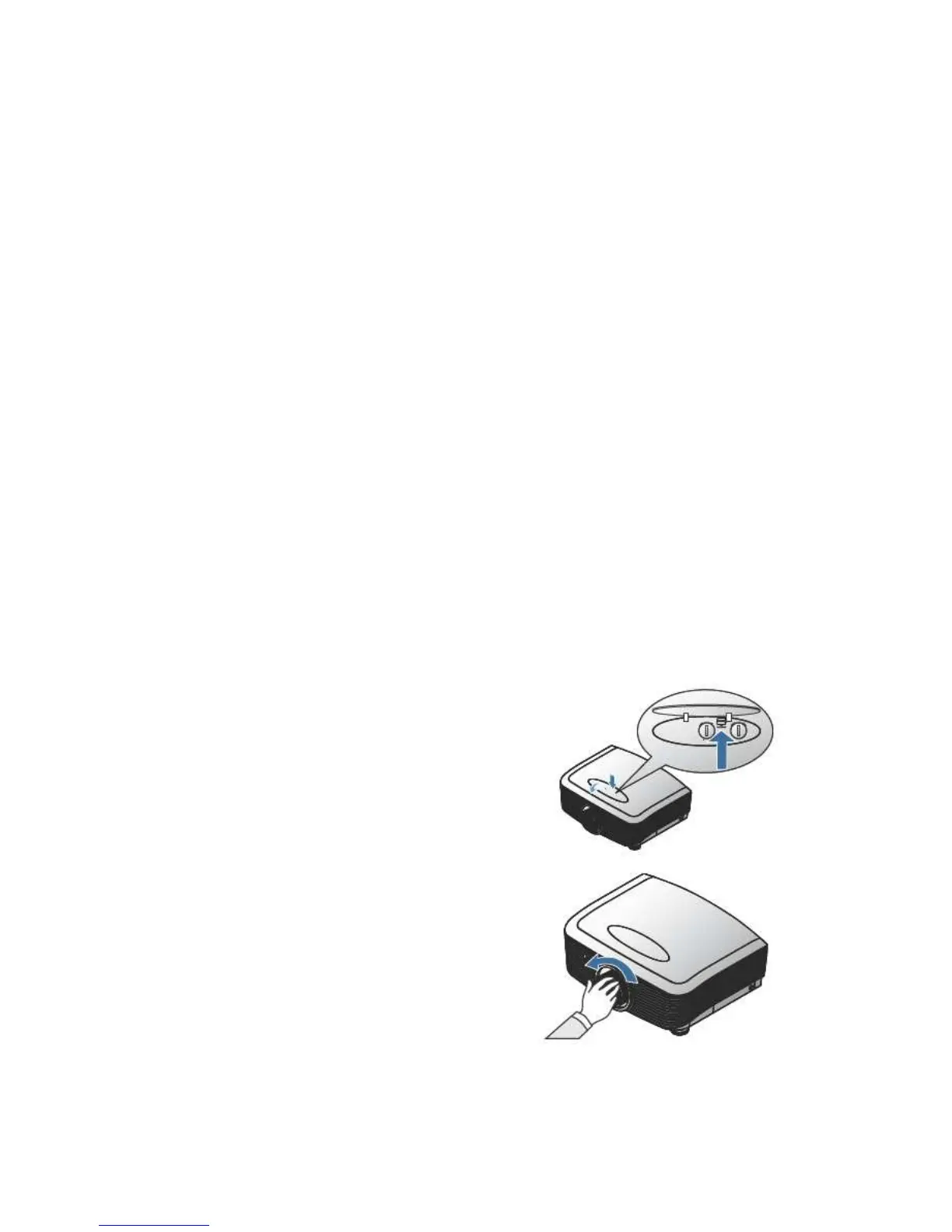
Removing the Existing Lens From the Projector
1. Push down and release the top cover to open.
2. PuII the Iocking Iever to the unIock position.
3. Grasp the lens and pull out.
4. Rotate the lens countercIockwise.
The existing Iens wiII be disengaged.



 To Next Page