© Optoma
Issue 2.1 July 25, 2018
52
6.2.4.2 Units Wide/Units High
The dimensions of the multi-screen display is defined with this menu. The maximum number of screen
supported is 16. This function is used in conjunction with the next function.
Settings: Units Wide: 1, 2, 3, 4 / Units High: 1, 2, 3, 4
Default: Units Wide: 1 / Units High: 1
6.2.4.3 Horizontal Pos/Vertical Pos
These setting provides the coordinates of the segment of the total image that the unit will process (cut
out and resize). This function is used in conjunction with the previous function to select the blend
regions to be provided even when auto zoom is turned off.
Settings: 1 to 4 indicating co-ordinates 1,1 to 4,4 for the maximum matrix size of 16
Default : 1,1
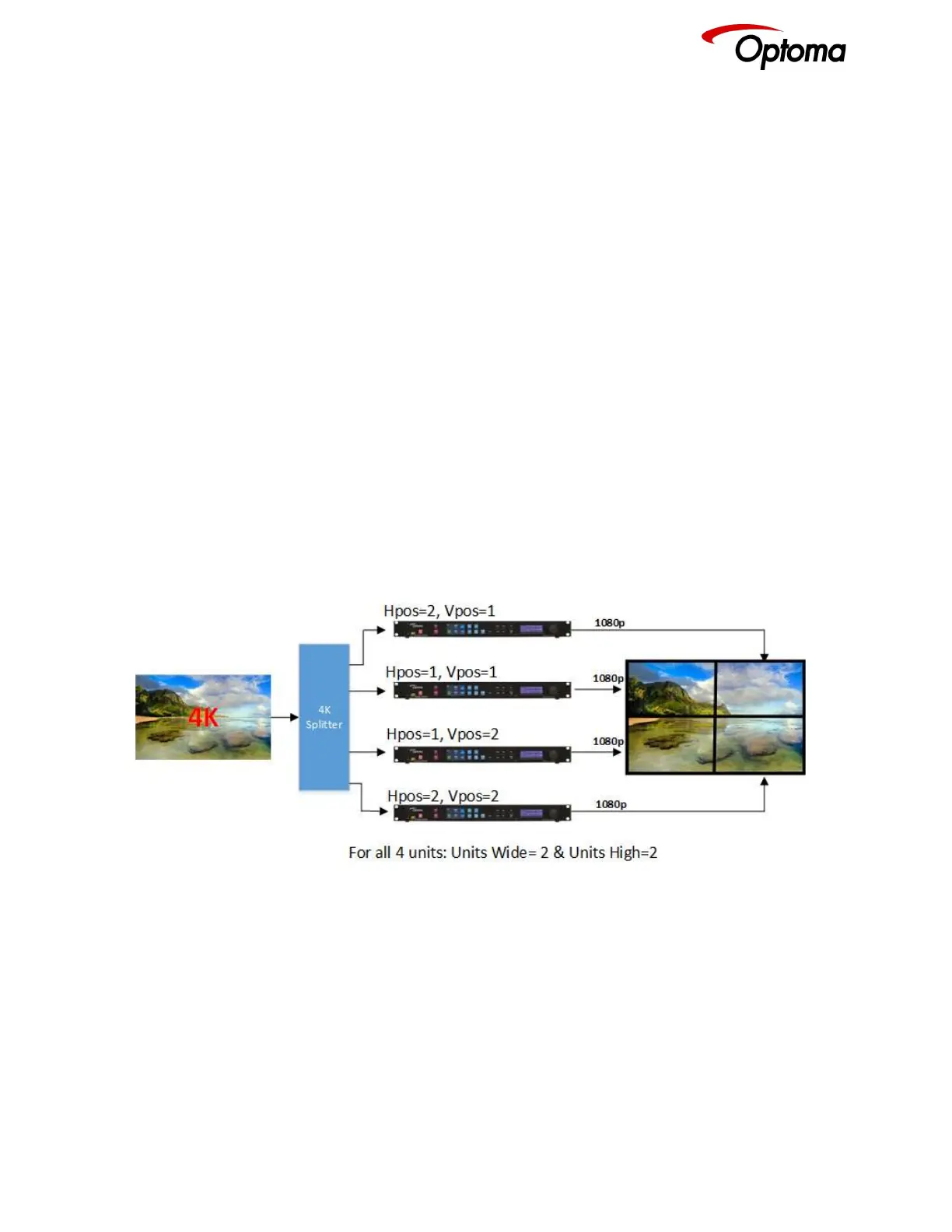
In the example below a 4K image is split into four 1080p quadrants in a 2x2 configuration. Each unit is
set for a 2x2 configuration and I/O lock. Hpos and Vpos setting are set as shown in the drawing.
Figure
Figure 3: Video Wall 2x2 example
6.2.4.4 Bezel Width
This menu allows uses to define the bezel widths in large system configuration where multiple units
are driving different portions of the display. There are separate adjustments for each .
Settings: Left Bezel Width, Right Bezel Width, Top Bezel Width, Bottom Bezel Width
Defaults: 0,0,0,0



 To Next Page