Condential
4-6
S310e/X312
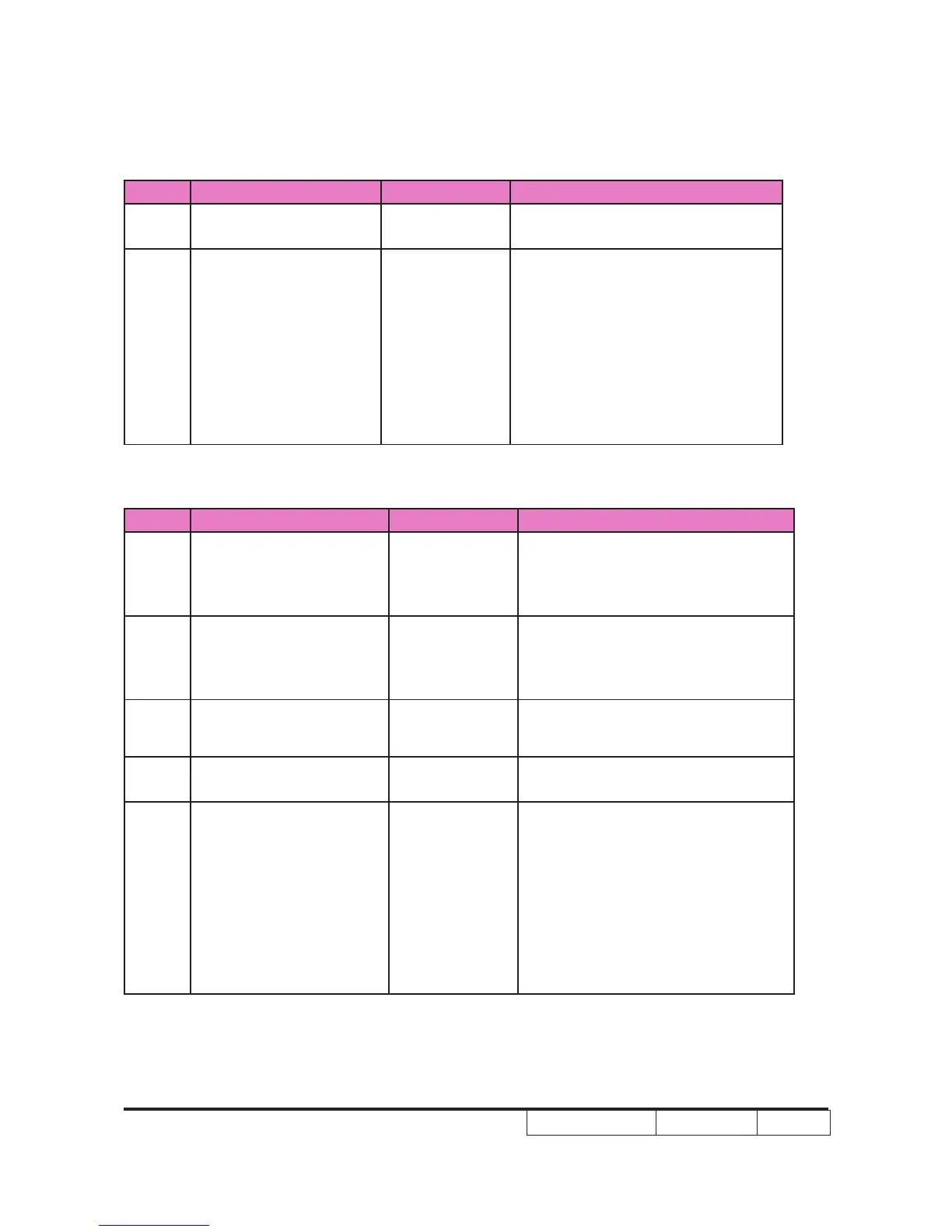
Order Symptom Pattern Criteria
4
Eyecatchers / Border
Artifacts
Black
1. Eyecatcher and border artifacts
are allowed
5 Projected Images
1. Any screen
2. Gray 10
3. Any screen
4. Gray 10
5. White
6. Any screen
7. Black or
White
1. No adjacent pixels
2. No bright pixels in Active Area
3. No unstable pixels in Active Area
4. ≤ 1 bright pixel in the POM
5. ≤ 4 dark pixels in the Active Area
6. No DMD window aperture
shadowing on the Active Area
7. Βlemishes are allowed
For S310e
Order Symptom Pattern Criteria
1 Dark Blemish Blue 60
1. ≤ 4 vis i b l e dar k ble m i sh es
are allowed in the active area
2. No blemish will be > 1.5” long/
diameter
2 Light Blemish Gray 10
1. ≤ 4 visible light blemishes are
allowed in the active area
2. No blemish will be > 1.5” long/
diameter
3
Reset Boundary
Artifact
Gray 30
1.No reset boundary artifacts
allowed
4
Eyecatchers /
Border Artifacts
Black
1.Eyecatcher and border artifacts
are allowed
5 Projected Images
1. Any screen
2. Gray 10
3. Any screen
4. Gray 10
5. White
6. Any screen
7. Black or
White
1. No adjacent pixels
2. No bright pixels in Active Area
3. No unstable pixels in Active Area
4. ≤ 1 bright pixel in the POM
5. ≤ 3 dark pixels in the Active Area
6. No DM D win d o w ape r tu r e
shadowing on the Active Area
7. Βlemishes are allowed



 To Next Page