06/2011 B400Page 104
Operation
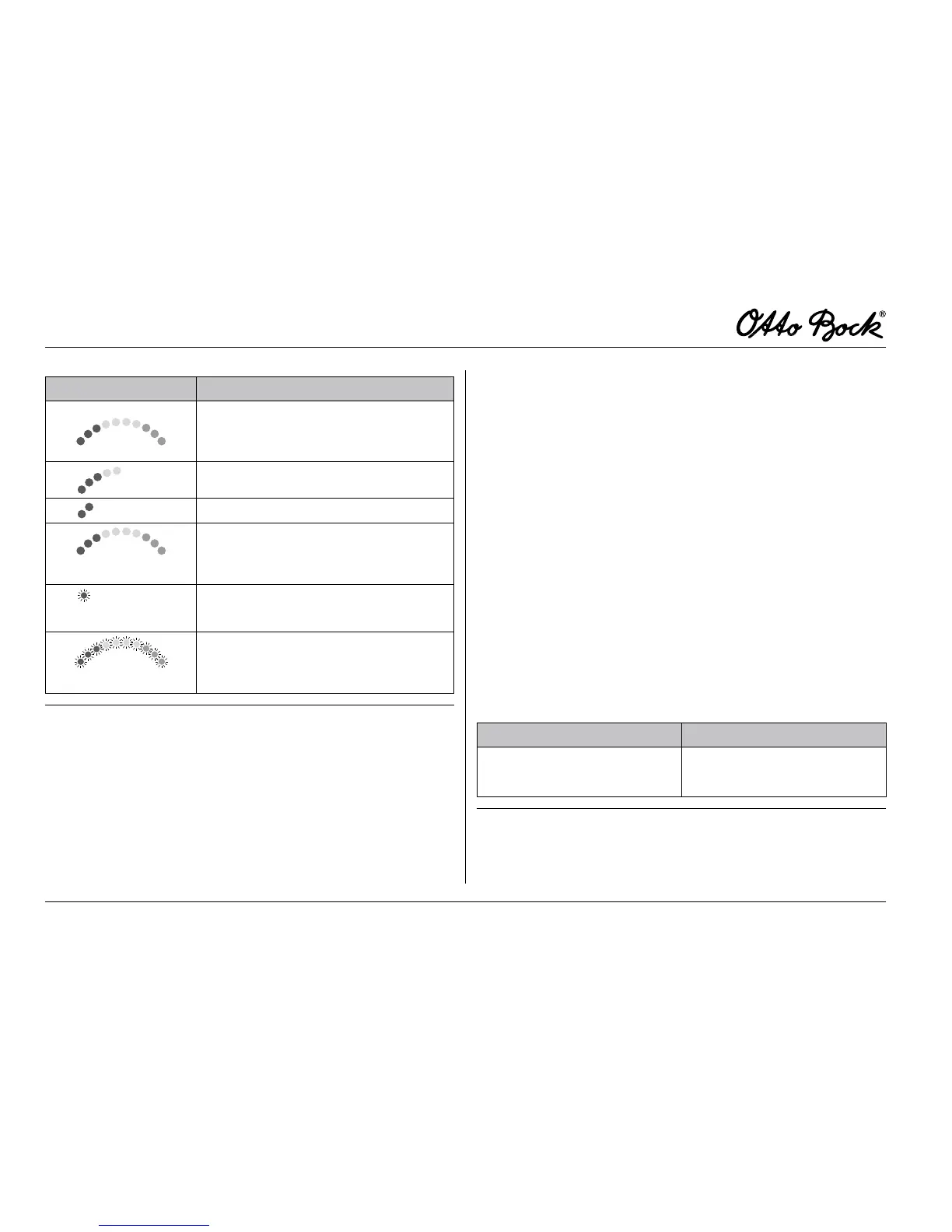
Indication Information
Batteries are charged
Recharge battery, if possible
Low battery, recharge urgently
Running light
Battery is charging
Flashing light
Battery: undervoltage
Flashing light
Battery: overvoltage
Table2 Batteryindicatoronthecontrolpanel
6.3.5 DriveLock
The control unit of the B400 power wheelchair features an
electronic drive-away lock. This function is activated/deacti-
vated via control panel.
Activating the drive-away lock:
1. With the control unit switched on, press and hold the
On/Off switch.
2. Once you hear a signal sound (approx. 1 sec.), release
the On/Off switch.
3. Move the joystick to the front until a signal sound is
heard.
4. Now move the joystick to the rear until a further signal
sound is heard.
5. A long beep conrms that the driving function has been
locked. The control unit then turns off.
The activation of the drive-away lock is indicated by a run-
ning light bar on the LED indicator “Speed Levels” after
switching the control unit on (see Table 3).
Indication Information
Running light LEDs
Speed Level LED indicator
Drive-away Lock
Table3 Drive-awaylockindicatoronthecontrolpanel















 To Next Page