EYFR03 User Manual 25 of 110 v1.6.0
Chapter 3: Configuring the unit 20 January 2020
Tool Configuration
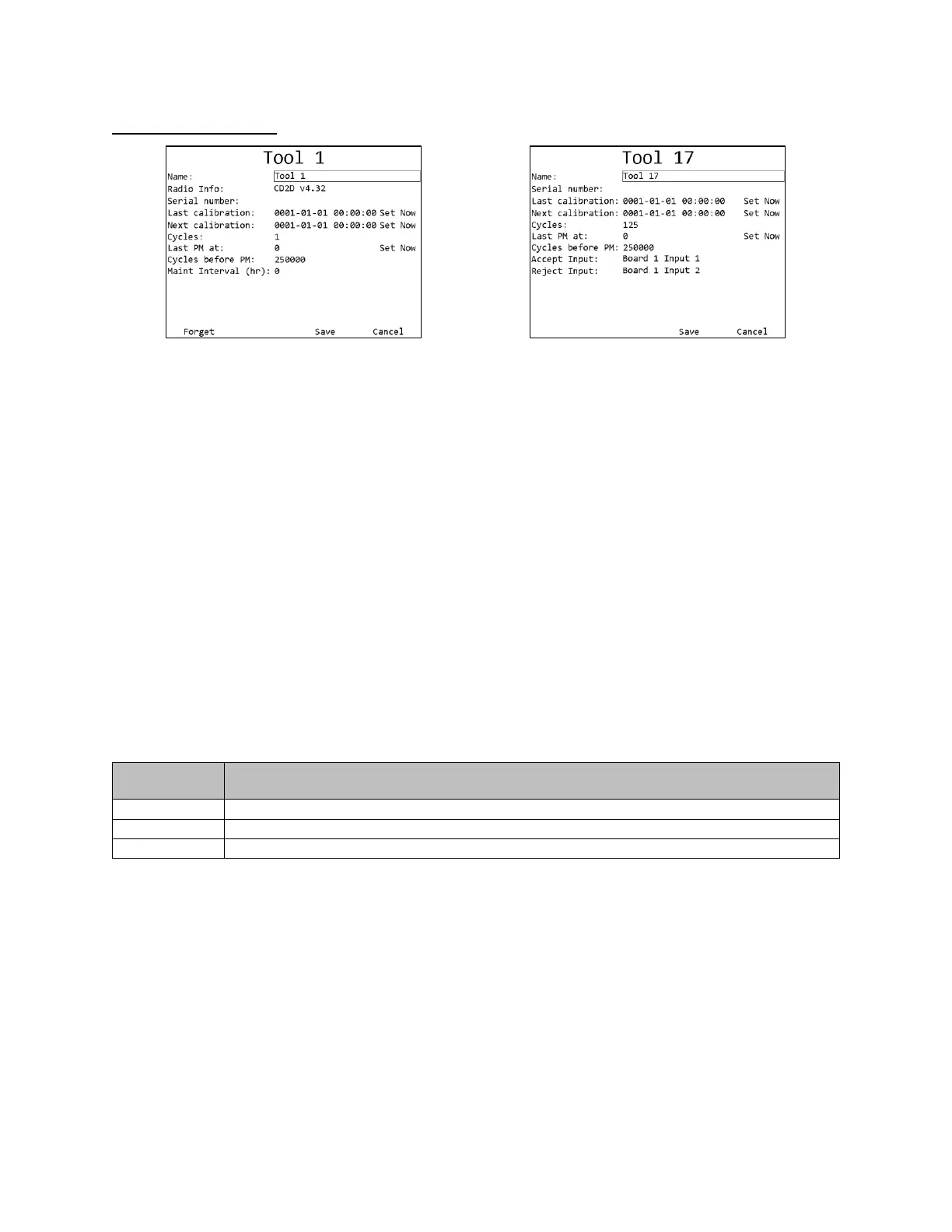
Figure 20: Tool Configuration screen
Figure 21: Tool Configuration screen – Input tools
Soft keys
1. Forget – Removes the tool from the unit.
2. No function
3. Save – Saves changes made to the tool configuration.
4. Cancel [ESC] – Cancels changes made to the tool configuration.
Name
The tool name can be up to 25 numbers, letters, or decimal points.
The tool name is shown on screen when running a parameter that uses the tool but is not reported
to the network.
Radio Info
The radio info shows the radio address and the firmware version used by the radio to
communicate with the qualifier. The device has additional firmware to run the tool, but no
information about this firmware is reported. Some features require a minimum radio version and
tool firmware version.
Features new in the version
• Improved result buffering
• Tool enable/disable/antitheft.
This field cannot be edited.
Serial Number
The tool serial number can be up to 14 numbers, letters, or decimal points.
The tool serial number is reported to the network with tightenings performed by the tool but is
not shown anywhere on screen besides this menu.
Last Calibration
This field is used to store the date when the tool was last calibrated. The display order of this
field is:











 To Next Page