EasyManua.ls Logo

Panasonic EYFR03 - Vendor-Specific Objects

Panasonic EYFR03
110 pages
Print Icon
To Next Page IconTo Next Page
To Previous Page IconTo Previous Page
Loading...
EYFR03 User Manual 75 of 110 v1.6.0
Chapter 7: EtherNet/IPTM 20 January 2020
This chapter describes the assembly object connection points and vendor-specific objects
provided by the EYFR03. Implementation was done against EtherNet/IP
TM
specification edition
1.16 (April 2014) and the associated CIP specification edition 3.16 (April 2014)
Vendor-Specific Objects
The objects described in this section are vendor-specific objects created by C.E. Electronics
(vendor ID: 1321) to manage the configuration of the EYFR03 that does not map to existing
open objects.
Tool Object
Class Code: 64 Hex
The Tool Object represents a tool learned into an EYFR03 device. A tool may be associated
with one or more C.E. Parameter objects.
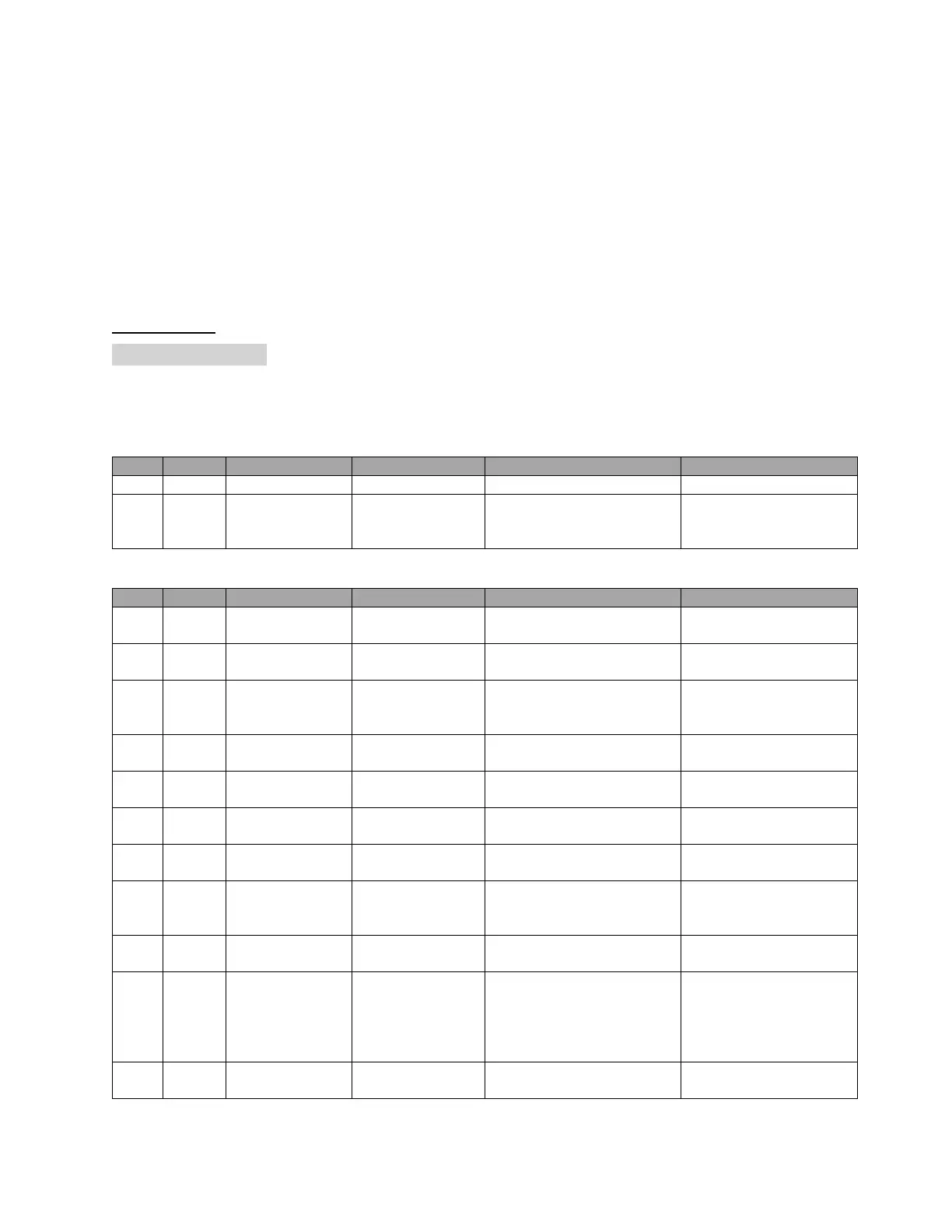
Class Attributes
ID
Access
Name
Data Type
Description of Attribute
Semantics of Value
1
Get
Revision
UINT
Revision of this object
1
2
Get
Max Instance
UINT
Maximum instance number
of a tool object in the
device.
The maximum number of
tools as specified for the
product.
Instance Attributes
ID
Access
Name
Data Type
Description of Attribute
Semantics of Value
1
Set
Name
SHORT_STRING
Name of the tool displayed
on screen
Maximum length is 25
characters
2
Get
Last Modified
DT
Last time the tool attributes
were modified
3
Get
Type
USINT
Type of tool
0 = none
1-3 = reserved
4 = battery
4
Set
Last Calibration
Date
DT
Date of last calibration
reported by tool
5
Set
Next Calibration
Date
DT
Recommended date of next
calibration
7
Set
Serial Number
SHORT_STRING
Serial number of the tool
Maximum length is 14
characters.
8
Get
Cycle Count
UDINT
Total number of cycles
performed by the tool.
9
Set
Cycles between
Preventative
Maintenance
UDINT
Number of cycles permitted
between preventative
maintenance.
10
Set
Last PM Cycle
Count
UDINT
Cycle count at time of last
preventative maintenance
11
Get
Maintenance
Reject Options
BYTE
Causes all results from a
tool to be rejected when one
or more of the specified
maintenance operations are
required.
Bit 0 – Calibration
Bit 1 – Cycles
12
Get
Required
Maintenance
BYTE
Indicates what maintenance
is currently required.
Bit 0 – Calibration
Bit 1 – Cycles

Table of Contents