EYFR03 User Manual 46 of 110 v1.6.0
Chapter 3: Configuring the unit 20 January 2020
The Events screen shows the log of non-tightening events that have occurred. More information
is available via the PC software application. This screen shows:
• Time – The time the event occurred. The date is indicated at the top of the table and each
time it changes. The current time is shown at the bottom of the screen for comparison.
• Code – The event code for this event.
• Event – The name of this event.
• Source – The source that caused the event.
• Status – The status of the event. 0 indicates success, non-zero indicates an error.
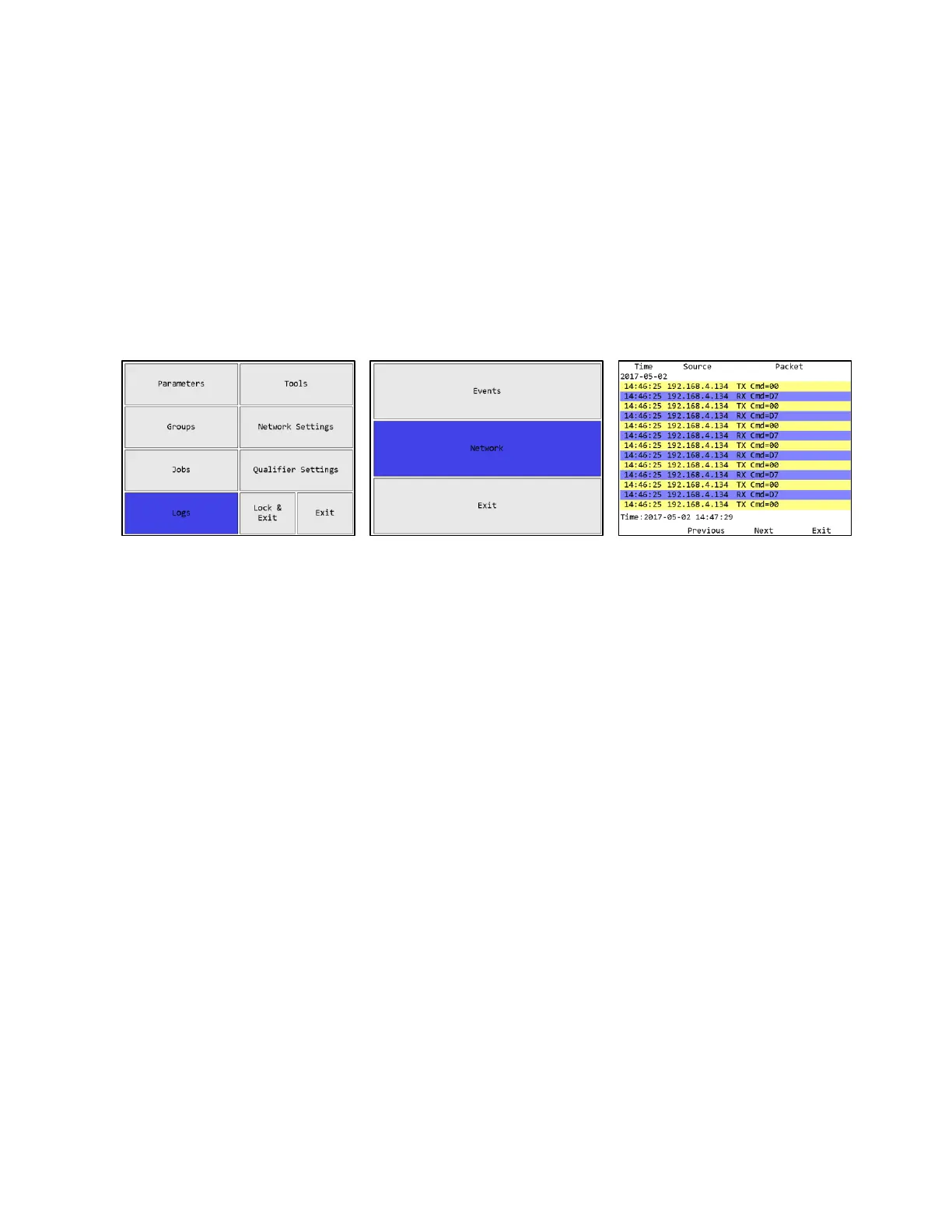
Network Log
Figure 49: Main menu – Logs
Figure 50: Logs Menu screen –
Network
Figure 51: Network Log screen
Function keys
1. No function
2. Previous – Go to the previous page of more recent network events. When on the first page,
this key will be blank.
3. Next [ENT] – Go to the next page of older network events. When on the last page, this key
will be blank.
4. Return [ESC] – Returns to the Run Screen.
The Network Log screen shows the log of network events that have occurred since the qualifier
started up. This log is not maintained across reboots or power cycles. This screen shows:
• Time – The time the event occurred. The date is indicated at the top of the table and each
time it changes. The current time is shown at the bottom of the screen for comparison.
• Source – The remote IP address for this event.
• Packet – Information about the packet sent or received or network connection start/stop.











 To Next Page