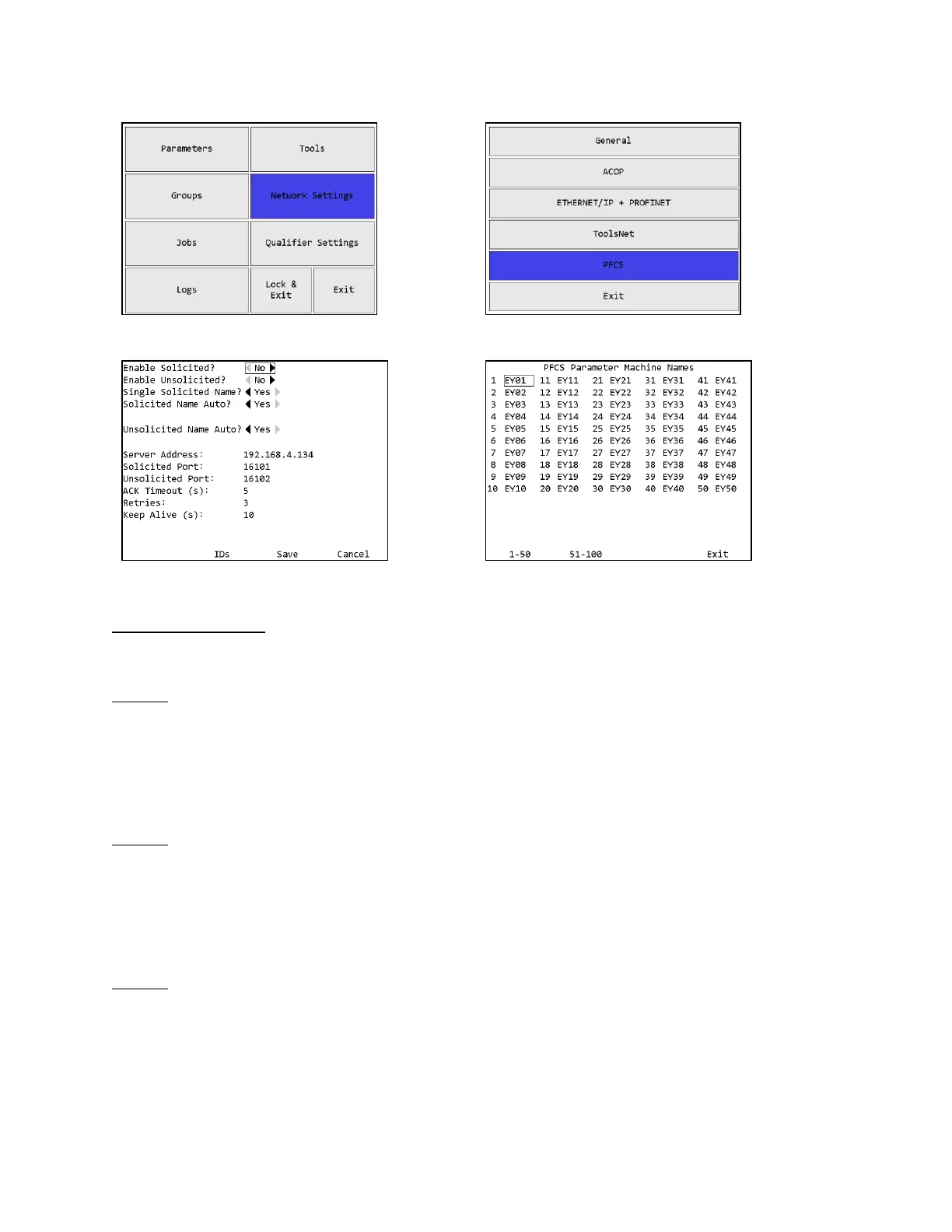
Protocol Settings
Enable Solicited?
Default: no
This setting determines if the qualifier will attempt to establish a solicited PFCS connection.
This setting is disabled by default because the qualifier will repeatedly make network requests to
attempt to establish a network connection to the PFCS server when enabled.
Enable Unsolicited?
Default: no
This setting determines if the qualifier will attempt to establish an unsolicited PFCS connection.
This setting is disabled by default because the qualifier will repeatedly make network requests to
attempt to establish a network connection to the PFCS server when enabled.
Single Solicited Name?
Default: yes
This setting determines if the qualifier will use a single machine id on the solicited connection or
if it will use a separate machine id per parameter. When this setting is set to No, the machine ids
for each parameter can be set from the IDs page.









 To Next Page