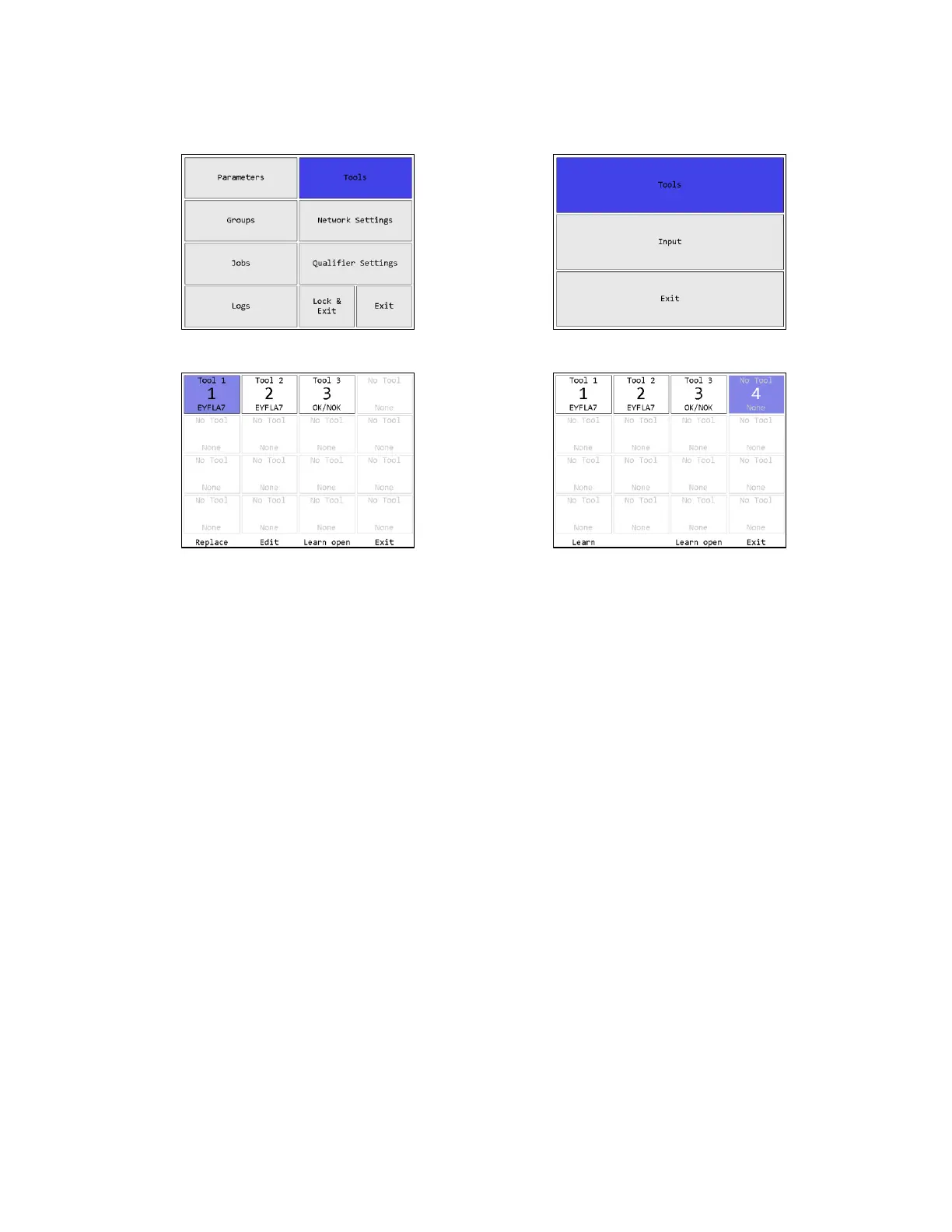
On this screen, AccuPulse tools will show their model number in two-way mode “90”.
AccuPulse in one-way mode “90” and other tools do not report their model number and will be
listed as “OK/NOK”. When the qualifier features differ between the tool type, they will be
noted.
Soft keys
Tools may be highlighted by using the arrow keys to move the highlight to the desired tool or
typing the number of the desired tool.
When a learned tool is highlighted, the soft keys are:
1. Replace – Learn a new tool in place of the current tool in this slot. If you cancel out of the
learn sequence, the current tool will remain in the slot.
2. Edit [ENT] – Go to the Tool Configuration screen for the selected tool.
3. Learn open – Starts the learn sequence for the empty tool slot with the lowest number.
4. Exit [ESC] – Returns to the Main Menu screen.
When an empty tool slot is highlighted, the soft keys are:
1. Learn [ENT] – Starts the learn sequence for the highlighted tool slot.
2. No function
3. Learn open – Starts the learn sequence for the empty tool slot with the lowest number.
4. Exit [ESC] – Returns to the Main Menu screen.











 To Next Page