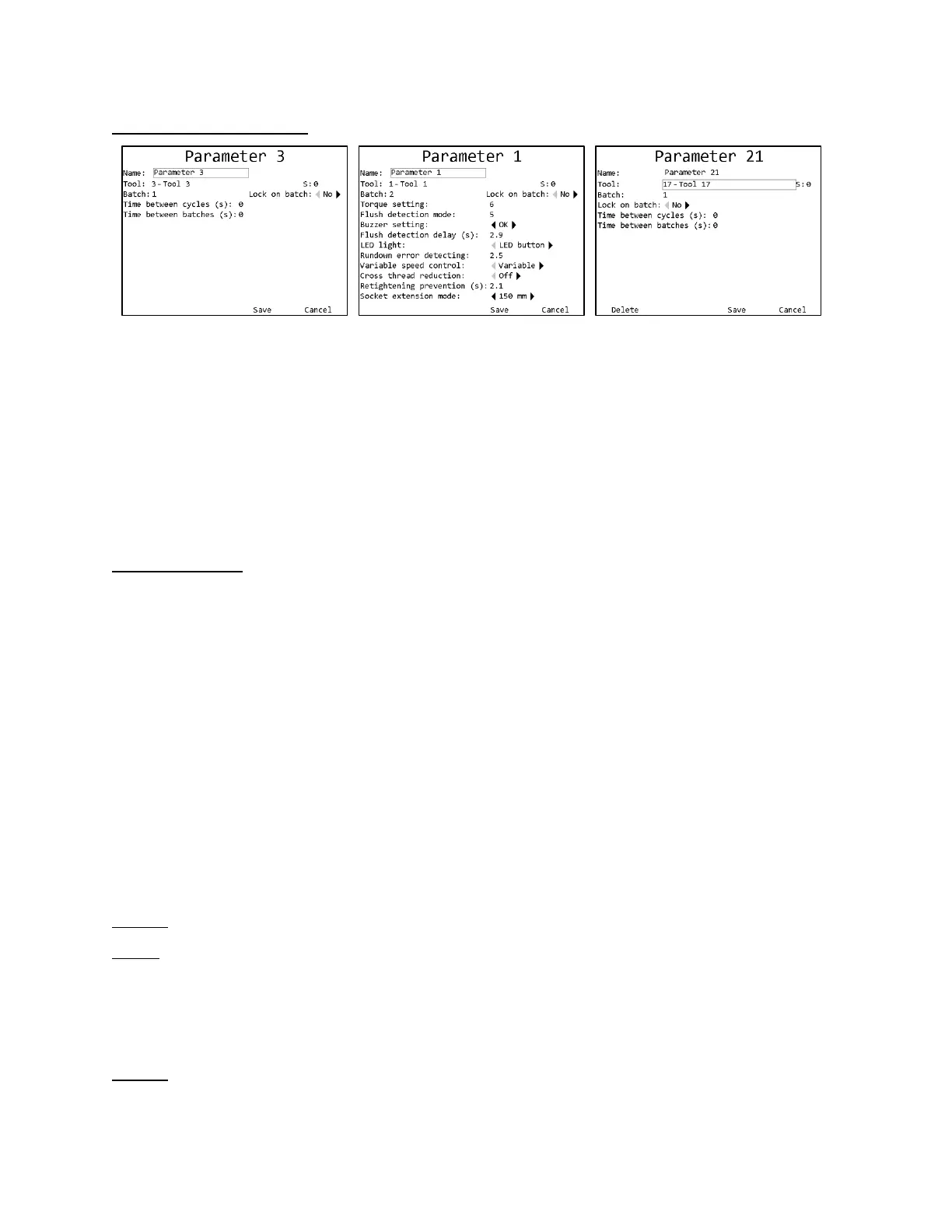
Soft keys
1. Delete – Deletes all information in the parameter and returns to the Choose Parameter screen.
This button is not available for parameters 1-16.
2. No function
3. Save – Saves changes to the parameter and returns to the Choose Parameter screen
4. Cancel [ESC] – Discards changes to the parameter and returns to the Choose Parameter
screen
Common Fields
Name
The parameter name can be up to 25 numbers, letters, or decimal points.
The parameter name is shown on screen when running the parameter and reported to the network
with tightenings performed in the parameter.
Tool
This setting controls which tool is used by this parameter. You must select a learned tool before
a parameter can be used. Parameters 1-16 always use the tool of the same number. (Parameter 1
uses tool 1, parameter 2 uses tool 2, etc.). Parameters 17-100 may be assigned to use any desired
tool. Multiple parameters may use the same tool.
If the tool used by a parameter is forgotten, the parameter will become invalid.
Batch
Default: 1
Range: 1 to 255
This setting determines how many good tightenings must be performed in the parameter to
complete a batch.
Lock on batch
Default: No












 To Next Page