105
VQT1N45
Using with a
PC
1
Starting HD Writer 2.5E
≥ When using HD Writer 2.5E on Windows XP/2000, log on to your computer as Administrator (or with
a login name equally authorized). If you log on with a login name other than Administrator, you cannot
use the applications.
≥ When using HD Writer 2.5E on Windows Vista, log on to your computer as Administrator (or with a
login name equally authorized) or with the user name for a standard user account. If you log on with a
user name for a guest user account, the software cannot be used.
(On the PC)
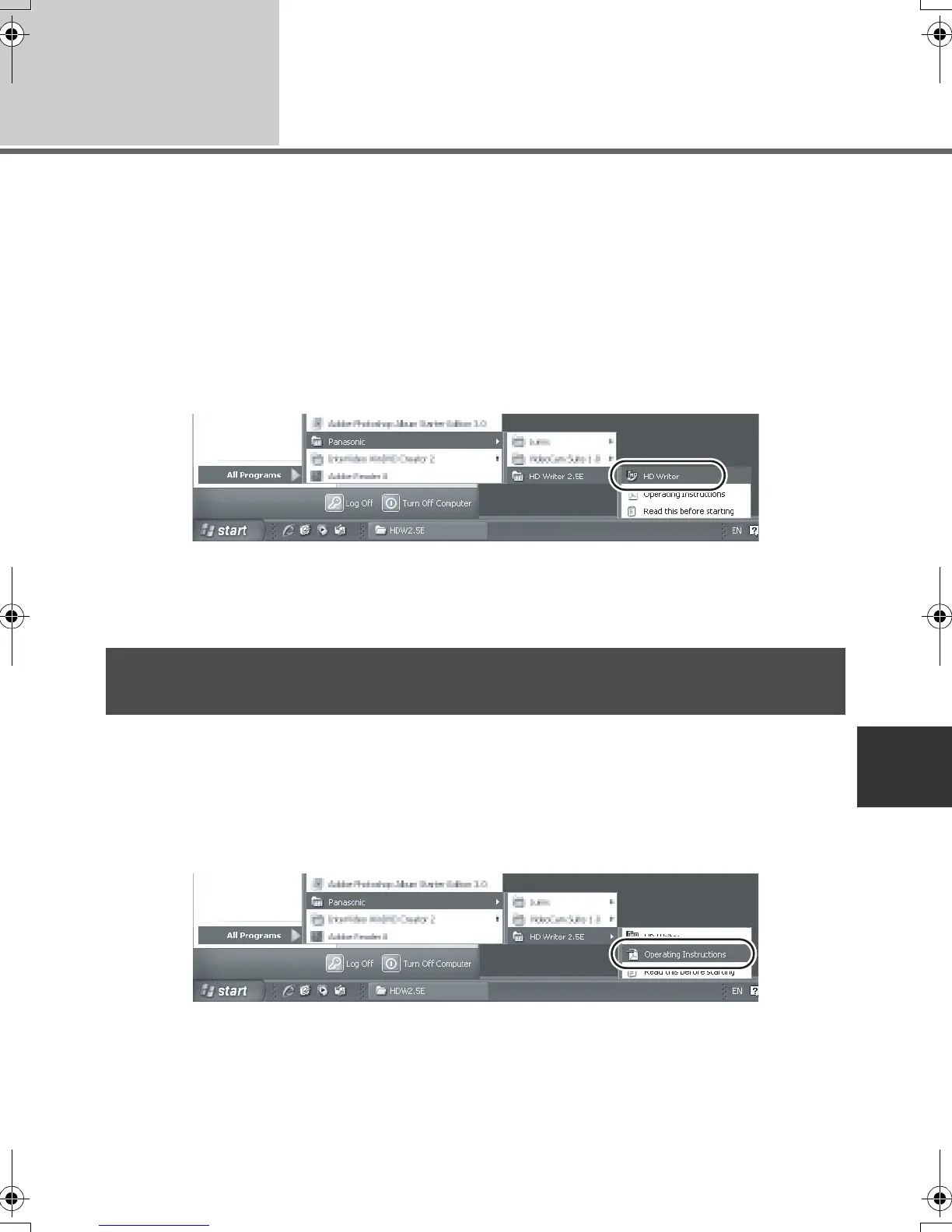
Select [start] # [All Programs (Programs)] # [Panasonic] # [HD Writer 2.5E]
# [HD Writer].
The HD Writer 2.5E introductory screen is displayed. If [OK] is clicked, the software will start.
≥ For details on how to use the software applications, read the PDF operating instructions of the
software.
For details on how to use the software applications, read the PDF operating instructions.
≥ You will need Adobe Acrobat Reader 5.0 or later or Adobe Reader 7.0 or later to read the PDF
operating instructions.
Select [start] # [All Programs (Programs)] # [Panasonic] # [HD Writer 2.5E]
# [Operating Instructions].
Reading the operating instructions of the software
applications
HDCSD9P-VQT1N45_ENG.book 105 ページ 2007年12月26日 水曜日 午後5時57分















 To Next Page