16
VQT1N45
Before using
1
Parts identification and
handling
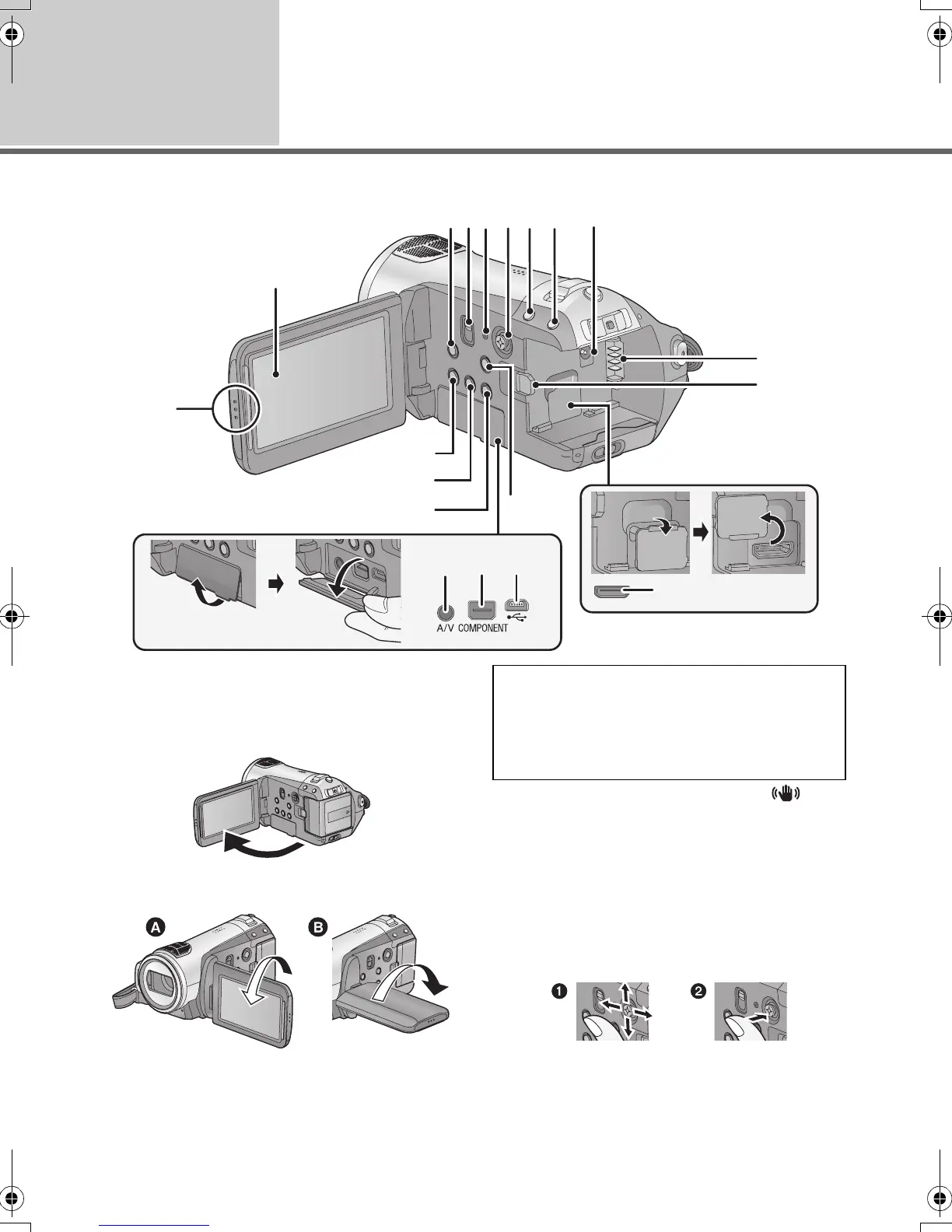
1 LCD monitor open part
2 LCD monitor (l 32)
Pull the LCD monitor out in the direction of the
arrow with your fingers.
≥ It can open up to 90o.
≥ It can rotate up to 180o A towards the lens or
90o B towards the opposite direction.
3 Optical image stabilizer button [ ,
O.I.S.] (l 45)
4 Mode select switch [AUTO/MANUAL/
FOCUS] (l 35, 59)
5 Reset button [RESET] (l 118)
6 Cursor button
Use the cursor button to select the recording
functions and playback operations, and to
operate the menu screen.
1 Select by moving up, down, left, right.
2 Set by pressing the center.
≥ Menu screen operations (l 27)
≥ To select the recording functions (l 47, 51)
2
345 6 7 8 9
10
11
19
1
13
14
15
12
16 17
18
Due to limitations in LCD production
technology, there may be some tiny bright or
dark spots on the LCD monitor screen.
However, this is not a malfunction and does
not affect the recorded picture.
HDCSD9P-VQT1N45_ENG.book 16 ページ 2007年12月26日 水曜日 午後5時57分















 To Next Page