93
VQT1N45
With other
products
3
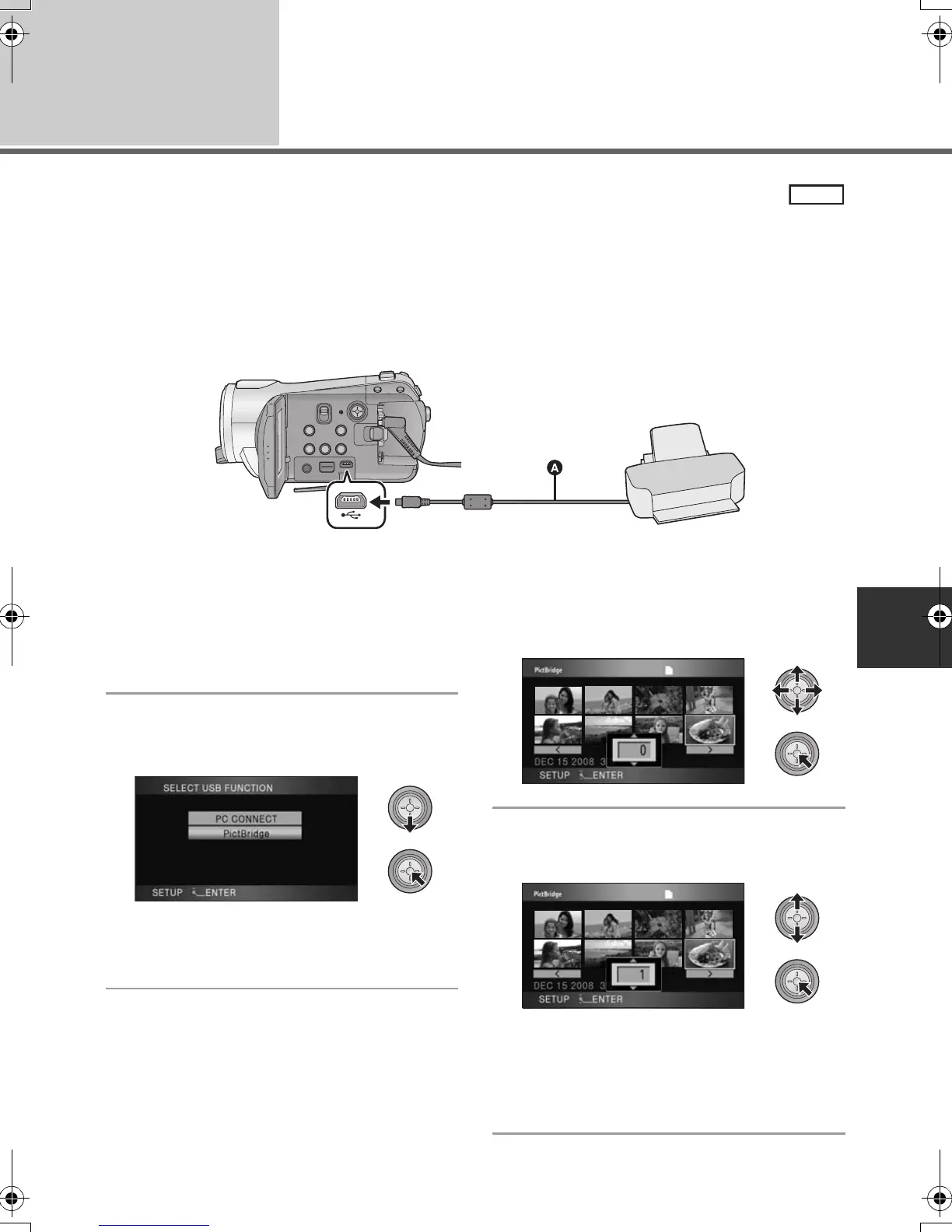
With a printer (PictBridge)
To print pictures by directly connecting this unit to the printer, use a printer compatible with PictBridge.
(Read the operating instructions for the printer.)
PictBridge is an industry standard from the Camera & Imaging Products Association (CIPA) for direct
printing. It allows images to be printed directly from digital cameras to a printer, without having to
connect the camera to a PC.
≥ Use the AC adaptor to free you from worrying about the battery running down.
≥ Turn on this unit. (This function is available in all modes.)
A USB cable (supplied)
≥ Insert the plugs as far as they will go.
1 Connect this unit to a printer.
≥ Do not use any other USB connection cables
except the supplied one. (Operation is not
guaranteed with any other USB cables.)
2 Select [PictBridge] and press the
cursor button.
≥ If the [PictBridge] indication does not appear or
continues to flash, disconnect and then
reconnect the USB cable.
3 Select a still picture to be printed,
then press the cursor button.
4
Select the desired number of prints,
then press the cursor button.
≥ You can set up to 9 prints.
≥ To cancel the setting, set the number of prints
to [0].
≥ Up to 8 files can be set in succession by
repeating steps 3 and 4.
PHOTO
HDCSD9P-VQT1N45_ENG.book 93 ページ 2007年12月26日 水曜日 午後5時57分















 To Next Page