41
VQT1N45
Recording
(Basic)
3
Recording still pictures
The number of pixels recorded for still pictures is 1920k1080. Still pictures can also be recorded while
recording motion pictures.
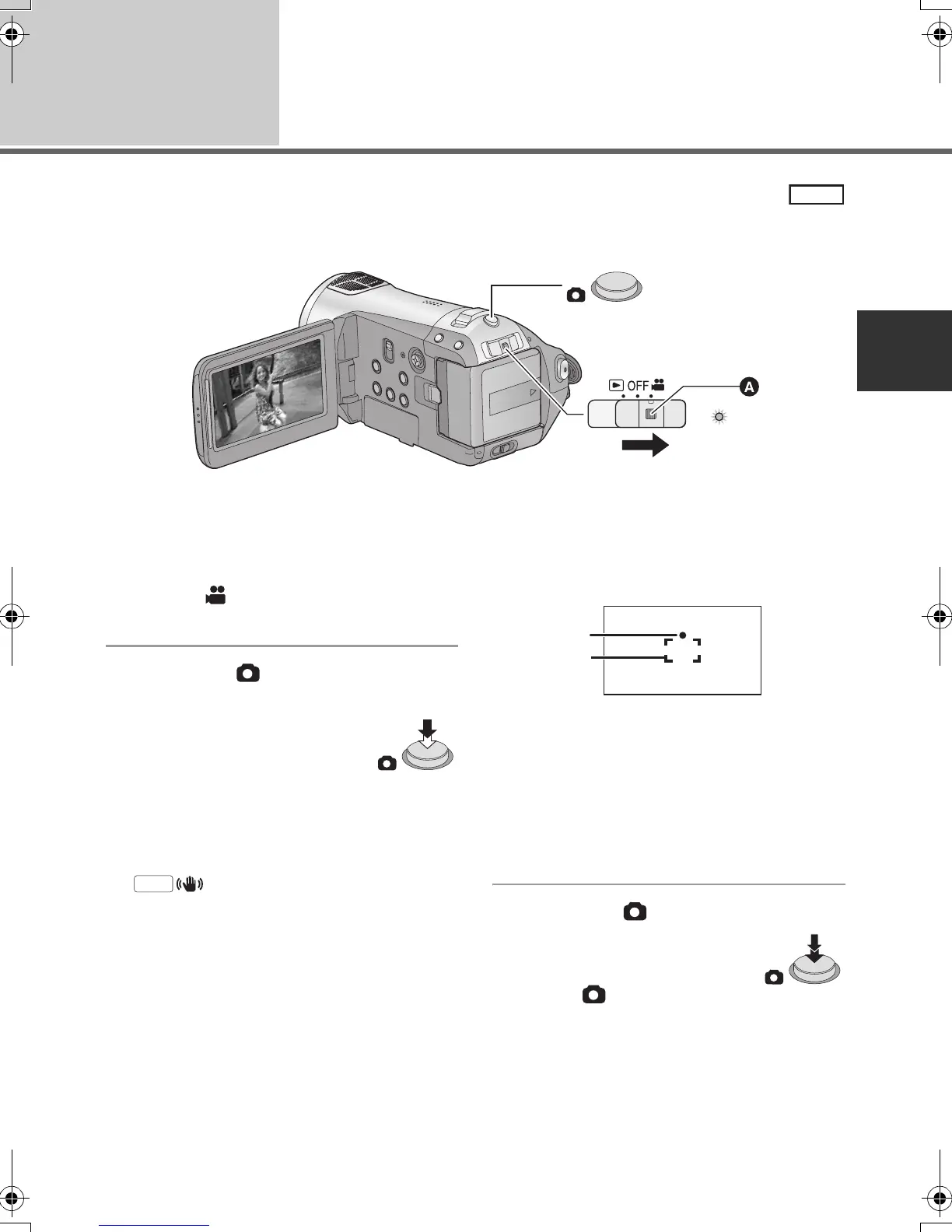
≥ Operate the mode switch while at the same time pressing in the lock release button A if changing
from OFF to another mode.
1 Operate the mode switch to
select and open the LCD
monitor.
2 Press the button halfway.
(For auto focus only)
Focus indication appears and the
unit focuses on the subject
automatically. (Focus on a subject
manually when it is not easily
focused automatically.)
≥ If you set [O.I.S.] (l 45) to on, then the image
stabilizer function will be more effective.
([ ] (MEGA optical image stabilizer)
will be displayed.)
Focus indication:
A Focus indication
± (The white lamp flashes.):
Focusing
¥ (The green lamp lights up.):
When in focus
No mark:
When focusing is unsuccessful.
B Focus area (area inside brackets)
3 Press the button fully.
≥ In order to take better still
pictures, the screen will brighten
when the button is fully
pressed.
PHOTO
MEGA
A
B
HDCSD9P-VQT1N45_ENG.book 41 ページ 2007年12月26日 水曜日 午後5時57分















 To Next Page