123
VQT1N45
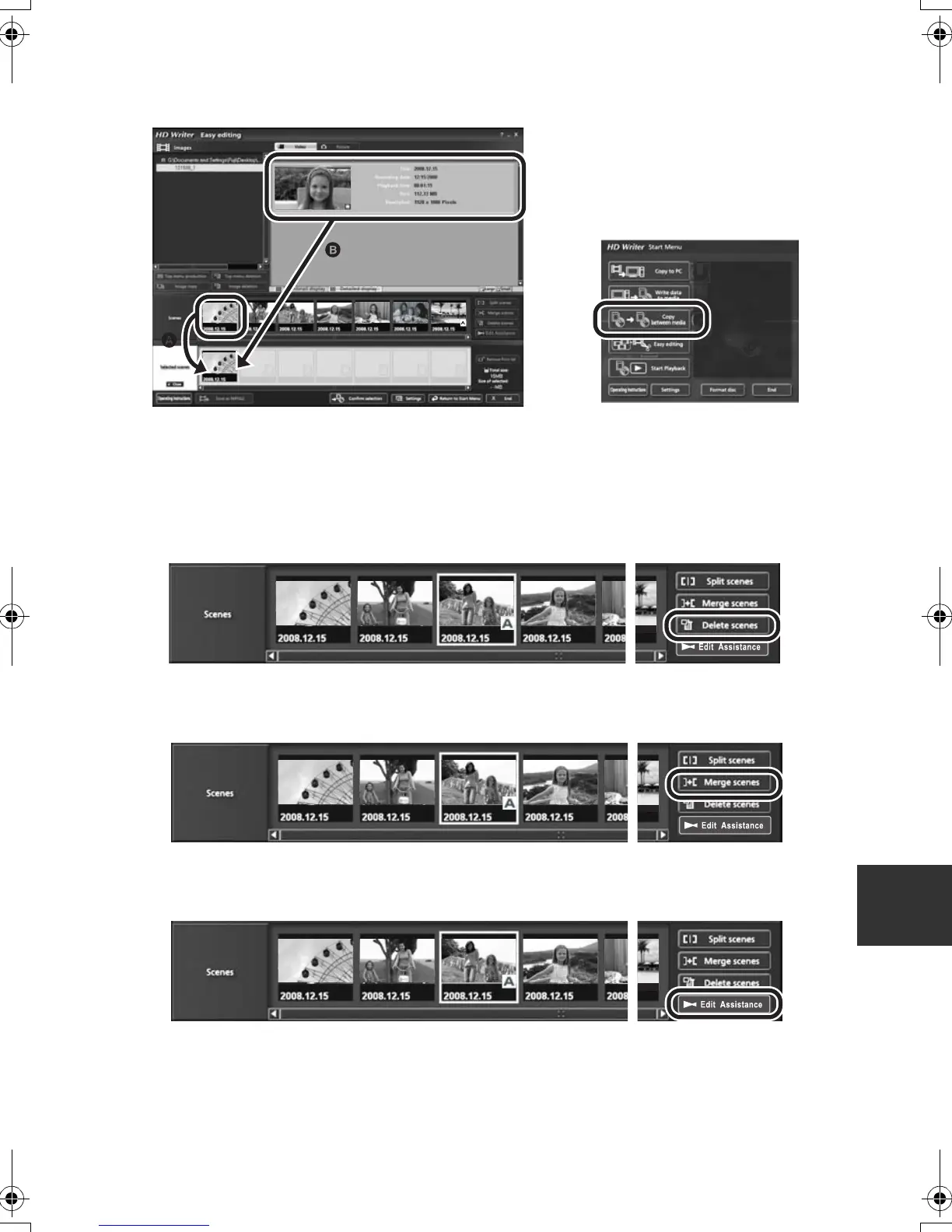
∫ When editing scenes on a PC using a software such as HD Writer 2.5E
∫ Example 1: When scenes were selected using HD Writer 2.5E and output to the media
If scenes were dragged and dropped from the scene display area A and output to the media, the
images will be still for several seconds wherever one scene changes to the next.
This stopping of the images for several seconds wherever one scene changes to the next can be
prevented by dragging and dropping the scenes in the Image display area B or by clicking [Copy
between media] button on the Start Menu.
∫ Example 2: When deleting scenes was initiated by HD Writer 2.5E
When a scene is deleted, the images may be still for several seconds where that scene was deleted.
∫ Example 3: When merging scenes was initiated by HD Writer 2.5E
Wherever scenes are merged, the images may be still for several seconds at the merged parts.
∫ Example 4: When edit assist is initiated by HD Writer 2.5E
When edit assist is initiated, the motion pictures at the switching points of the respective scenes or
edited portions may stop for several seconds.
HDCSD9P-VQT1N45_ENG.book 123 ページ 2007年12月26日 水曜日 午後5時57分















 To Next Page