KW8M Eco-POWER METER
20
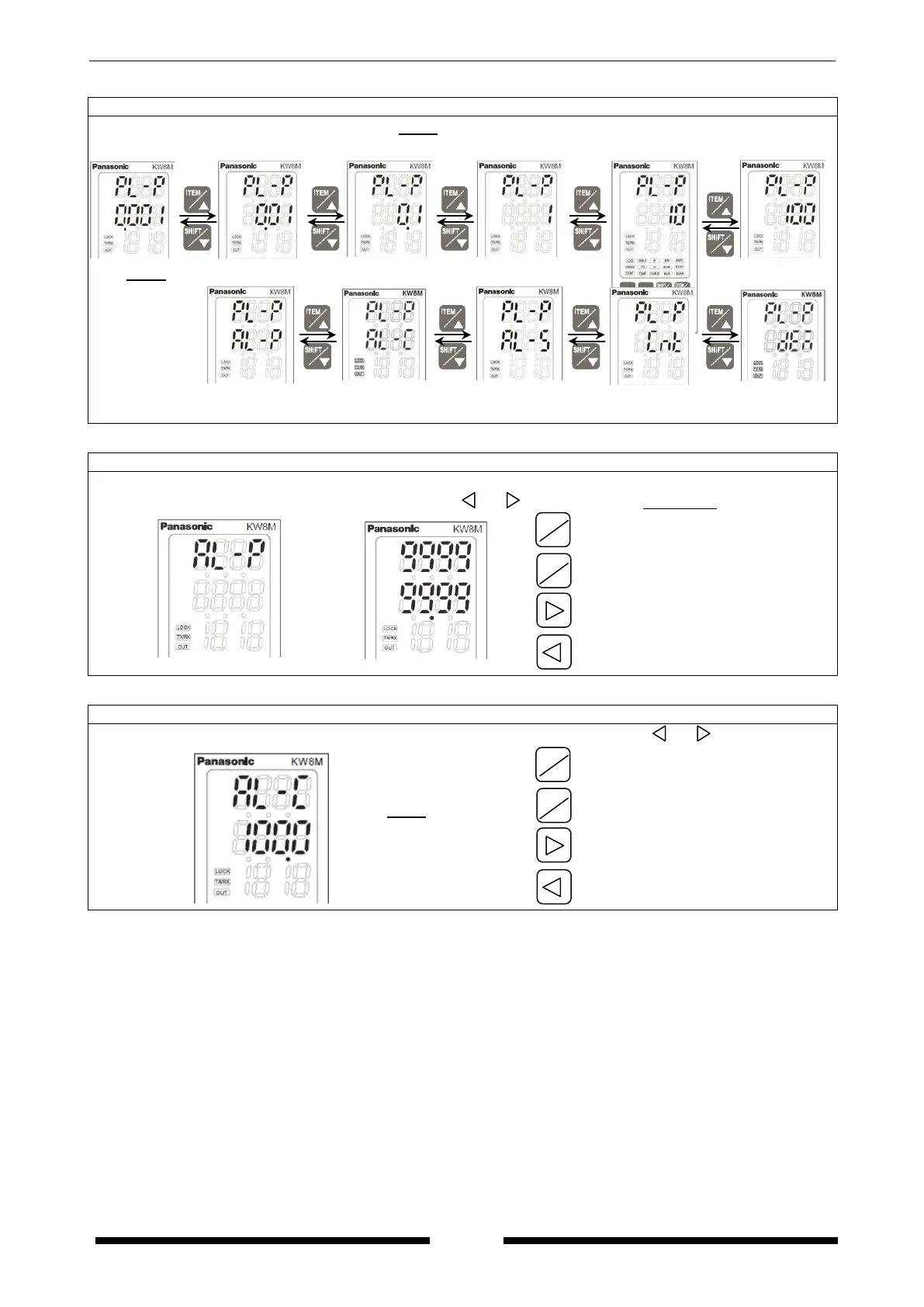
Unit for pulse output setting mode
Press <ITEM/△>, <SHIFT/▽> to change 0.001 ⇔ 0.01 ⇔ 0.1 ⇔ 1 ⇔ 10 ⇔ 100 ⇔ AL-P(Alarm) ⇔
AL-C(Alarm) ⇔ AL-S(Alarm) ⇔ Cnt (Count output) ⇔ DEM(demand alarm)*.
Power alarm value setting mode
*It is only when “AL-P” is selected on unit for pulse output setting mode.
Display changes to set an alarm value after “AL-P” is displayed at the upper line for 1 sec.
Set power for alarm using <ITEM/△>, <SHIFT/▽>, < >, < >. (0.00 to 999999.99)
after
1 sec.
Increase value
Decrease value
Shift place to set
Shift place to set
Current alarm setting mode
*It is only when “AL-C” is selected on unit for pulse output setting mode.
Set current ratio (for the rated current) for alarm using <ITEM/△>, <SHIFT/▽>, < >, < >.
(1.0 to 100.0)
Increase value
Decrease value
Shift place to set
Shift place to set
ITEM
SHIFT
▽
ITEM
△









 To Next Page