Advanced (Playback)
- 91 -
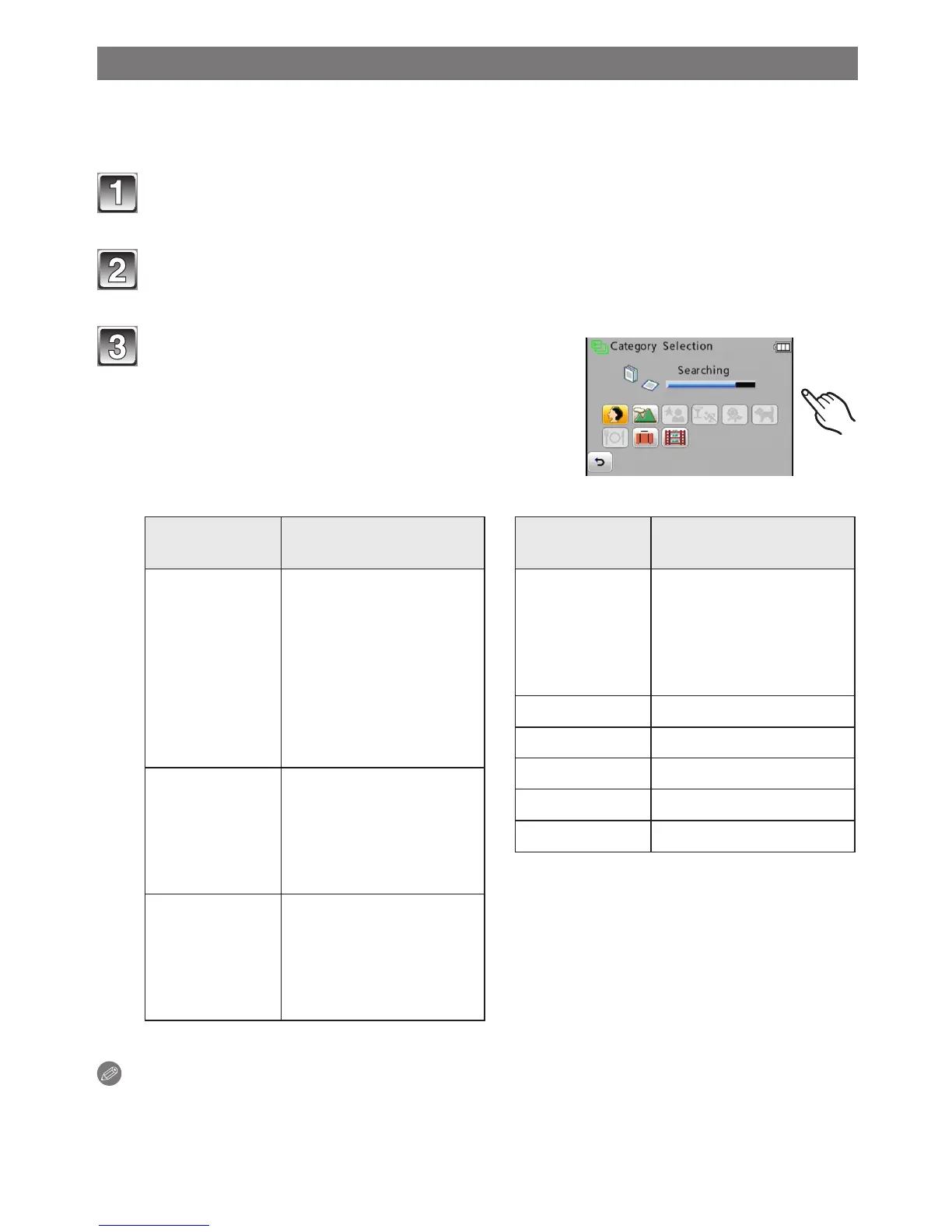
[Category Selection]
This mode allows you to search images by Scene Mode or other categories (such as
[Portrait], [Scenery] or [Night Scenery]) and sort the pictures into each of the categories.
You can then play back the pictures in each category.
Touch [
w
9] in Playback Mode.
Touch []] and touch [;].
Touch the category to playback.
• If there are no pictures in the selected
category, a message is displayed and
playback will become impossible.
• Pictures are sorted into the categories as
follows.
Category
Recording information
e.g. Scene Modes
q
[Portrait],
[i-Portrait],
[Transform],
[Self Portrait],
[Night Portrait],
[i-Night Portrait],
[Baby1] / [Baby2],
[Cosmetic Mode]
r
[Scenery],
[i-Scenery],
[Sunset],
[i-Sunset],
[Aerial Photo]
y
[Night Portrait],
[i-Night Portrait],
[Night Scenery],
[i-Night Scenery],
[Starry Sky]
Category
Recording information
e.g. Scene Modes
q
[Sports], [Party],
[Candle Light],
[Fireworks],
[Beach], [Snow],
[Aerial Photo]
w
[Baby1] / [Baby2]
d
[Pet]
i
[Food]
e
[Travel Date]
r
[Motion Picture]
Note
• The available playback menu will vary according to the selected category.



 To Next Page
 Loading...