EasyManua.ls Logo

Panasonic Palmcoder PalmSight PV-L51 - Page 21

Panasonic Palmcoder PalmSight PV-L51
44 pages
Print Icon
To Next Page IconTo Next Page
To Previous Page IconTo Previous Page
Loading...
Playing
Back
Recordings
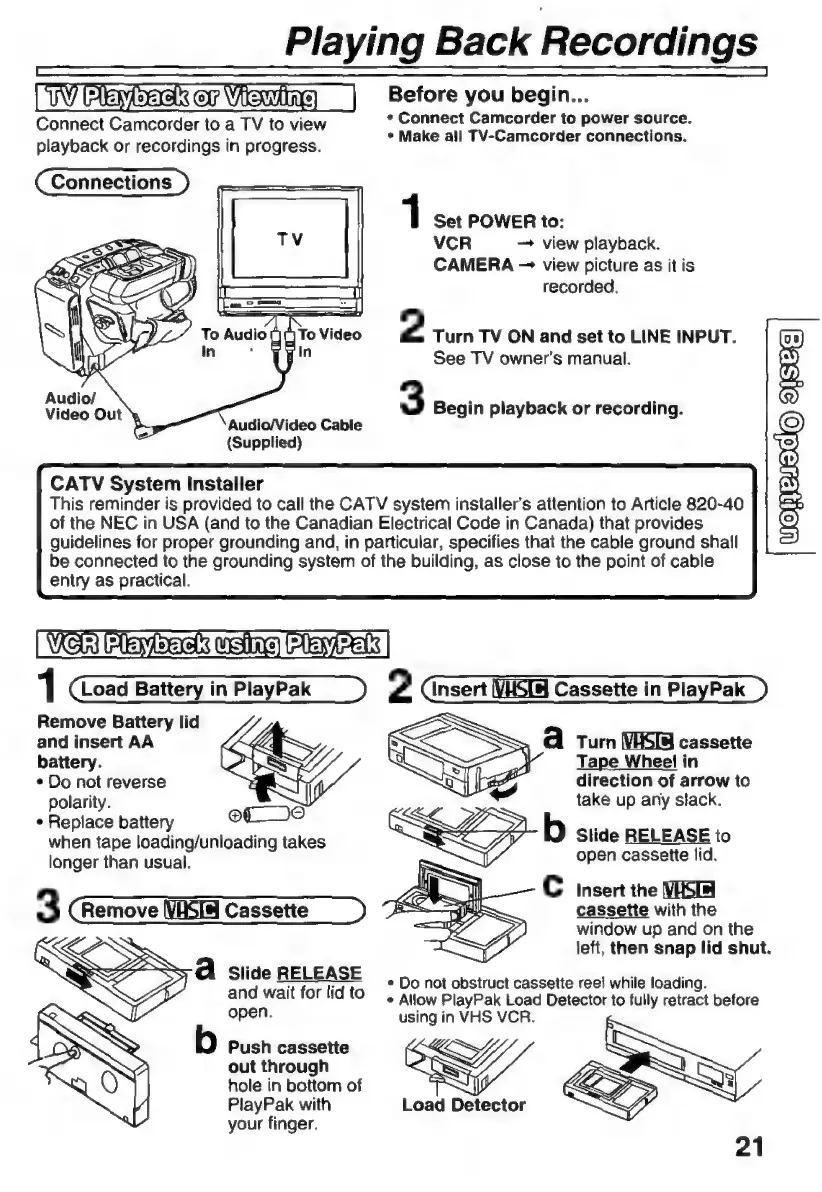
Before
you
begin...
A
f
N
-
F
n
A
playback
or
recordings
in
progress.
Make
all
TV-Camcorder
connections
Connections
1
Set
POWER
to:
VCR
view
playback.
CAMERA
view
picture
as
it
is
recorded.
2
Turn
TV
ON
and
set
to
LINE
INPUT.
See
TV
owner’s
manual.
Video
Out
y
3
Begin
playback
or
recording.
Audio/Video
Cable
(Supplied)
CATV
System
Installer
This
reminder
is
provided
to
call
the
CATV
system
installer’s
attention
to
Article
820-40
of
the
NEC
in
USA
(and
to
the
Canadian
Electrical
Code
in
Canada)
that
provides
OREIRO)
guidelines
for
proper
grounding
and,
in
particular,
specifies
that
the
cable
ground
shall
be
connected
to
the
grounding
system
of
the
building,
as
close
to
the
point
of
cable
entry
as
practical.
|
Wel
Me
mtbac
wsing
(ara:
|
1
Load
Battery
in
PlayPak
2
Insert
VHSTA
Cassette
in
PlayPak
Remove
Battery
lid
and
insert
AA
battery.
*
Do
not
reverse
polarity.
+
Replace
battery
oL
O
when
tape
loading/unloading
takes
longer
than
usual.
A
Turn
VAS
cassette
Tape
Wheel
in
direction
of
arrow
to
take
up
any
stack.
Slide
RELEASE
to
open
cassette
lid.
C
insert
the
cassette
with
the
window
up
and
on
the
left,
then
snap
lid
shut.
3
Remove
\VHSIa
Cassette
d
Slide
RELEASE
>
:
.
n
tr
reel
while
loading.
and
wait
tor
ito
Do
not
obstruct
cassette
reel
while
loading
+
Allow
PlayPak
Load
Detector
to
fully
retract
before
open.
using
in
VHS
VCR.
Push
cassette
Es
out
through
hole
in
bottom
of
PlayPak
with
Load
Detector
your
finger.

Related product manuals