EasyManua.ls Logo

Panasonic Palmcoder PalmSight PV-L51 - Viewfinder;Lcd Monitor Indications Sss

Panasonic Palmcoder PalmSight PV-L51
44 pages
Print Icon
To Next Page IconTo Next Page
To Previous Page IconTo Previous Page
Loading...
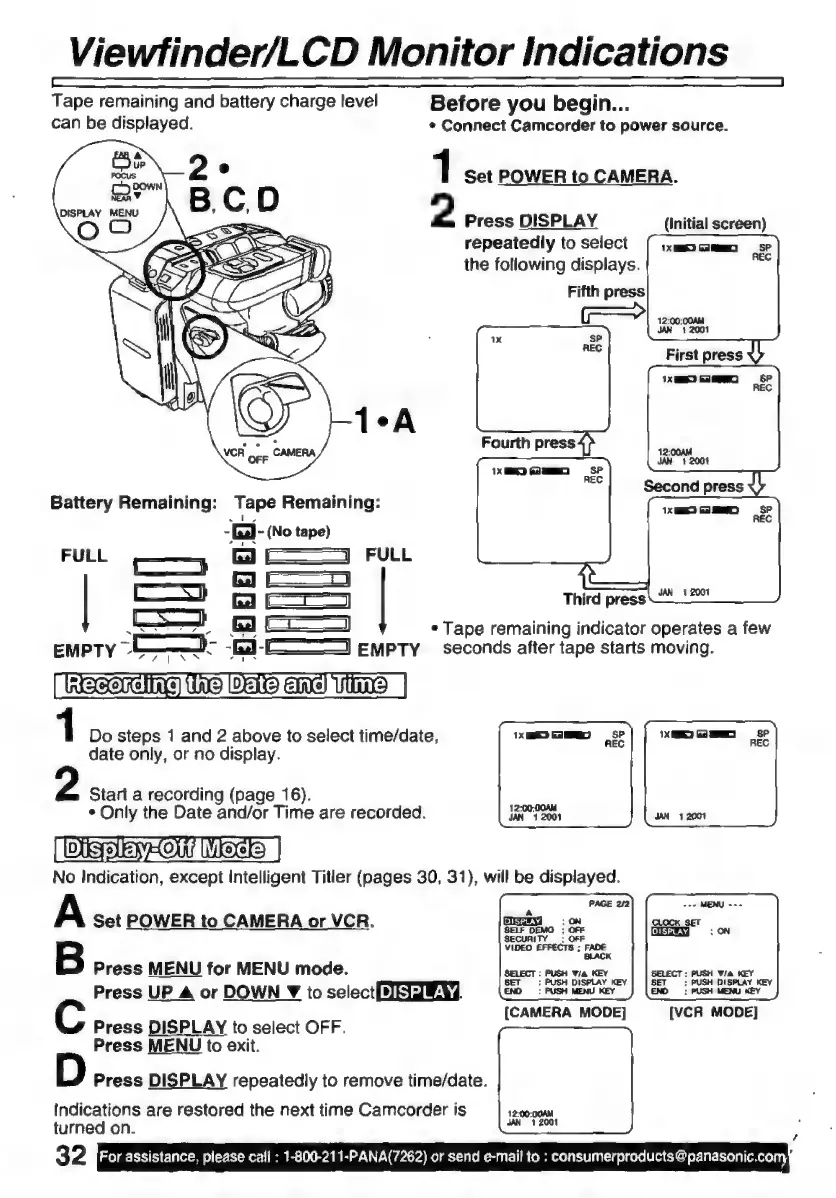
Viewfinder/LCD
Monitor
Indications
Tape
remaining
and
battery
charge
level
Before
you
begin...
can
be
displayed.
*
Connect
Camcorder
to
power
source.
1
Set
POWER
to
CAMERA.
2
Press
DISPLAY
(Initial
screen)
repeatedly
to
select
the
following
displays.
Fifth
press
Battery
Remaining:
Tape
Remaining:
-Ga
-
(No
tape)
FULL
e
GA
Cd
FULL
El
——
ba
Third
press
oo
GA
e
Tape
remaining
indicator
operates
a
few
EMPTY
os
bd
E
empty
seconds
after
tape
starts
moving.
Saas
ssl)
1
DES
ane)
VIA
|
1
Do
steps
1
and
2
above
to
select
time/date,
Xm
O
SP
date
only,
or
no
display.
Start
a
recording
(page
16).
*
Only
the
Date
and/or
Time
are
recorded.
DISSE
HOW
Mae
|
No
Indication,
except
Intelligent
Titler
(pages
30,
31),
will
be
displayed.
A
Set
POWER
to
CAMERA
or
VCR.
RI
o
B
Press
MENU
for
MENU
mode.
Press
UP
A
or
DOWN
Y
to
selecti
YR]
AESi.
[CAMERA
MODE]
[VCR
MODE]
Press
DISPLAY
to
select
OFF.
Press
MENU
to
exit.
Press
DISPLAY
repeatedly
to
remove
time/date.
Indications
are
restored
the
next
time
Camcorder
is
esan.
turned
on.
32
For
assistance,
please
cali
:
1-800-211-PANA(7262)
or
send
e-mail
to
:
consumerproducts
@panasonic.com,

Related product manuals