EasyManua.ls Logo

Panasonic Palmcoder PalmSight PV-L51 - Page 31

Panasonic Palmcoder PalmSight PV-L51
44 pages
Print Icon
To Next Page IconTo Next Page
To Previous Page IconTo Previous Page
Loading...
Intelligent
Titler
Before
you
begin...
+
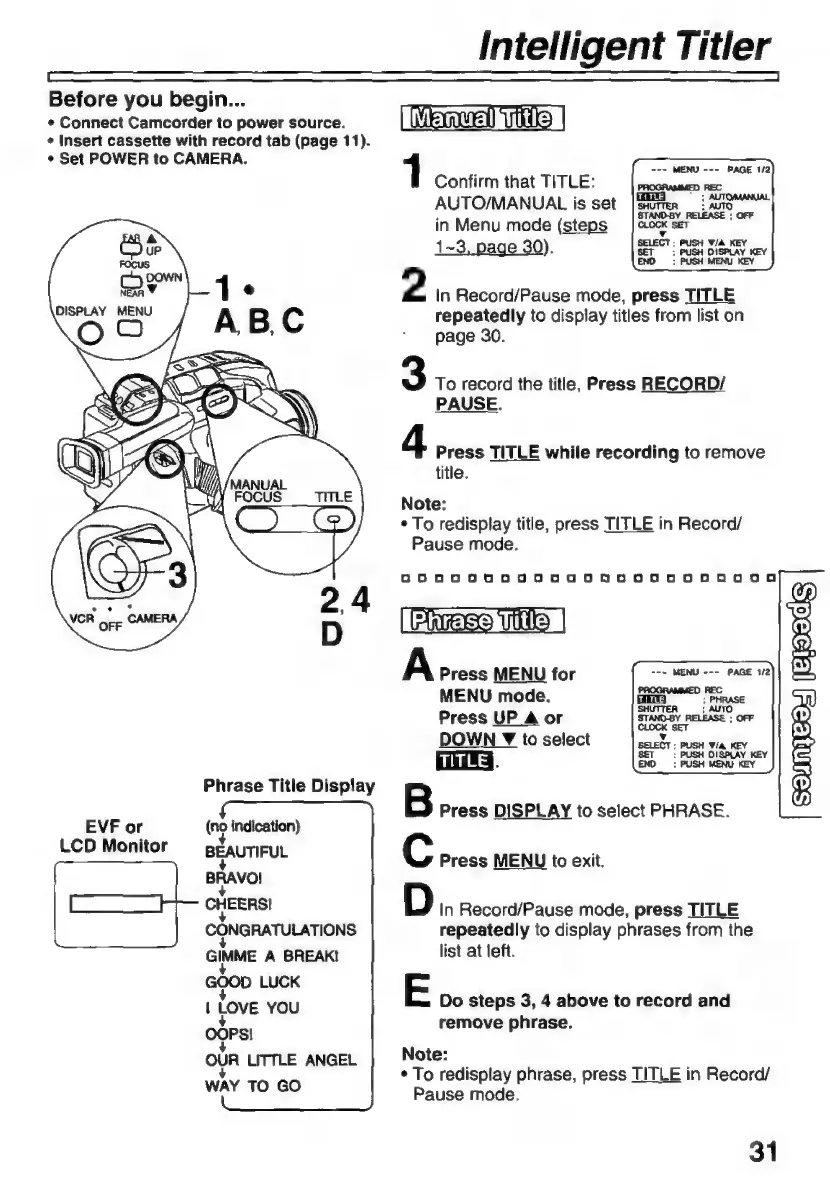
Connect
Camcorder
to
power
source.
+
Insert
cassette
with
record
tab
(page
11).
s
Set
POWER
to
CAMERA.
Phrase
Title
Display
EVF
or
LCD
Monitor
(no
indication)
BEAUTIFUL
BRAVO!
CHEERS!
CONGRATULATIONS
GIMME
A
BREAK!
DOD
LUCK
|
LOVE
YOU
OOPS!
OUR
LITTLE
ANGEL
WAY
TO
GO
Mm
TO
|
1
Confirm
that
TITLE:
AUTO/MANUAL
is
set
in
Menu
mode
(steps
K
1-3,
page
30).
SET
PUSH
DISPLAY
KEY
END
:
PUSH MENU
KEY
2
In
Record/Pause
mode,
press
TITLE
repeatedly
to
display
titles
from
list
on
page
30.
3
To
record
the
title,
Press
RECORD/
PAUSE.
4
Press
TITLE
while
recording
to
remove
title.
Note:
*
To
redisplay
title,
press
TITLE
in
Record/
Pause
mode.
0200000000
58500505800020800An200a
PEE
UM
|
A
Press
MENU
for
MENU
mode.
Press
UP
4
or
DOWN
Y
to
select
ua.
B
Press
DISPLAY
to
select
PHRASE.
C
Press
MENU
to
exit.
D
In
Record/Pause
mode,
press
TITLE
repeatedly
to
display
phrases
from
the
list
at
left.
E
Do
steps
3,
4
above
to
record
and
remove
phrase.
Note:
*
To
redisplay
phrase,
press
TITLE
in
Record/
Pause
mode.
31

Related product manuals