EasyManua.ls Logo

Panasonic Palmcoder PalmSight PV-L51 - 1% | Copying Your Tapes (Dubbing)

Panasonic Palmcoder PalmSight PV-L51
44 pages
Print Icon
To Next Page IconTo Next Page
To Previous Page IconTo Previous Page
Loading...
Copying
your
Tapes
(dubbing)
(COMECAR
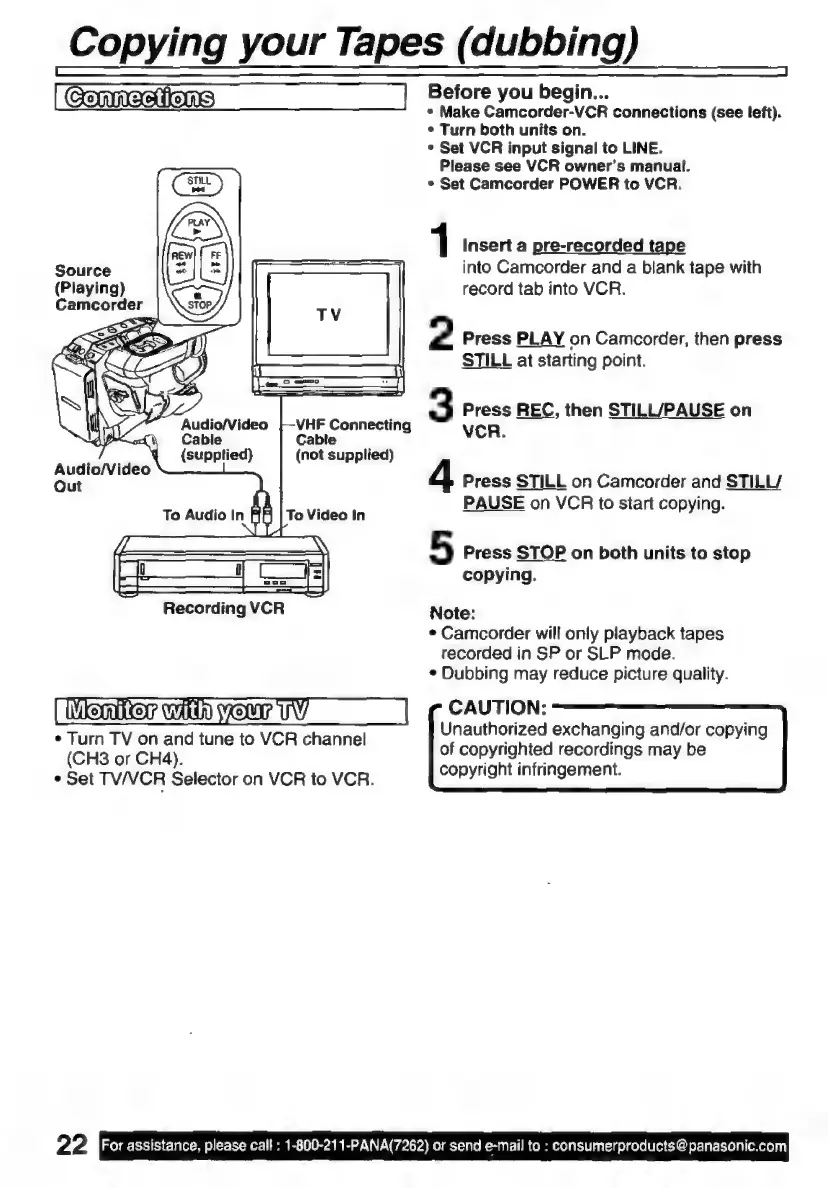
Source
(Playing)
Audio/Video
=D
Cable
q
(supplied)
Audio/Video
Out
d
VHF
Connecting
Cable
(not
supplied)
To
Audio
In
To
Video
In
Recording
VCR
WSS"
Win
NOW
UW
e
Turn
TV
on
and
tune
to
VCR
channel
(CH3
or
CH4).
e
Set
TV/VCR
Selector
on
VCR
to
VCR.
22
For
assistance,
please
call:
1-800-211-PANA(7262)
or
send
e-mail
to
:
consumerproducts
@panasonic.com
Before
you
begin...
*
Make
Camcorder-VCR
connections
(see
left).
*
Turn
both
units
on.
s
Set
VCR
input
signal
to
LINE.
Please
see
VCR
owner's
manual.
*
Set
Camcorder
POWER
to
VCR.
1
Insert
a
pre-recorded
tape
into
Camcorder
and
a
blank
tape
with
record
tab
into
VCR.
2
Press
PLAY
on
Camcorder,
then
press
STILL
at
starting
point.
3
Press
REC,
then
STILUPAUSE
on
VCR.
4
Press
STILL
on
Camcorder
and
STILL/
PAUSE
on
VCR
to
start
copying.
5
Press
STOP
on
both
units
to
stop
copying.
Note:
e
Camcorder
will
only
playback
tapes
recorded
in
SP
or
SLP
mode.
*
Dubbing
may
reduce
picture
quality.
CAUTION:
Unauthorized
exchanging
and/or
copying
of
copyrighted
recordings
may
be
copyright
infringement.

Related product manuals