EasyManua.ls Logo

Panasonic Palmcoder PalmSight PV-L51 - DECKS FOCUS (Anto Mana FOCUS) Ia Ias

Panasonic Palmcoder PalmSight PV-L51
44 pages
Print Icon
To Next Page IconTo Next Page
To Previous Page IconTo Previous Page
Loading...
Focus
Before
you
begin...
*
Connect
Camcorder
to
power
source.
«
Set
POWER
to
CAMERA.
KOGU
S
Camcorder
automatically
focuses
on
subject
even
during
zooming.
Auto
Focus
is
on
when
“MF”
is
not
displayed
in
EVF
or
LCD
monitor.
Press
MANUAL
FOCUS
to
remove
“MF”
in
EVF
or
LCD
monitor
if
necessary.
MEnVEl
Focus
Use
Manual
Focus
(MF)
when
:
*
recording
through
glass.
e
lighting
is
poor.
e
subject
is
far
away
with
objects
in
foreground.
EVF
or
LCD
Monitor
e
subject
has
distinct
horizontal
lines.
¢
subject
is
not
centered
in
EVF
or
LED
monitor.
ME
*
subject
has
a
shiny
surface.
*
subject
is
slanted.
*
subject
is
bright
and
flat,
like
a
white
wall.
*
subject
has
fast
motion,
like
a
golf
swing.
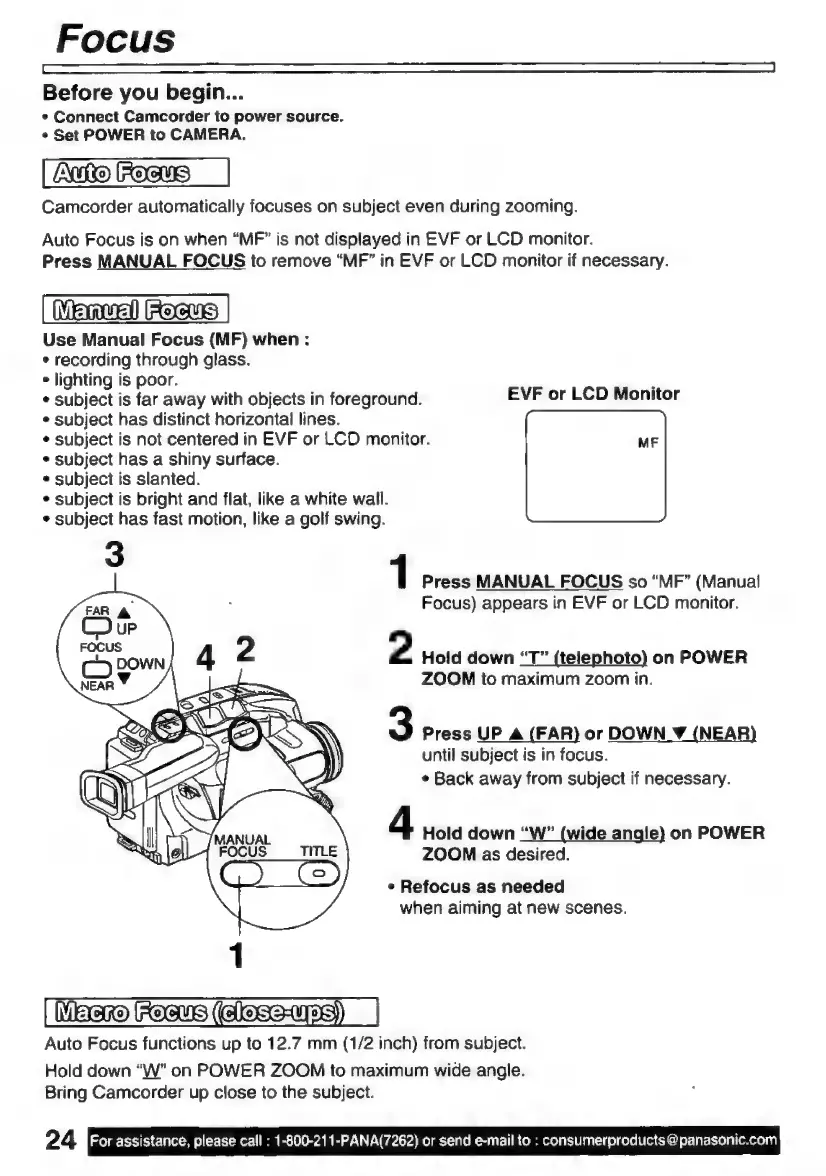
1
Press
MANUAL
FOCUS
so
“MF”
(Manual
Focus)
appears
in
EVF
or
LCD
monitor.
2
Hold
down
“T”
(telephoto)
on
POWER
ZOOM
to
maximum
zoom
in.
3
Press
UP
A
(FAR)
or
DOWN
Y
(NEAR)
until
subject
is
in
focus.
*
Back
away
from
subject
if
necessary.
4
Hold
down
“W”
(wide
angle}
on
POWER
ZOOM
as
desired.
s
Refocus
as
needed
when
aiming
at
new
scenes.
MECO
[FOCUS
(CEAT)
Auto
Focus
functions
up
to
12.7
mm
(1/2
inch)
from
subject.
Hold
down
“W”
on
POWER
ZOOM
to
maximum
wide
angle.
Bring
Camcorder
up
close
to
the
subject.
24
For
assistance,
please
call
:
1-800-211-PANA(7262)
or
send
e-mail
to
:
consumerproducts
@
panasonic.com

Related product manuals