EasyManua.ls Logo

Panasonic Palmcoder PalmSight PV-L51 - Security MODO TTT

Panasonic Palmcoder PalmSight PV-L51
44 pages
Print Icon
To Next Page IconTo Next Page
To Previous Page IconTo Previous Page
Loading...
Security
Mode
Recording
starts
automatically
if
motion
is
detected.
Motion
Security
may
mistakenly
start
when:
*
background
is
plain,
like
a
white
wall,
or
has
distinct
vertical,
horizontal,
or
slanted
stripes,
like
a
venetian
blind.
*
brightness
suddenly
changes.
Motion
Security
may
not
start
when:
*
motion
is
very
slow
or
fast.
e
moving
object
is
very
small.
*
motion
occurs
only
in
1
corner
of
viewing
area.
*
in
poor
lighting
(in
this
case,
MOTION
SECURITY
flashes).
*
background
is
plain,
like
a
white
wall,
or
has
distinct
horizontal
or
vertical
stripes.
Note:
*
Security
recording
starts
if
Camcorder
is
bumped
or
repositioned.
*
This
feature
is
not
available
during
normal
recording.
e
While
in
Motion
Security
stand-by,
the
following
functions
are
not
available:
Record/Pause,
Stand-by
mode,
Digital
E.1.S.,
Video
Effects
(Auto/Digital
Fade).
Before
you
begin...
+
Connect
Camcorder
to
power
source.
Use
AC
Adaptor
for
longer
recordings.
*
Insert
cassette
with
record
tab
(page
11).
*
Set
POWER
to
CAMERA.
¢
Securely
position
and
aim
Camcorder.
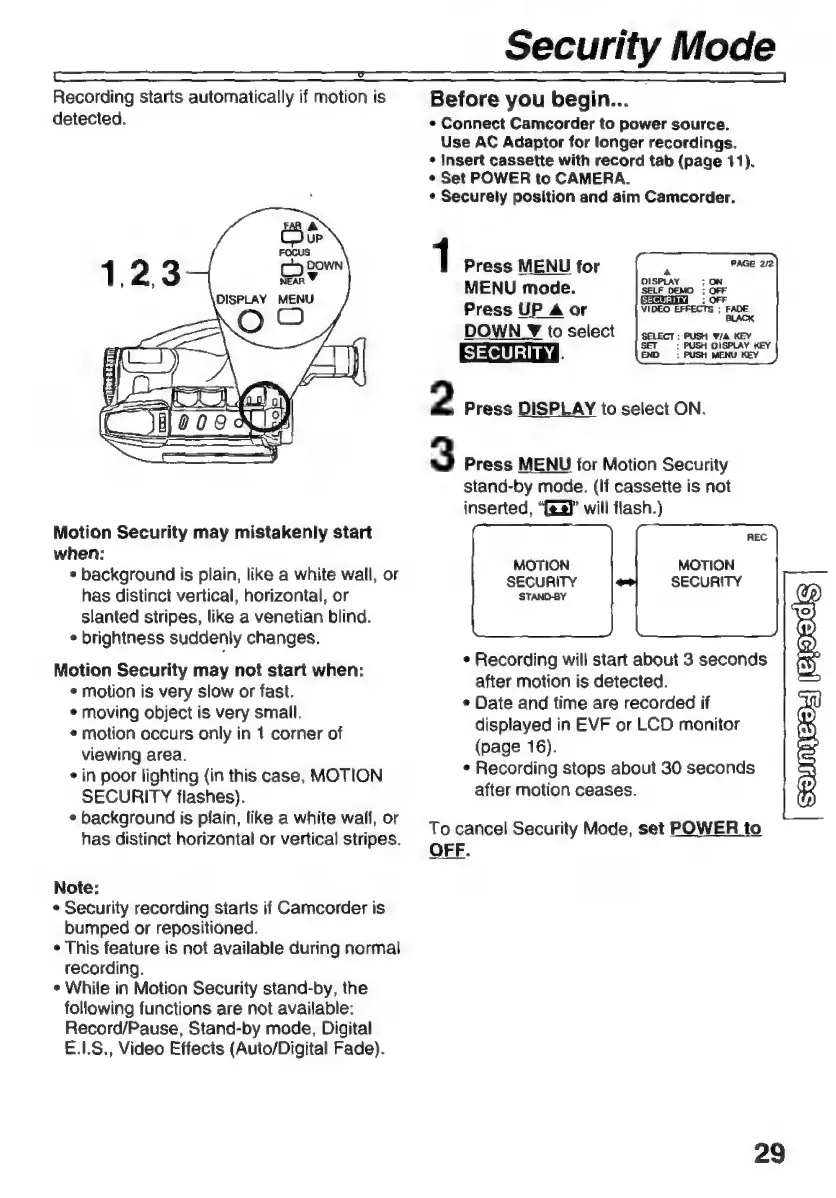
1
Press
MENU
for
MENU
mode.
Press
UP
Aor
DOWN
Z
to
select
SECURITY
Ñ
2
Press
DISPLAY
to
select
ON.
3
Press
MENU
for
Motion
Security
stand-by
mode.
(If
cassette
is
not
inserted,
“es
will
flash.)
MOTION
MOTION
SECURITY
SECURITY
STAND-BY
e
Recording
will
start
about
3
seconds
after
motion
is
detected.
s
Date
and
time
are
recorded
if
displayed
in
EVF
or
LCD
monitor
(page
16).
e
Recording
stops
about
30
seconds
after
motion
ceases.
To
cancel
Security
Mode,
set
POWER
to
OFF.
29

Related product manuals