EasyManua.ls Logo

Panasonic Palmcoder PalmSight PV-L51 - Replacing Clock;Remote Battery

Panasonic Palmcoder PalmSight PV-L51
44 pages
Print Icon
To Next Page IconTo Next Page
To Previous Page IconTo Previous Page
Loading...
Replacing
Clock/Remote
Battery
The
clock
and
remote
batteries
are
pre-installed.
Follow
the
steps
below
if
replacement
becomes
necessary.
WARNING:
Replace
battery
with
Panasonic
PART
NO.
VSBW0004
(CR2025)
only.
Use
of
another
battery
may
present
a
risk
of
fire
or
explosion.
Caution:
Battery
may
explode
if
mistreated.
Dispose
of
used
battery
promptly.
Keep
away
from
children.
Do
not
recharge,
disassemble
or
dispose
of
in
fire.
|
GOS
EEL
|
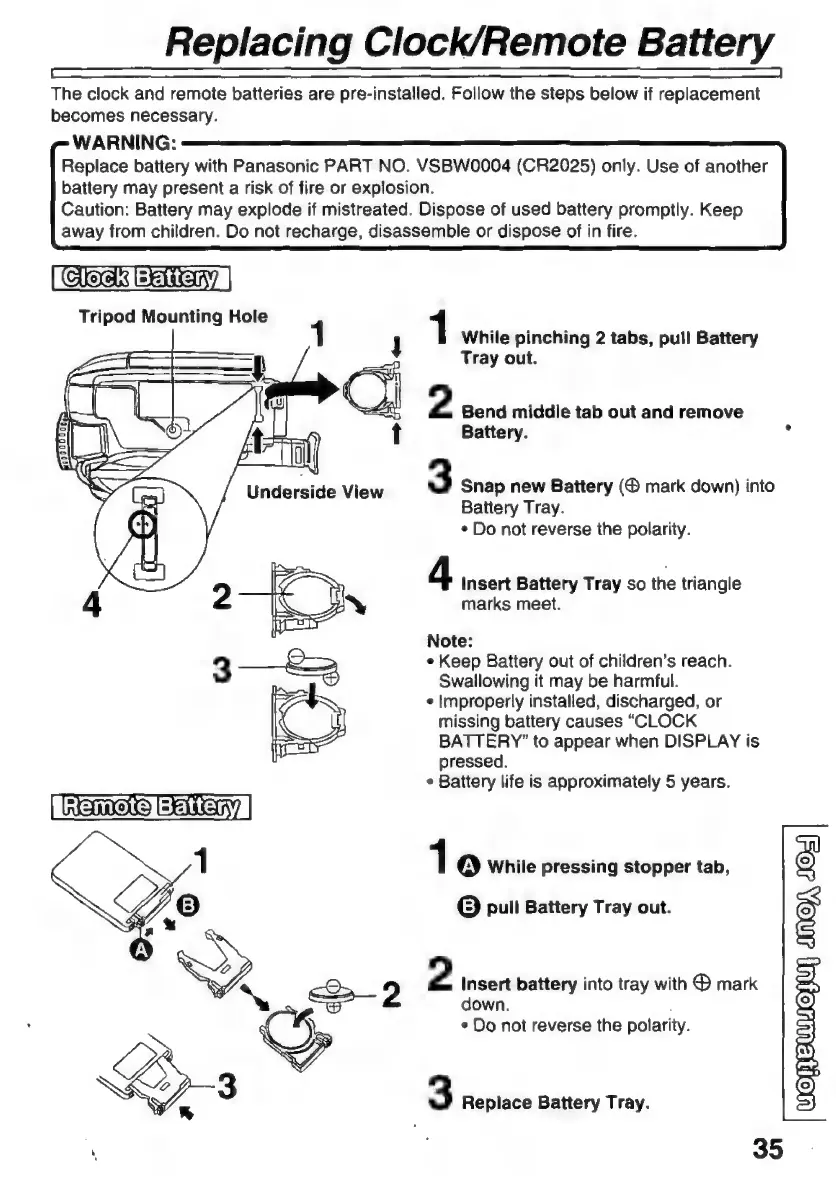
Tripod
Mounting
Hole
1
1
While
pinching
2
tabs,
pull
Battery
Tray
out.
2
Bend
middle
tab
out
and
remove
Battery.
3
Snap
new
Battery
mark
down)
into
Battery
Tray.
+
Do
not
reverse
the
polarity.
4
Insert
Battery
Tray
so
the
triangle
marks
meet.
Note:
3
—-&=2
+
Keep
Battery
out
of
children’s
reach.
Swallowing
it
may
be
harmful.
s
improperly
installed,
discharged,
or
missing
battery
causes
“CLOCK
BATTERY”
to
appear
when
DISPLAY
is
pressed.
s
Battery
life
is
approximately
5
years.
1
O
While
pressing
stopper
tab,
G
pull
Battery
Tray
out.
IQ,
492)
2
Insert
battery
into
tray
with
®
mark
down.
*
Do
not
reverse
the
polarity.
JEUMOLUI
uol
3
Replace
Battery
Tray.

Related product manuals