EasyManua.ls Logo

Panasonic Palmcoder PalmSight PV-L51 - Self Demo MOE Nia Neeaaea

Panasonic Palmcoder PalmSight PV-L51
44 pages
Print Icon
To Next Page IconTo Next Page
To Previous Page IconTo Previous Page
Loading...
Self
Demo
Mode
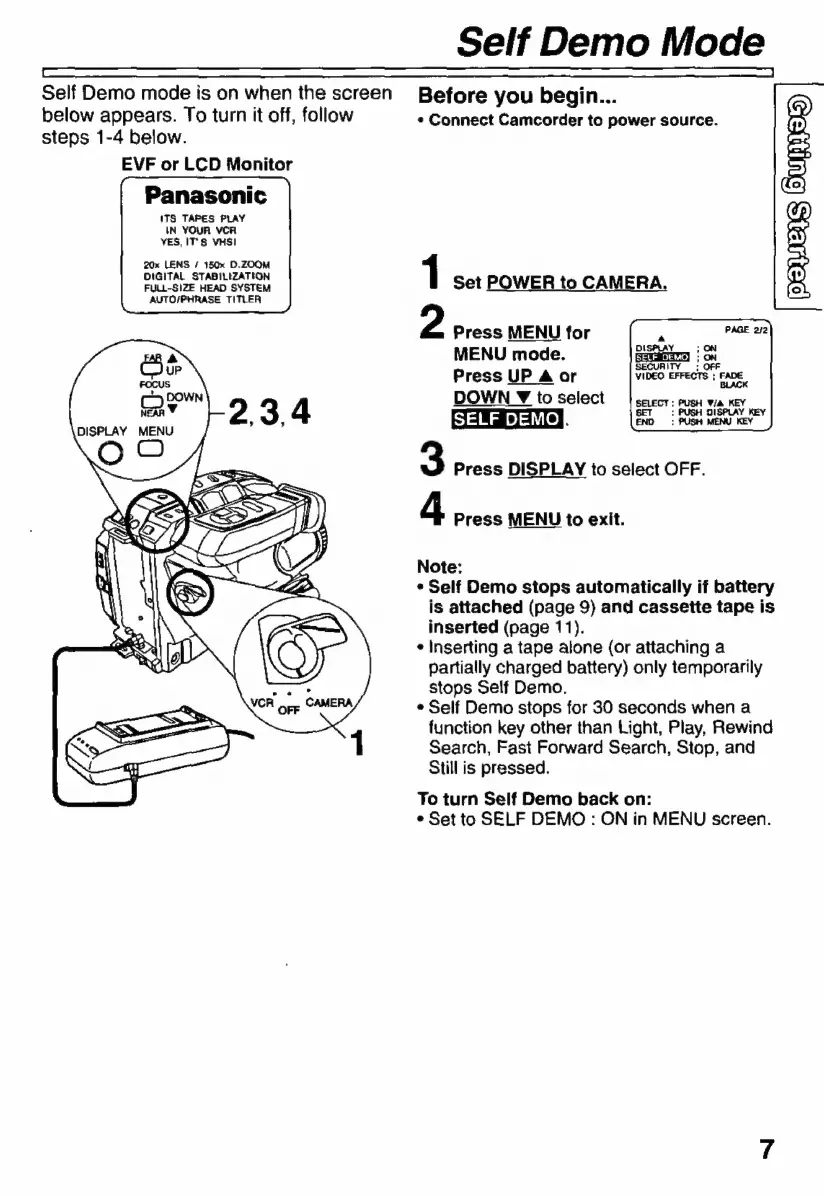
Self
Demo
mode
is
on
when
the
screen
below
appears.
To
turn
it
off,
follow
steps
1-4
below.
EVF
or
LCD
Monitor
Panasonic
ITS
TAPES
PLAY
IN
YOUR
VCR
YES,
IT'S
VHSI
20x
LENS
/
150x
D.ZOOM
DIGITAL
STABILIZATION
FULL-SIZE
HEAD
SYSTEM
AUTO/PHRASE
TITLER
Before
you
begin...
s
Connect
Camcorder
to
power
source.
1
Set
POWER
to
CAMERA.
2
Press
MENU
for
MENU
mode.
Press
UP
A
or
DOWN
¥
to
select
SELF
DEMOR
END
3
Press
DISPLAY
to
select
OFF.
SELECT
:
PUSH
V/a
KEY
:
PUSH
DISPLAY
KEY
:
PUSH
MENU
KEY
d
Press
MENU
to
exit.
Note:
s
Self
Demo
stops
automatically
if
battery
is
attached
(page
9)
and
cassette
tape
is
inserted
(page
11).
*
Inserting
a
tape
alone
(or
attaching
a
partially
charged
battery)
only
temporarily
stops
Self
Demo.
*
Self
Demo
stops
for
30
seconds
when
a
function
key
other
than
Light,
Play,
Rewind
Search,
Fast
Forward
Search,
Stop,
and
Still
is
pressed.
To
turn
Self
Demo
back
on:
e
Set
to
SELF
DEMO
:
ON
in
MENU
screen.

Related product manuals