EasyManua.ls Logo

Panasonic Palmcoder PalmSight PV-L51 - Camera Recording (Basic, Stand-By, Programmed Recording)

Panasonic Palmcoder PalmSight PV-L51
44 pages
Print Icon
To Next Page IconTo Next Page
To Previous Page IconTo Previous Page
Loading...
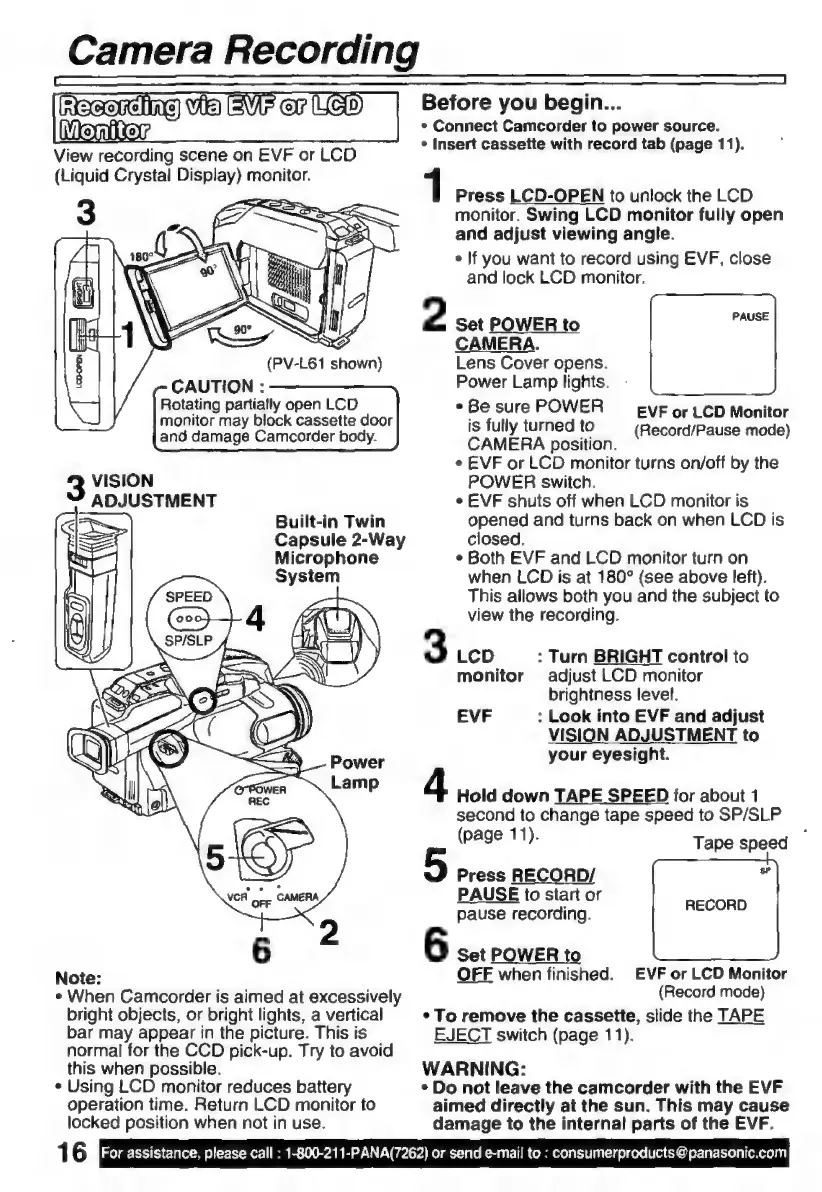
Camera
Recording
Reeri)
Vib
VF
or
Lye)
Before
you
begin...
Moniton
»
Connect
Camcorder
to
power
source.
View
recording
scene
on
EVF
or
LCD
(Liquid
Crystal
Display)
monitor.
*
Insert
cassette
with
record
tab
(page
11).
1
Press
LCD-OPEN
to
unlock
the
LCD
monitor.
Swing
LCD
monitor
fully
open
and
adjust
viewing
angle.
»
If
you
want
to
record
using
EVF,
close
and
lock
LCD
monitor.
2
Set
POWER
to
CAMERA.
Lens
Cover
opens.
Power
Lamp
lights.
«Be
sure
POWER
EVF
or
LCD
Monitor
is
fully
turned
tO
(Record/Pause
mode)
CAMERA
position.
¢
EVF
or
LCD
monitor
turns
on/off
by
the
(PV-L61
shown)
CAUTION
:
Rotating
partially
open
LCD
monitor
may
block
cassette
door
and
damage
Camcorder
body.
VISION
POWER
switch.
ADJUSTMENT
e
EVE
shuts
off
when
LCD
monitor
is
>
Built-in
Twin
opened
and
turns
back
on
when
LCD
is
:
Capsule
2-Way
closed.
Ro
Microphone
¢
Both
EVF
and
LCD
monitor
turn
on
System
when
LCD
is
at
180°
(see
above
left).
This
allows
both
you
and
the
subject
to
view
the
recording.
3
LCD
:
Turn
BRIGHT
control
to
monitor
adjust
LCD
monitor
brightness
level.
EVF
:
Look
into
EVF
and
adjust
VISION
ADJUSTMENT
to
your
eyesight.
4
Hold
down
TAPE
SPEED
for
about
1
second
to
change
tape
speed
to
SP/SLP
(page
11).
Tape
speed
_
Press
RECORD/
N
PAUSE
to
start
or
2
pause
recording.
daon
6
6
set
power
to
Note:
OFF
when
finished.
EVF
or
LCD
Monitor
e
When
Camcorder
is
aimed
at
excessively
(Record
mode)
bright
objects,
or
bright
lights,
a
vertical
s
To
remove
the
cassette,
slide
the
TAPE
bar
may
appear
in
the
picture.
This
is
EJECT
switch
(page
11).
normal
for
the
CCD
pick-up.
Try
to
avoid
this
when
possible.
WARNING:
*
Using
LCD
monitor
reduces
battery
*
Do
not
leave
the
camcorder
with
the
EVF
operation
time.
Return
LCD
monitor
to
aimed
directly
at
the
sun.
This
may
cause
locked
position
when
not
in
use.
damage
to
the
internal
parts
of
the
EVF.
16
For
assistance,
please
call
:
1-800-211-PANA(7262)
or
send
e-mail
to
:
consumerproducts
@panasonic.com

Related product manuals