EasyManua.ls Logo

Panasonic Palmcoder PalmSight PV-L51 - Page 17

Panasonic Palmcoder PalmSight PV-L51
44 pages
Print Icon
To Next Page IconTo Next Page
To Previous Page IconTo Previous Page
Loading...
Camera
Recording
Before
you
begin...
|
Senda
@uick
Releases|
«
Connect
Camcorder
to
power
source.
;
+
Insert
cassette
with
record
tab
(page
11).
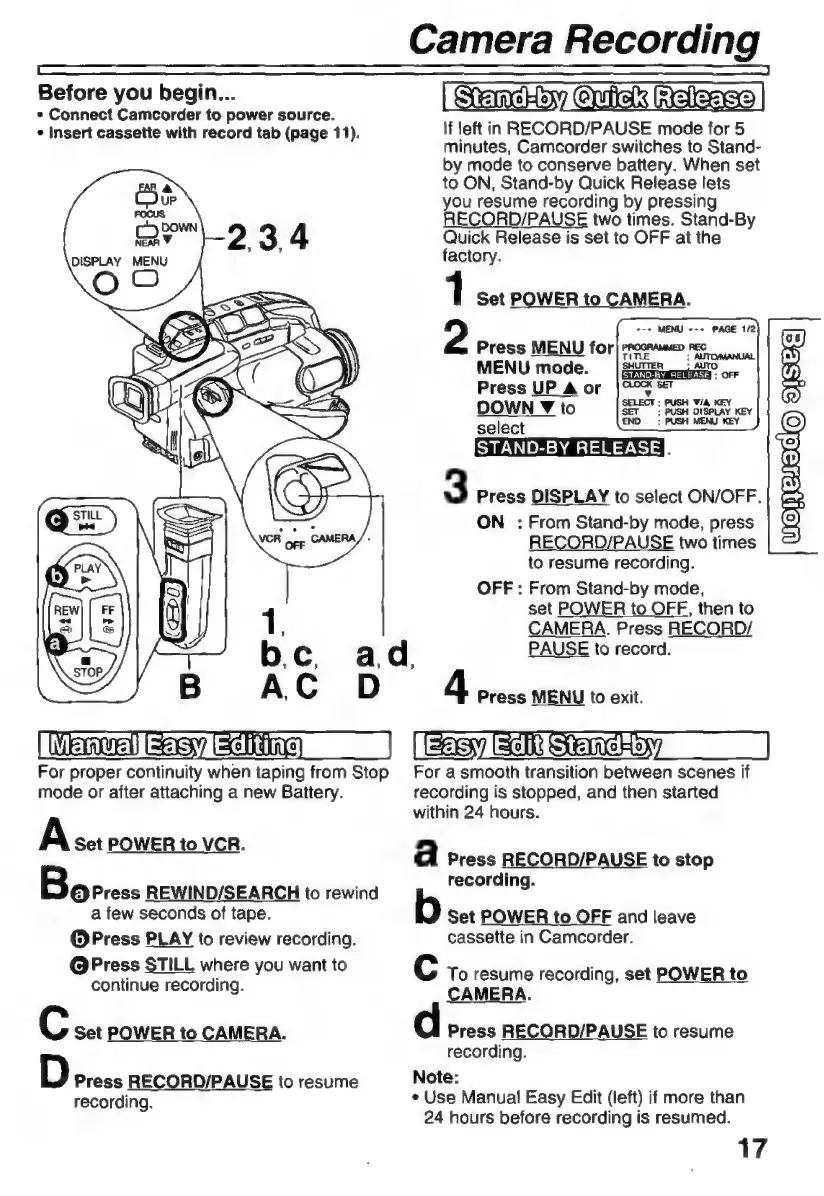
If
left
in
RECORD/PAUSE
mode
for
5
minutes,
Camcorder
switches
to
Stand-
by
mode
to
conserve
battery.
When
set
to
ON,
Stand-by
Quick
Release
lets
you
resume
recording
by
pressing
RECORD/PAUSE
two
times.
Stand-By
Quick
Release
is
set
to
OFF
at
the
factory.
1
Set
POWER
to
CAMERA.
2
Press
MENU
for)
prox
MENU
mode.
SENEN.
OFF
Press
UP
A
or
[o
se
DOWN
Y
to
select
STAND-BY
RELEASE
3
Press
DISPLAY
to
select
ON/OFF.
ON
:
From
Stand-by
mode,
press
RECORD/PAUSE
two
times
to
resume
recording.
OFF
:
From
Stand-by
mode,
set
POWER
to
OFF,
then
to
CAMERA.
Press
RECORD/
PAUSE
to
record.
4
Press
MENU
to
exit.
MERA
Es
Edna
|
(fevlaiiSthmcHsyy
|
For
proper
continuity
when
taping
from
Stop
For
a
smooth
transition
between
scenes
if
mode
or
after
attaching
a
new
Battery.
recording
is
stopped,
and
then
started
within
24
hours.
A
Set
POWER
to
VCR.
a
Press
RECORD/PAUSE
to
stop
recording.
Bo
Press
REWIND/SEARCH
to
rewind
Sere
a
few
seconds
of
tape.
Set
POWER
to
OFF
and
leave
O
Press
PLAY
to
review
recording.
cassette
in
Camcorder.
ideado
rot
sah
you
want
to
LC
To
resume
recording,
set
POWER
to
ontinue
recording.
CAMERA.
C
Set
POWER
to
CAMERA.
Press
RECORD/PAUSE
to
resume
recording.
D
Press
RECORD/PAUSE
to
resume
Note:
l l
recording.
+
Use
Manual
Easy
Edit
(left)
if
more
than
24
hours
before
recording
is
resumed.
17

Related product manuals