EasyManua.ls Logo

Panasonic Palmcoder PalmSight PV-L51 - Page 18

Panasonic Palmcoder PalmSight PV-L51
44 pages
Print Icon
To Next Page IconTo Next Page
To Previous Page IconTo Previous Page
Loading...
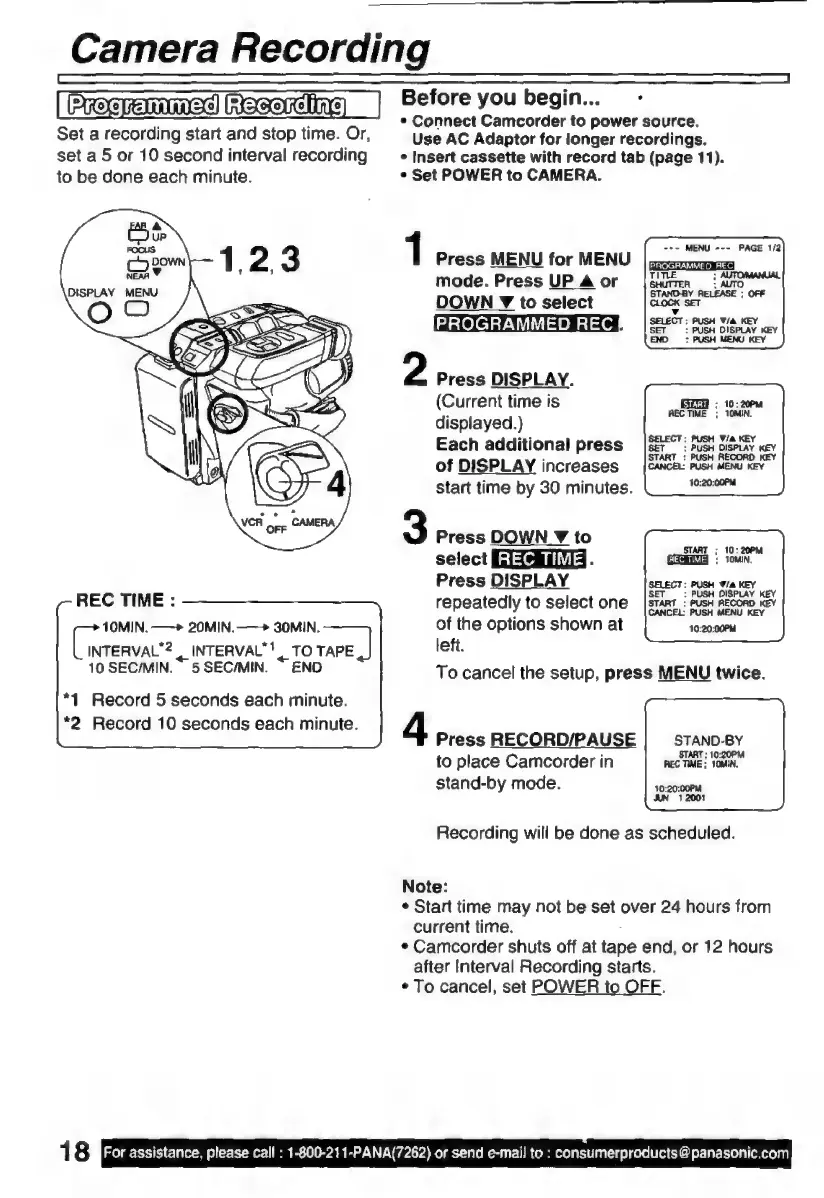
Camera
Recording
|
Precrmmac)
Racerchine)
|
Set
a
recording
start
and
stop
time.
Or,
set
a
5
or
10
second
interval
recording
to
be
done
each
minute.
REC
TIME
:
10MIN.
—>
20MIN.—*
30MIN.
reas
«
INTERVAL"!
TO
TAPE
|
10
SEC/MIN.
5SEC/MIN.
END
*1
Record
5
seconds
each
minute.
*2
Record
10
seconds
each
minute.
1
8
For
assistance,
please
call
:
1-800-211-PANA(7262)
or
send
e-mail
to
:
consumerproducts
@
panasonic.com
Before
you
begin...
>
*
Connect
Camcorder
to
power
source.
Use
AC
Adaptor
for
longer
recordings.
»
Insert
cassette
with
record
tab
(page
11).
s
Set
POWER
to
CAMERA.
+-
MENU
«--
PAGE
1/2
1
Press
MENU
for
MENU
mode.
Press
UP
A
or
¡Sun
i
DOWN
¥
to
select
x
PHOGHAMMED
REC
HA0
PUSH
Wa
ney
:
PUSH
MENU
KEY
:
AUTO
STAND-BY
RELEASE
;
OFF
CLOCK
SET
2
Press
DISPLAY.
(Current
time
is
pS
:
19;
200M
displayed.)
TE
Each
additional
press
of
DISPLAY
increases
Start
time
by
30
minutes.
3
Press
DOWN
¥
to
select
CEANA.
$
TOUN
n
Press
DISPLAY
SELECT:
PUSH
T/A
KEY
repeatedly
to
select
one
[stant
:
PUSH
RECORD
KEV
of
the
options
shown
at
10:20:00M
left.
To
cancel
the
setup,
press
MENU
twice.
4
Press
RECORD/PAUSE
STAND-BY
to
place
Camcorder
in
REC
TIME:
TS
stand-by
mode.
nip
JUN
12001
Recording
will
be
done
as
scheduled.
Note:
*
Start
time
may
not
be
set
over
24
hours
from
current
time.
-
*
Camcorder
shuts
off
at
tape
end,
or
12
hours
after
Interval
Recording
starts.
*
To
cancel,
set
POWER
to
OFF.

Related product manuals