EasyManua.ls Logo

Panasonic Palmcoder PalmSight PV-L51 - Intelligent Titler

Panasonic Palmcoder PalmSight PV-L51
44 pages
Print Icon
To Next Page IconTo Next Page
To Previous Page IconTo Previous Page
Loading...
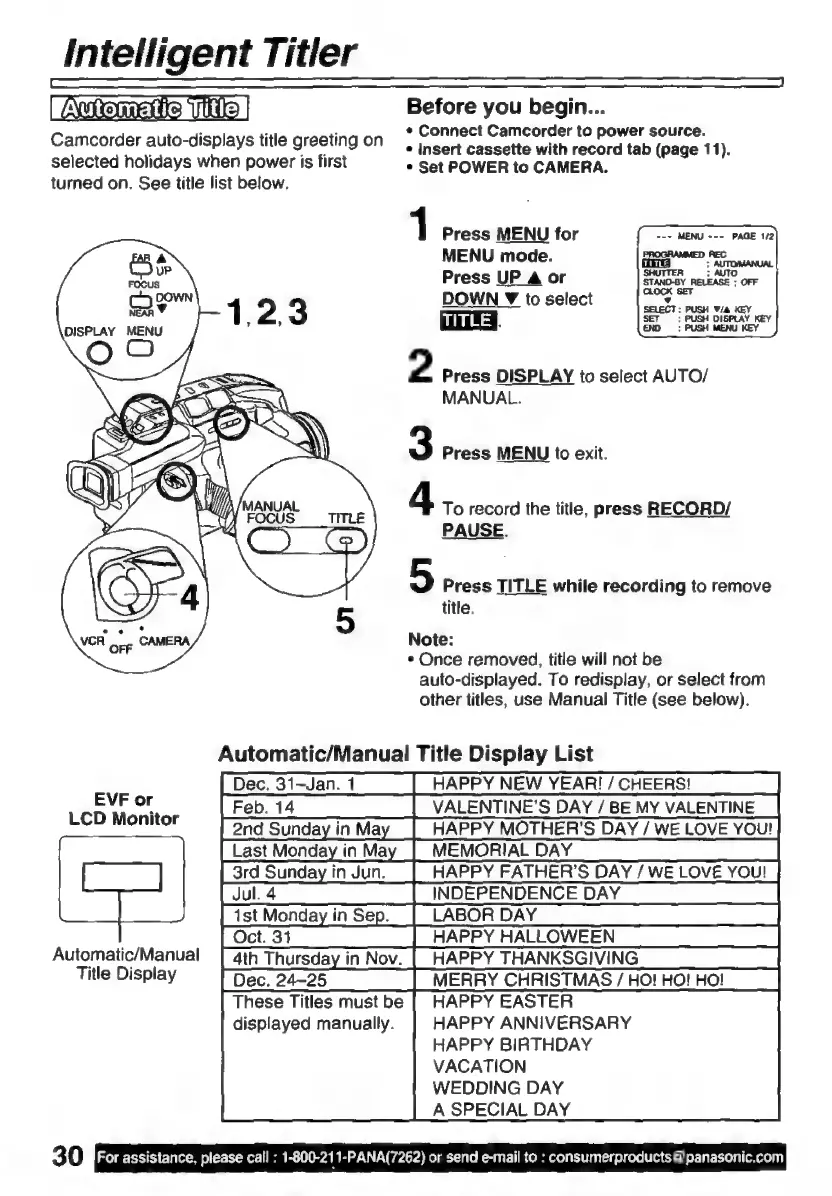
Intelligent
Titler
|
Automate
Tite
|
Camcorder
auto-displays
title
greeting
on
selected
holidays
when
power
is
first
turned
on.
See
title
list
below.
Before
you
begin...
*
Connect
Camcorder
to
power
source.
e
Insert
cassette
with
record
tab
(page
11).
*
Set
POWER
to
CAMERA.
1
Press
MENU
for
MENU
mode.
Press
UP
A
or
DOWN
Y
to
select
TITLE
§
2
Press
DISPLAY
to
select
AUTO/
MANUAL.
3
Press
MENU
to
exit.
4
To
record
the
title,
press
RECORD/
PAUSE.
5
Press
TITLE
while
recording
to
remove
title.
Note:
*
Once
removed,
title
will
not
be
auto-displayed.
To
redisplay,
or
select
from
other
titles,
use
Manual
Title
(see
below).
Automatic/Manual
Title
Display
List
Dec.
31-Jan.
1
HAPPY
NEW
YEAR!
/
CHEERS!
EVF
or
VALENTINE'S
DAY
/
BE
MY
VALENTINE
LCD
Monitor
HAPPY
MOTHER'S
DAY
/
WE
LOVE
You!
MEMORIAL
DAY
HAPPY
FATHER’S
DAY
/
WE
LOVE
YOU!
INDEPENDENCE
DAY
LABOR
DAY
HAPPY
HALLOWEEN
Automatic/Manual
|
4th
Thursday
in
Nov.
These
Titles
must
be
displayed manually.
30
For
assistance,
please
call
:
1-800-211-PANA(7262)
or
send
e-mail
to
:
consumerproducts
@
panasonic.com
matic
HAPPY
THANKSGIVING
Title
Display
Dec.
24-25
MERRY
CHRISTMAS
/
HO!
HO!
HO!
HAPPY
EASTER
HAPPY
ANNIVERSARY
HAPPY
BIRTHDAY
VACATION
WEDDING
DAY
A
SPECIAL
DAY

Related product manuals