EasyManua.ls Logo

Panasonic Palmcoder PalmSight PV-L51 - Playing Back Recordings (O) (Basic Playback, Visual Search, Still Picture, Tracking, TV;VCR Playback)

Panasonic Palmcoder PalmSight PV-L51
44 pages
Print Icon
To Next Page IconTo Next Page
To Previous Page IconTo Previous Page
Loading...
Playing
Back
Recordings
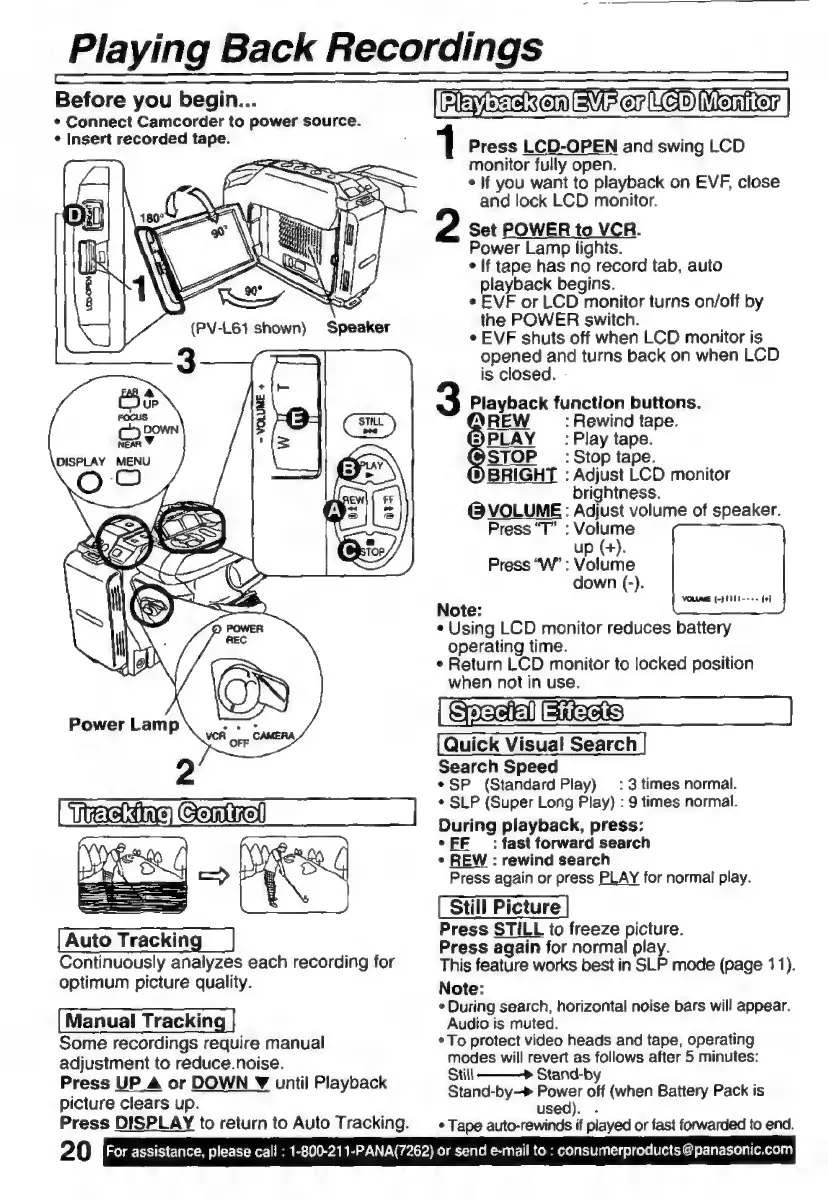
Before
you
begin...
*
Connect
Camcorder
to
power
source.
¢
Insert
recorded
tape.
(PV-L61
shown)
Speaker
2
vere
Genital
Auto
Tracking
Continuously
analyzes
each
recording
for
optimum
picture
quality.
Manual
Tracking
Some
recordings
require
manual
adjustment
to
reduce.noise.
Press
UP
Â
or
DOWN
Z
until
Playback
picture
clears
up.
Press
DISPLAY
to
return
to
Auto
Tracking.
20
For
assistance,
please
call
:
1-800-211-PANA(7262)
or
send
e-mail
to
:
consumerproducts
@
panasonic.com
IIS
Er]
er
Le
Mention
|
Press
LCD-OPEN
and
swing
LCD
monitor
fully
open.
s
lf
you
want
to
playback
on
EVF,
close
and
lock
LCD
monitor.
Set
POWER
to
VCR.
Power
Lamp
lights.
s
If
tape
has
no
record
tab,
auto
playback
begins.
*
EVF
or
LCD
monitor
turns
on/off
by
the
POWER
switch.
e
EVF
shuts
off
when
LCD
monitor
is
opened
and
turns
back
on
when
LCD
is
closed.
-
Playback
function
buttons.
d
HEW
:
Rewind
tape.
PLAY
_
:Play
tape.
STOP
_
:
Stop
tape.
BRIGHT
:
Adjust
LCD
monitor
brightness.
@
VOLUME:
Adjust
volume
of
speaker.
Press
"T"
:
Volume
up
(+).
Press
“W”
:
Volume
down
(-).
Note:
*
Using
LCD
monitor
reduces
battery
operating
time.
e
Return
LCD
monitor
to
locked
position
when
not
in
use.
S
dl
BIAB
Quick
Visual
Search
Search
Speed
e
SP
(Standard
Play)
:
3
times
normal.
*
SLP
(Super
Long
Play)
:
9
times
normal.
During
playback,
press:
s
EE
:
fast
forward
search
*
REW
:
rewind
search
Press
again
or
press
PLAY
for
normal
play.
Press
STILL
to
freeze
picture.
Press
again
for
normal
play.
This
feature
works
best
in
SLP
mode
(page
11).
Note:
*
During
search,
horizontal
noise
bars
will
appear.
Audio
is
muted.
*To
protect
video
heads
and
tape,
operating
modes
will
revert
as
follows
after
5
minutes:
Still
———>
Stand-by
Stand-by-»
Power
off
(when
Battery
Pack
is
used).
.
*
Tape
auto-rewinds
if
played
or
fast
forwarded
to
end.

Related product manuals