EasyManua.ls Logo

Panasonic Palmcoder PalmSight PV-L51 - Al Setting the Clock (Time Zone, Auto Daylight Saving Time)

Panasonic Palmcoder PalmSight PV-L51
44 pages
Print Icon
To Next Page IconTo Next Page
To Previous Page IconTo Previous Page
Loading...
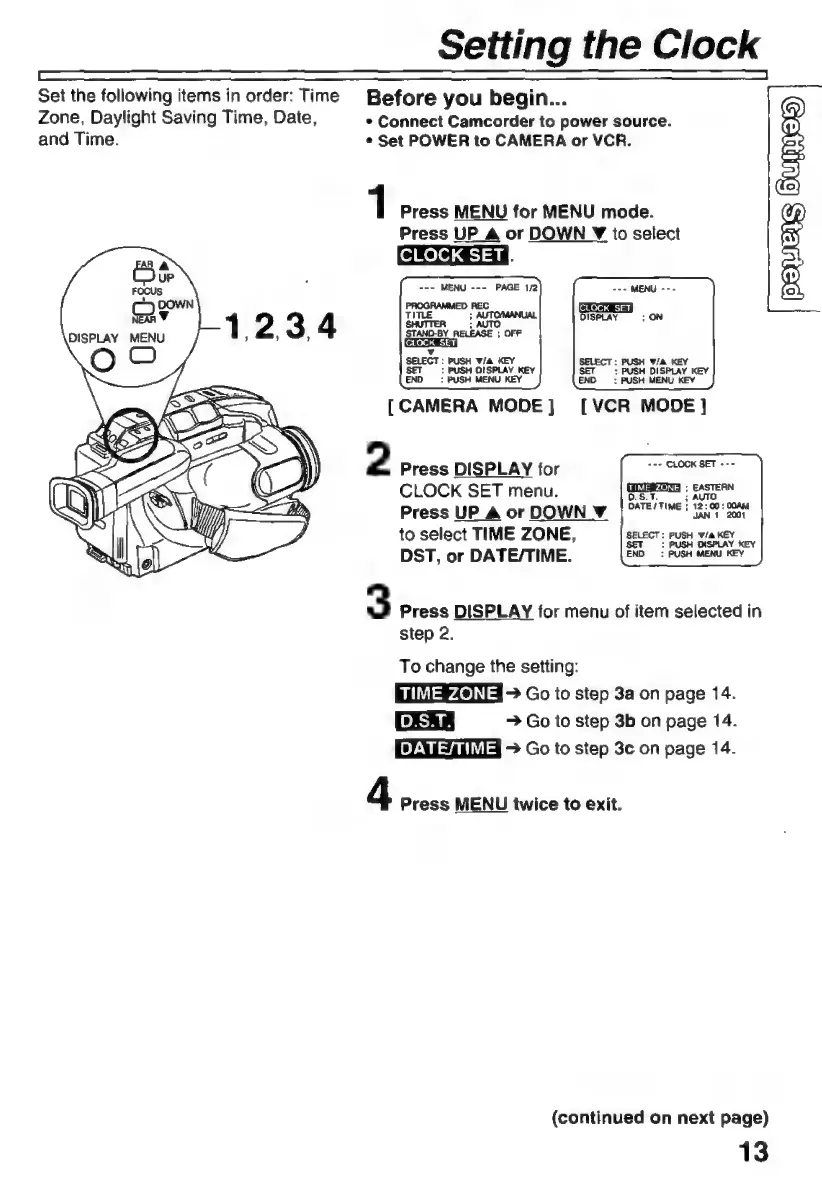
Set
the
following
items
in
order:
Time
Zone,
Daylight
Saving
Time,
Date,
and
Time.
Setting
the
Clock
Before
you
begin...
*
Connect
Camcorder
to
power
source.
e
Set
POWER
to
CAMERA
or
VCR.
1
Press
MENU
for
MENU
mode.
Press
UP_A
or
DOWN
Y
to
select
CLOCK
SET}
SELECT:
PUSH
F/A KEY
SET
>
PUSH
DISPLAY
KEY
END:
PUSH
MENU
KEY
Wie
KEY
:
PUSH
DISPLAY
KEY
:
PUSH
MENU
KEY
[CAMERA
MODE]
[VCR
MODE]
2
Press
DISPLAY
for
Fe
CROCK
BEE
AS
CLOCK
SET
menu.
dd
Press
UP
A
or
DOWN
Y
¡ATT
i
RAOT
oe
to
select
TIME
ZONE,
SELECT:
PUSH
Wia
KEY
DST,
or
DATE/TIME.
END
:
PUSH
MENU
KEY
3
Press
DISPLAY
for
menu
of
item
selected
in
step
2.
To
change
the
setting:
EMIFA
>
Go
to
step
3a
on
page
14.
>
Go
to
step
3b
on
page
14.
3
Go
to
step
3c
on
page
14.
4
Press
MENU
twice
to
exit.
(continued
on
next
page)
13

Related product manuals