EasyManua.ls Logo

Panasonic Palmcoder PalmSight PV-L51 - Page 14

Panasonic Palmcoder PalmSight PV-L51
44 pages
Print Icon
To Next Page IconTo Next Page
To Previous Page IconTo Previous Page
Loading...
Setting
the
Clock
(continued)
3a
Gating
to
Time
Zas
|]
~~-
SELECT
TIME ZONE
---
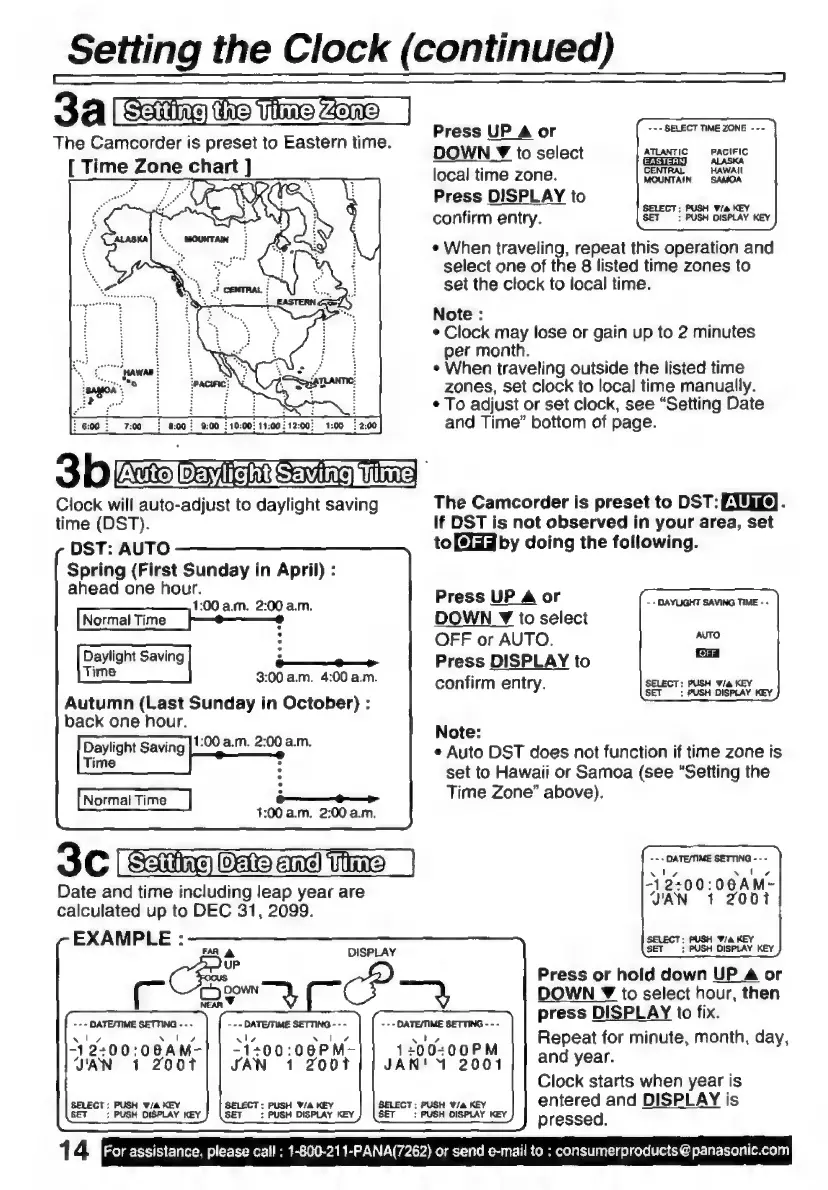
The
Camcorder
is
preset
to
Eastern
time.
Press
UP
A
or
DOWN
¥
to
select
ATLANTIC
PACIFIC
im
n
ch
A
ALASKA
[TI
=
E
ar!
]
local
time
zone.
CENTRAL
=
HAWAII
Press
DISPLAY
to
e
SELECT;
PUSH
Wia
KEY
confirm
entry.
SET
:
PUSH
DISPLAY
KEY
s
When
traveling,
repeat
this
operation
and
select
one
of
the
8
listed
time
zones
to
set the
clock
to
local
time.
Note
:
e
Clock
may
lose
or
gain
up
to
2
minutes
per
month.
»
When
traveling
outside
the
listed
time
zones,
set
clock
to
local
time
manualiy.
O.
;
e
To
adjust
or
set
clock,
see
“Setting
Date
:
8:00;
9:00
:
1007
11:00:12:00
1:00
¿2:00
and
Time”
bottom
of
page.
3
br
O
Tatts
POE
U
SA)
VS
Clock
will
auto-adjust
to
daylight
saving
The
Camcorder
is
preset
to
DST:
DIG).
time
(DST).
If
DST
is
not
observed
in
your
area,
set
DST:
AUTO
to
[PL
by
doing
the
following.
Spring
(First
Sunday
in
April)
:
ahead
one
hour.
Press
UP
Aor
AAA
MA
e
DOWN
Y
to
select
:
OFF
or
AUTO.
s
e
Press
DISPLAY
to
=
3:00
a.m.
4:00
a.m.
confirm
entry.
SELECT:
PUSH
Wa
KEY
Autumn
(Last
Sunday
in
October)
:
SOE
ae
back
one
hour.
Note:
s
Auto
DST
does
not
function
if
time
zone
is
set
to
Hawaii
or
Samoa
(see
“Setting
the
Time
Zone”
above).
Daylight
Saving
|!:00.
a.m.
2:00
a.m.
Time
:
Normal
Time
i—i
4:00
a.m.
2:00
a.m.
3C
|
Sang]
hime
-+
DATEMME
SETTING
-
Date
and
time
including
leap
year
are
y
00:
00AM-
calculated
up
to
DEC
31,
2099.
JAN
1
2001
EXAMPLE
:
SELECT:
PUSH
Wa
KEY
SET
;
PUSH
DISPLAY
KEY
FAR
a
DISPLAY
Press
or
hold
down
UP
A
or
F
Qe
+.
$
4
DOWN
Y
to
select
hour,
then
press
DISPLAY
to
fix.
+++
DATE/TIME
SETTING
-
-
-
-
-
-
DATE/TIME
SETTING
-
-
-
ale
ao
Repeat
for
minute,
month,
day,
xl,
solo,
aly
x
|
z
-12:00:0B6AM-
-1+00:08PM-
120
0:00
PM
JAN
DAD
SR
HCl
|
SAN
1
2001
|
|
VAN’
2001
| |
and
year.
Clock
starts
when
year
is
SELECT:
PUSH
v/a
KEY
SELECT:
PUS
SELECT:
PUSH
W/a
entered
and
DISPLAY
is
H
Wie
KEY
KEY
BET
:
PUSH
DISPLAY
KEY
SET
:
PUSH
DISPLAY
KEY
SET
:
PUSH
DISPLAY
KEY
pressed.
1
4
For
assistance,
please
call
:
1-800-211-PANA(7262)
or
send
e-mail
to
:
consumerproducts
@
panasonic.com

Related product manuals