EasyManua.ls Logo

Panasonic Palmcoder PalmSight PV-L51 - High Speed Shutter (Auto;Manual Shutter)

Panasonic Palmcoder PalmSight PV-L51
44 pages
Print Icon
To Next Page IconTo Next Page
To Previous Page IconTo Previous Page
Loading...
High
Speed
Shutter
Improves
Still
or
Slow
Motion
playback
Before
you
begin...
picture
of
high
speed
subjects
(e.g.
a
tennis
<
Connect
Camcorder
to
power
source.
stroke),
when
viewed
on
Camcorder
or3
or
e
Insert
cassette
with
record
tab
(page
11).
4
head
VCR.
s
Set
POWER
to
CAMERA.
Año
Shutter
In
AUTO
mode
(no
indication
in
EVF
or
LCD
Monitor),
shutter
speed
is
auto-adjusted
from
1/60
to
1/350
according
to
subject
brightness.
s
AUTO
mode
is
selected
each
time
POWER
is
set
to
CAMERA.
Mena
Saleen
The
faster
the
shutter
speed,
the
more
light
is
needed
for
proper
picture
and
color
quality.
High
Speed
Shutter
indication
flashes
if
light
is
inadequate.
Provide
additional
light.
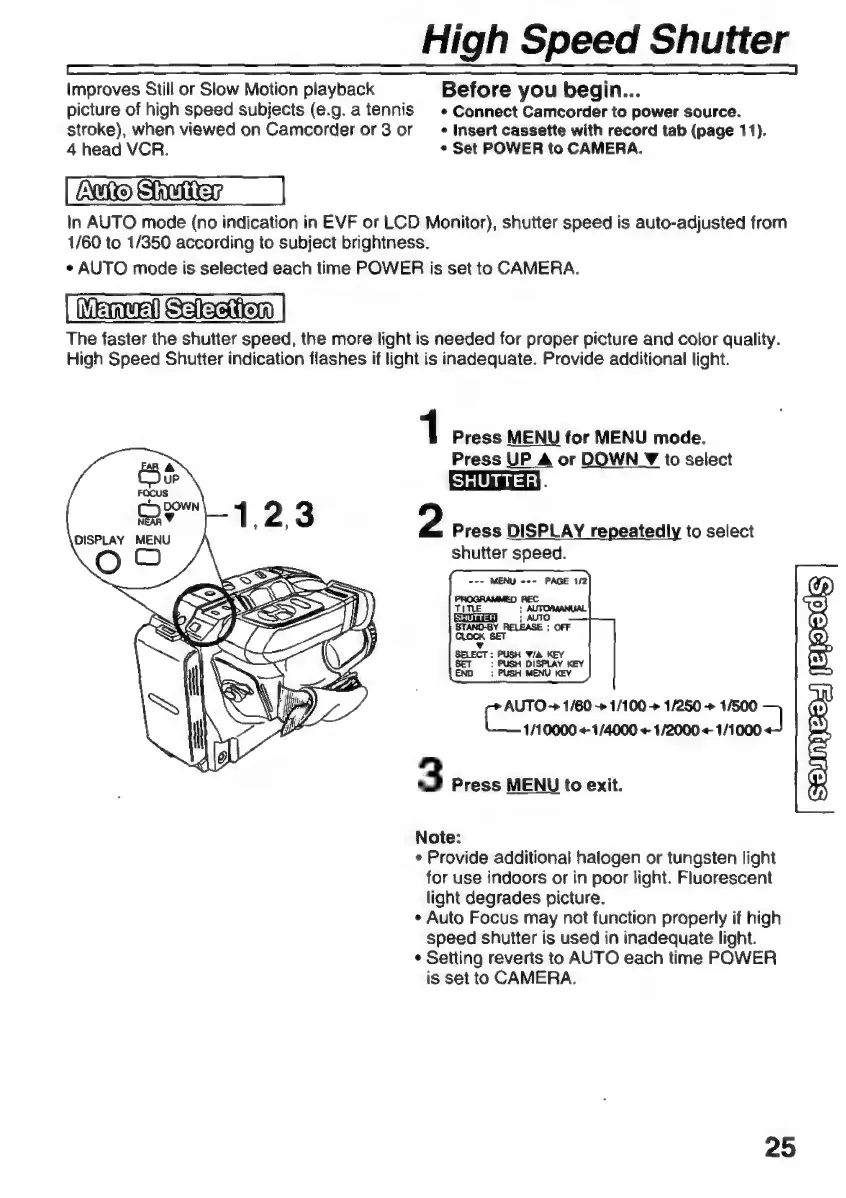
1
Press
MENU
for
MENU
mode.
Press
UP
A
or
DOWN
Y
to
select
ISHUTTERE
2
Press
DISPLAY
repeatedly
to
select
shutter
speed.
ds
1/250
>
1/500
1/10000
«1/4000
+-
1/2000
+
1/1000
3
Press
MENU
to
exit.
Note:
e
Provide
additional
halogen
or
tungsten
light
for
use
indoors
or
in
poor
light.
Fluorescent
light
degrades
picture.
»
Auto
Focus
may
not
function
properly
if
high
speed
shutter
is
used
in
inadequate
light.
*
Setting
reverts
to
AUTO
each
time
POWER
is
set
to
CAMERA.
25

Related product manuals