EasyManua.ls Logo

Panasonic Palmcoder PalmSight PV-L51 - Page 8

Panasonic Palmcoder PalmSight PV-L51
44 pages
Print Icon
To Next Page IconTo Next Page
To Previous Page IconTo Previous Page
Loading...
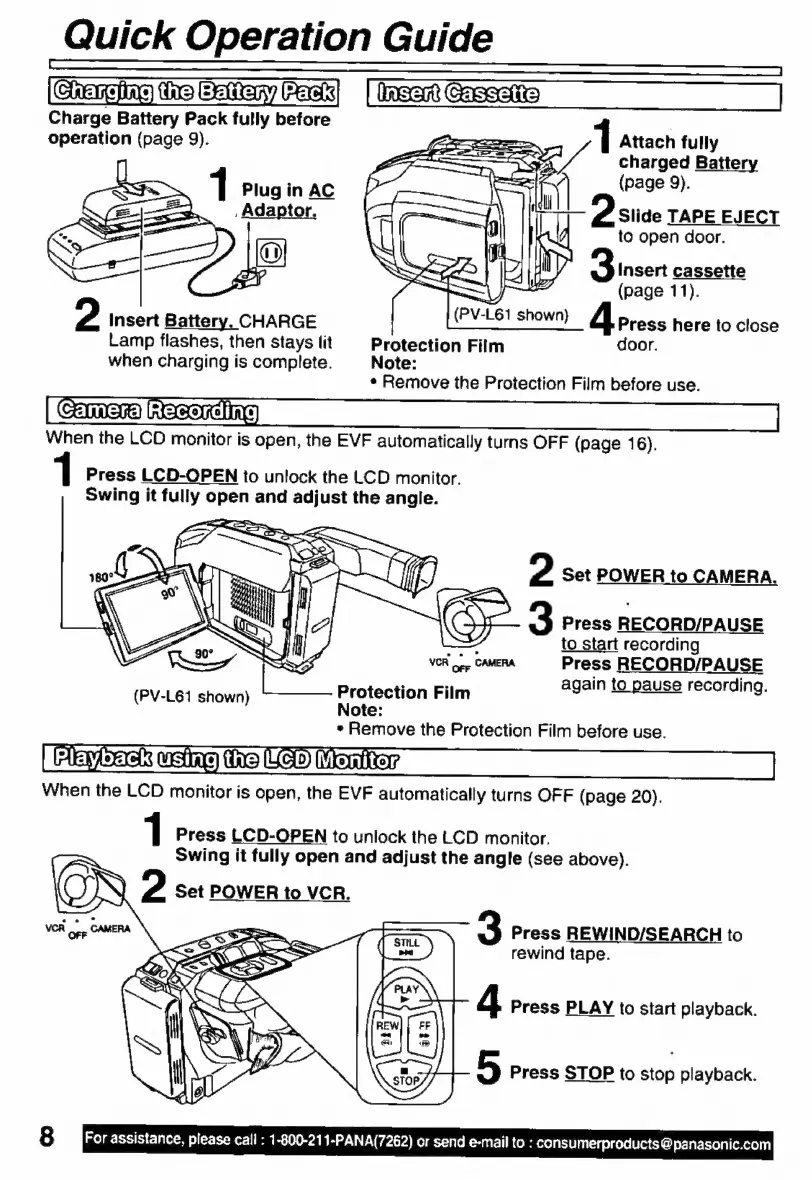
Quick
Operation
Guide
Charge
Battery
Pack
fully
before
l
operation
(page
9).
1
Attach
fully
charged
Battery
1
Plug
in
AC
pagea)
,
Adaptor.
Slide
TAPE
EJECT
to
open
door.
Insert
cassette
(page
11).
2
Insert
Battery.
CHARGE
(PV-L61
shown)
Press
here
to
close
Lamp
flashes,
then
stays
lit
Protection
Film
door.
when
charging
is
complete.
Note:
*
Remove
the
Protection
Film
before
use.
Comer
Racarchne
When
the
LCD
monitor
is
open,
the
EVF
automatically
turns
OFF
(page
16).
1
Press
LCD-OPEN
to
unlock
the
LCD
monitor.
Swing
it
fully
open
and
adjust
the
angle.
SRE
2
Set
POWER
to
CAMERA.
3
Press
RECORD/PAUSE
to
start
recording
Press
RECORD/PAUSE
again
to
pause
recording.
Protection
Film
Note:
s
Remove
the
Protection
Film
before
use.
Pack
using
the
TSS"
Meriter
When
the
LCD
monitor
is
open,
the
EVF
automatically
turns
OFF
(page
20).
(PV-L61
shown)
1
Press
LCD-OPEN
to
unlock
the
LCD
monitor.
Swing
it
fully
open
and
adjust
the
angle
(see
above).
2
Set
POWER
to
VCR.
3
Press
REWIND/SEARCH
to
rewind
tape.
4
Press
PLAY
to
start
playback.
5
Press
STOP
to
stop
playback.
For
assistance,
please
cali
:
1-800-211-PANA(7262)
or
send
e-mail
to
:
consumerproducts
@
panasonic.com

Related product manuals