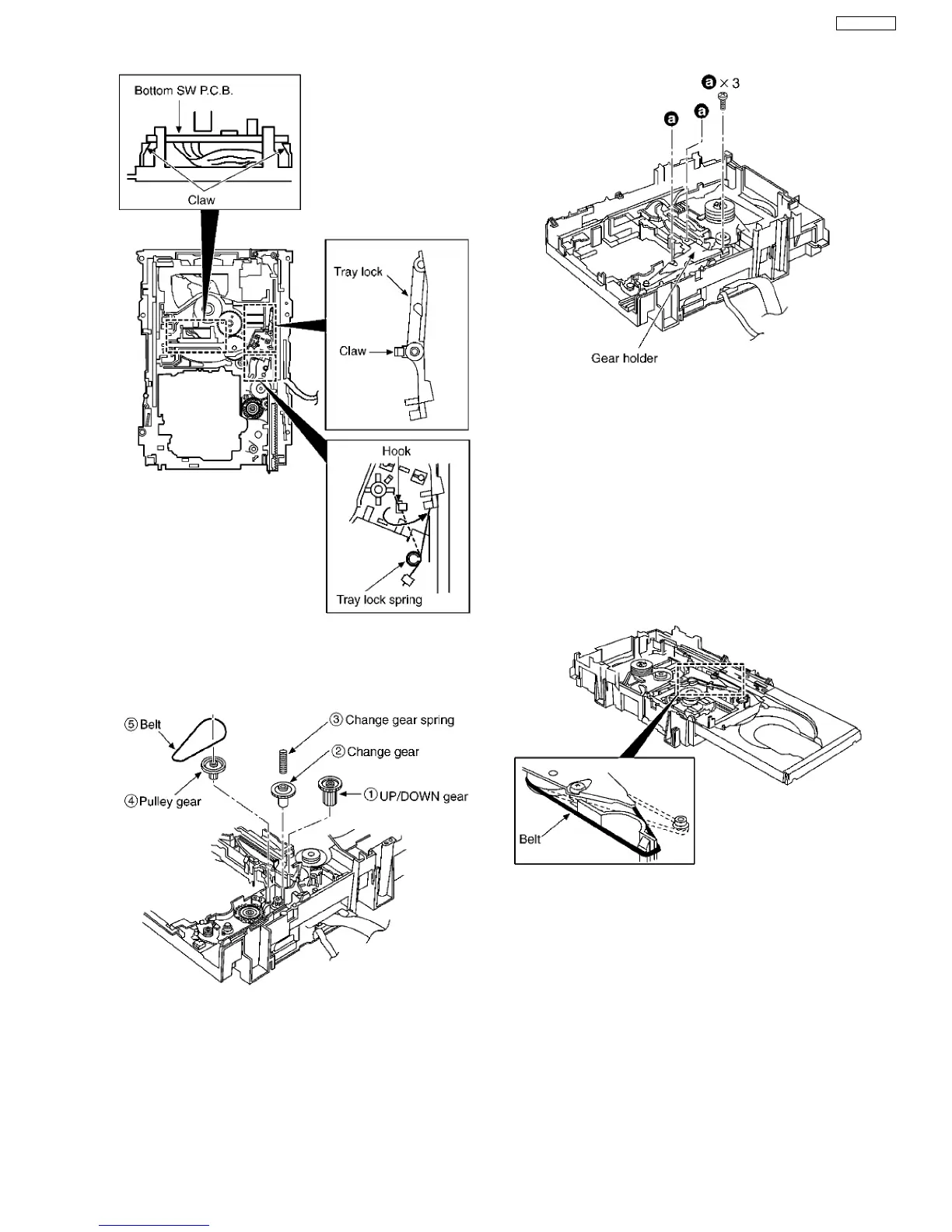
Step 11 Remove the tray lock spring from hook,and then latch
to the tray lock.
Step 12 Install the UP/DOWN gear, change gear, change gear
spring, pulley gear and belt in the order of (1) - (5).
Step 13 Install the gear holder, and then tighten the screw (a).
Step 14 Install the tray base, traverse ass’y, mechanism cover
and upper plate.
[Operation check after servicing]
Check the proper operation of following items with gear and
hexagonal screwdriver.
1. Open/close of tray base.
2. Moving the tray base to the stock side.
3. UP/DOWN operation of spindle base unit.
4. UP/DOWN operation of traverse ass’y.
16.8.4. Replacement for the motor ass’y
·
Follow the (Step 1) - (Step 7) of Item 16.8.2.
Step 1 Install the belt temporarily.
NOTE:
Take care not apply the grease to the belt.
Step 2 Upset the CD loading unit.
Step 3 Remove 3 screws.
49
SA-VK61DEE








 To Next Page