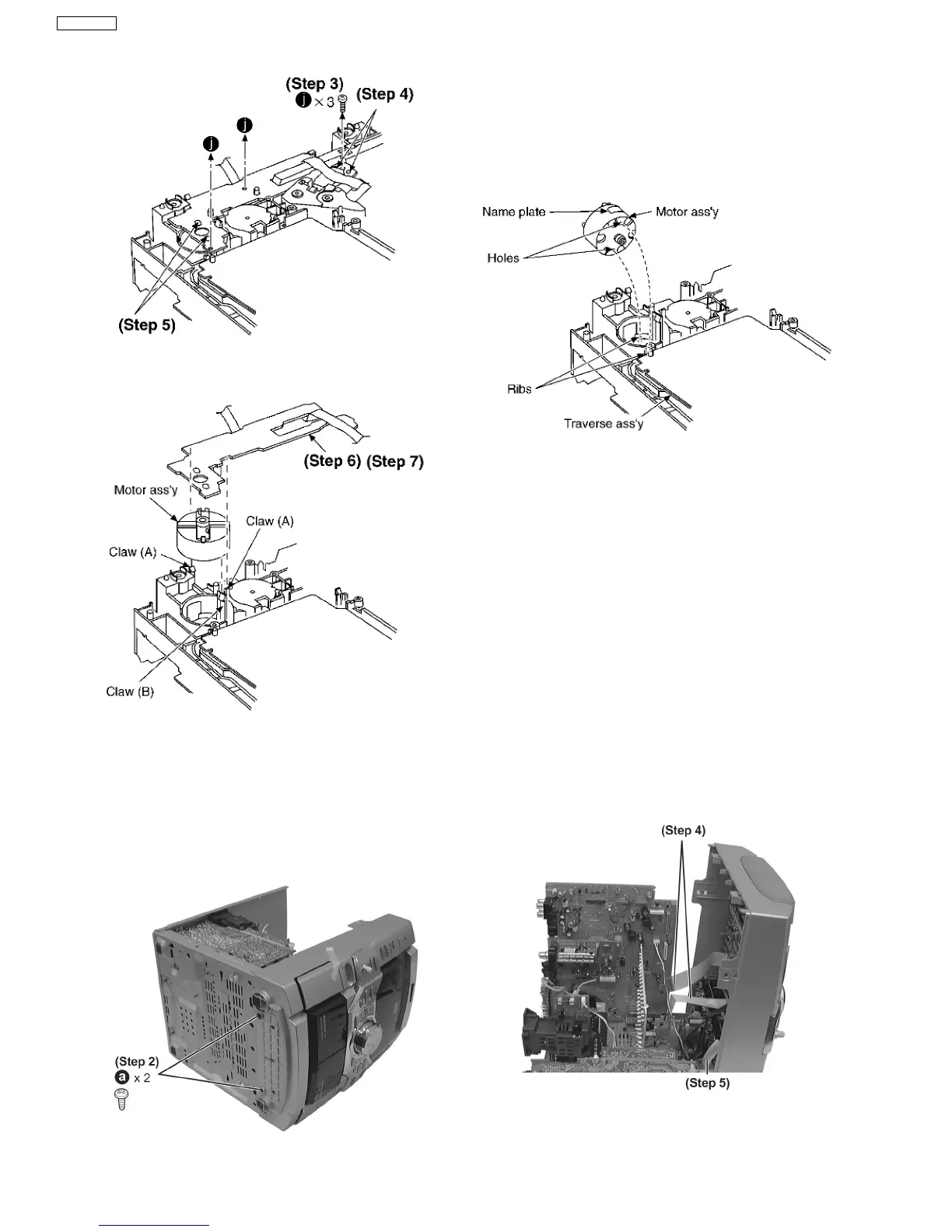
Step 4 Unsolder the plunger terminals (2 points).
Step 5 Unsolder the motor terminals (2 points).
·
Follow the (Step 1) - (Step 2) of Item 16.2.
·
Follow the Disassembly for the Top Ornament Unit of Item
16.4.
·
Follow the Disassembly for the DVD changer unit of Item
16.5.
Step 1 Lay the unit as shown.
Step 6 Release the 2 claws (A), and then remove the Motor
P.C.B.
Step 7 Release the claw (B), and then remove the motor ass’y.
[Notice for motor ass’y installation]
1. Locate the name plate of motor to the traverse ass’y.
2. Align the hole of motor with the ribs.
Step 2 Remove 2 screws.
Step 3 Release the 2 claws, and then draw the front panel
ass’y forward.
Step 4 Detach FFC Board (CN601 & CN602).
Step 5 Detach flat cable wire (CN1001).
16.9. Disassembly of Deck Mechanism Unit
50
SA-VK61DEE








 To Next Page