·
Follow the (Step 1) - (Step 2) of Item 16.2.
·
Follow the Disassembly for the Top Ornament Unit of Item
17.4.
Step 1 Detach FFC Boards (FP5201, FP3202, FP3203 &
FP4202).
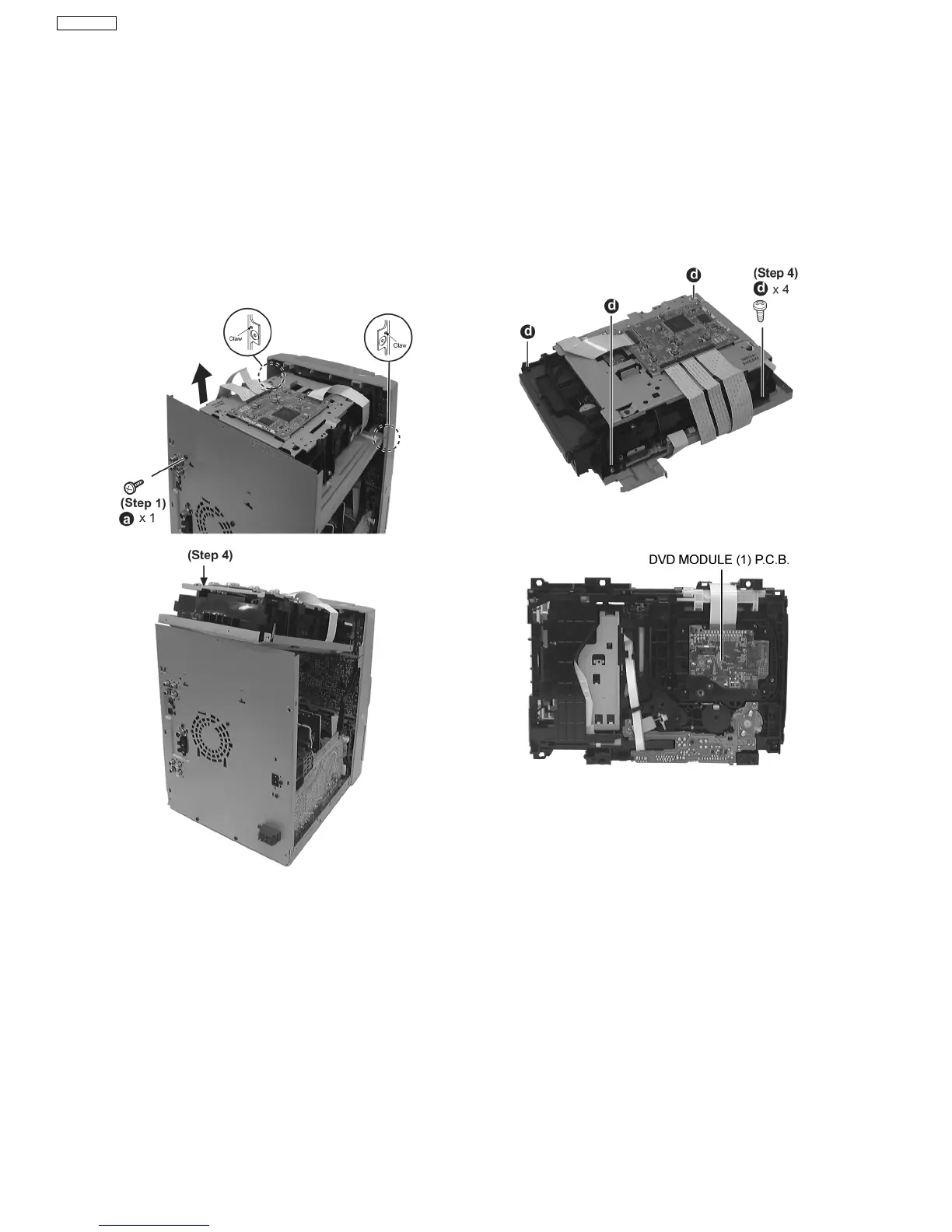
Step 2 Remove 1 screw at rear cabinet as show below.
Step 3 Lift up the mechanism unit cover, and then push in the
mechanism unit cover.
Step 4 Release the claws of both ends, and then lift up the
DVD changer unit.
·
Follow the (Step 1) - (Step 2) of Item 16.2.
·
Follow the Disassembly for the Top Ornament Unit of Item
16.4.
Step 1 Lay the unit as shown below.
16.5.1. Disassembly of the DVD Module
(1) P.C.B.
·
Follow the (Step 1) - (Step 2) of Item 16.2.
·
Follow the Disassembly for the Top Ornament Unit of Item
16.4.
·
Follow the (Step 1) - (Step 4) of Item 16.5.
Step 1 Remove 4 screws.
Step 2 Remove the mechanism unit cover.
Step 3 Lay the unit.
Step 4 Connect the FFCs board from DVD Module (1) P.C.B..
16.5. Disassembly for DVD changer unit
16.6. Disassembly for Panel P.C.B., LED P.C.B. & Tact Switch P.C.B.
34
SA-VK61DEE








 To Next Page