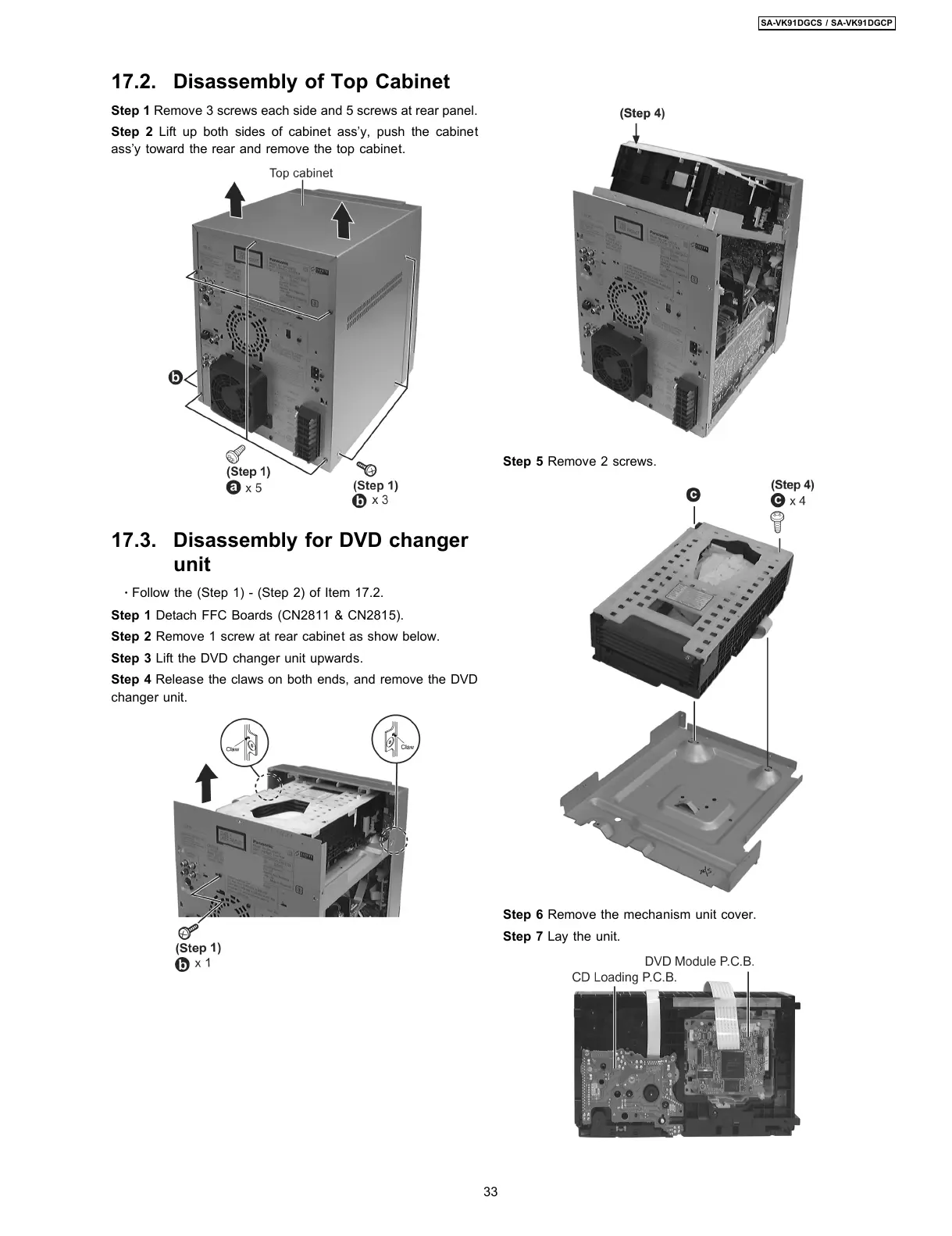
Step 1 Remove 3 screws each side and 5 screws at rear panel.
Step 2 Lift up both sides of cabinet ass’y, push the cabinet
ass’y toward the rear and remove the top cabinet.
17.3. Disassembly for DVD changer
unit
·
Follow the (Step 1) - (Step 2) of Item 17.2.
Step 1 Detach FFC Boards (CN2811 & CN2815).
Step 2 Remove 1 screw at rear cabinet as show below.
Step 3 Lift the DVD changer unit upwards.
Step 4 Release the claws on both ends, and remove the DVD
changer unit.
Step 5 Remove 2 screws.
Step 6 Remove the mechanism unit cover.
Step 7 Lay the unit.
17.2. Disassembly of Top Cabinet
33
SA-VK91DGCS / SA-VK91DGCP








 To Next Page