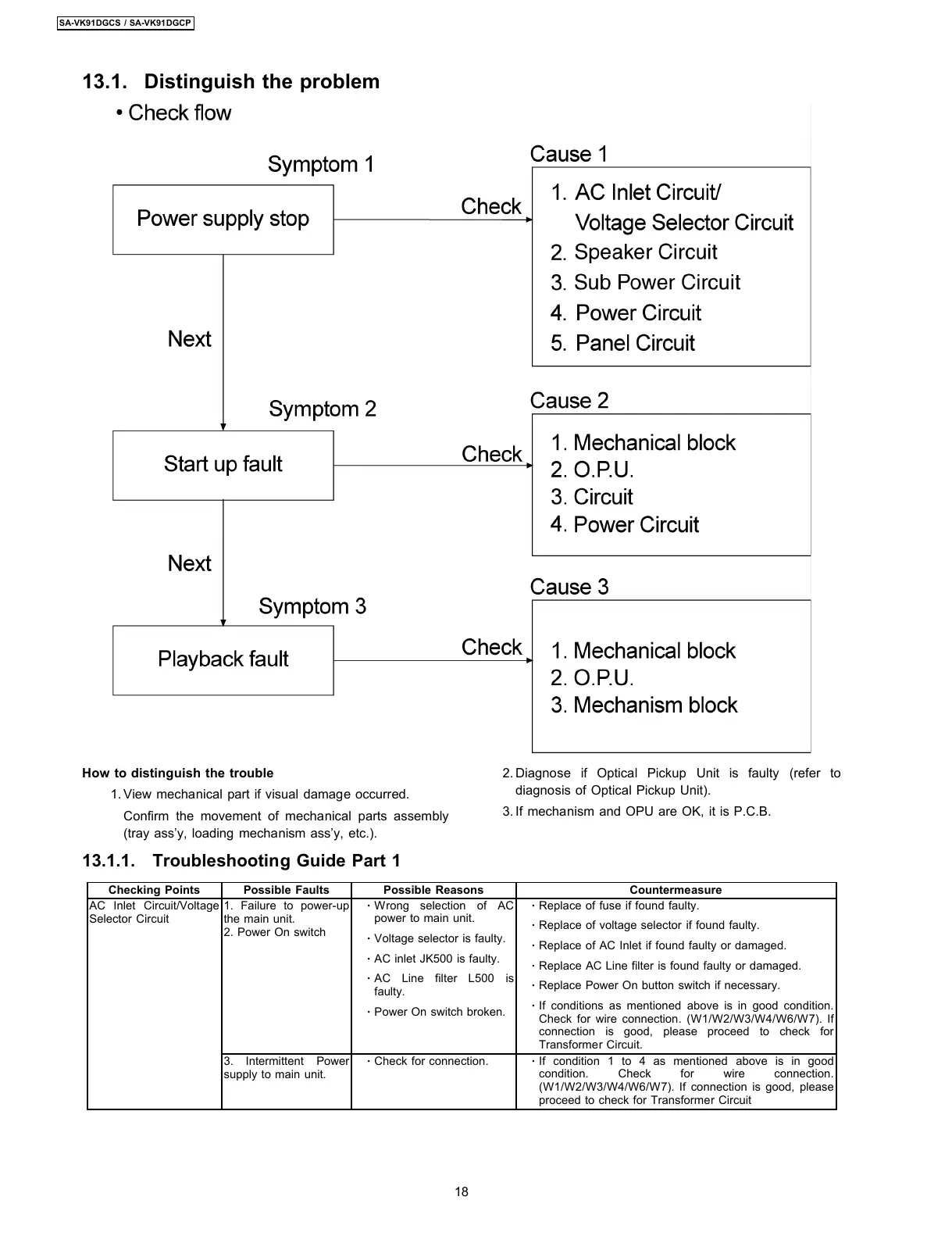
13.1. Distinguish the problem
How to distinguish the trouble
1. View mechanical part if visual damage occurred.
Confirm the movement of mechanical parts assembly
(tray ass’y, loading mechanism ass’y, etc.).
2. Diagnose if Optical Pickup Unit is faulty (refer to
diagnosis of Optical Pickup Unit).
3. If mechanism and OPU are OK, it is P.C.B.
13.1.1. Troubleshooting Guide Part 1
Checking Points Possible Faults Possible Reasons Countermeasure
AC Inlet Circuit/Voltage
Selector Circuit
1. Failure to power-up
the main unit.
2. Power On switch
·
Wrong selection of AC
power to main unit.
·
Voltage selector is faulty.
·
AC inlet JK500 is faulty.
·
AC Line filter L500 is
faulty.
·
Power On switch broken.
·
Replace of fuse if found faulty.
·
Replace of voltage selector if found faulty.
·
Replace of AC Inlet if found faulty or damaged.
·
Replace AC Line filter is found faulty or damaged.
·
Replace Power On button switch if necessary.
·
If conditions as mentioned above is in good condition.
Check for wire connection. (W1/W2/W3/W4/W6/W7). If
connection is good, please proceed to check for
Transformer Circuit.
3. Intermittent Power
supply to main unit.
·
Check for connection.
·
If condition 1 to 4 as mentioned above is in good
condition. Check for wire connection.
(W1/W2/W3/W4/W6/W7). If connection is good, please
proceed to check for Transformer Circuit
18
SA-VK91DGCS / SA-VK91DGCP








 To Next Page