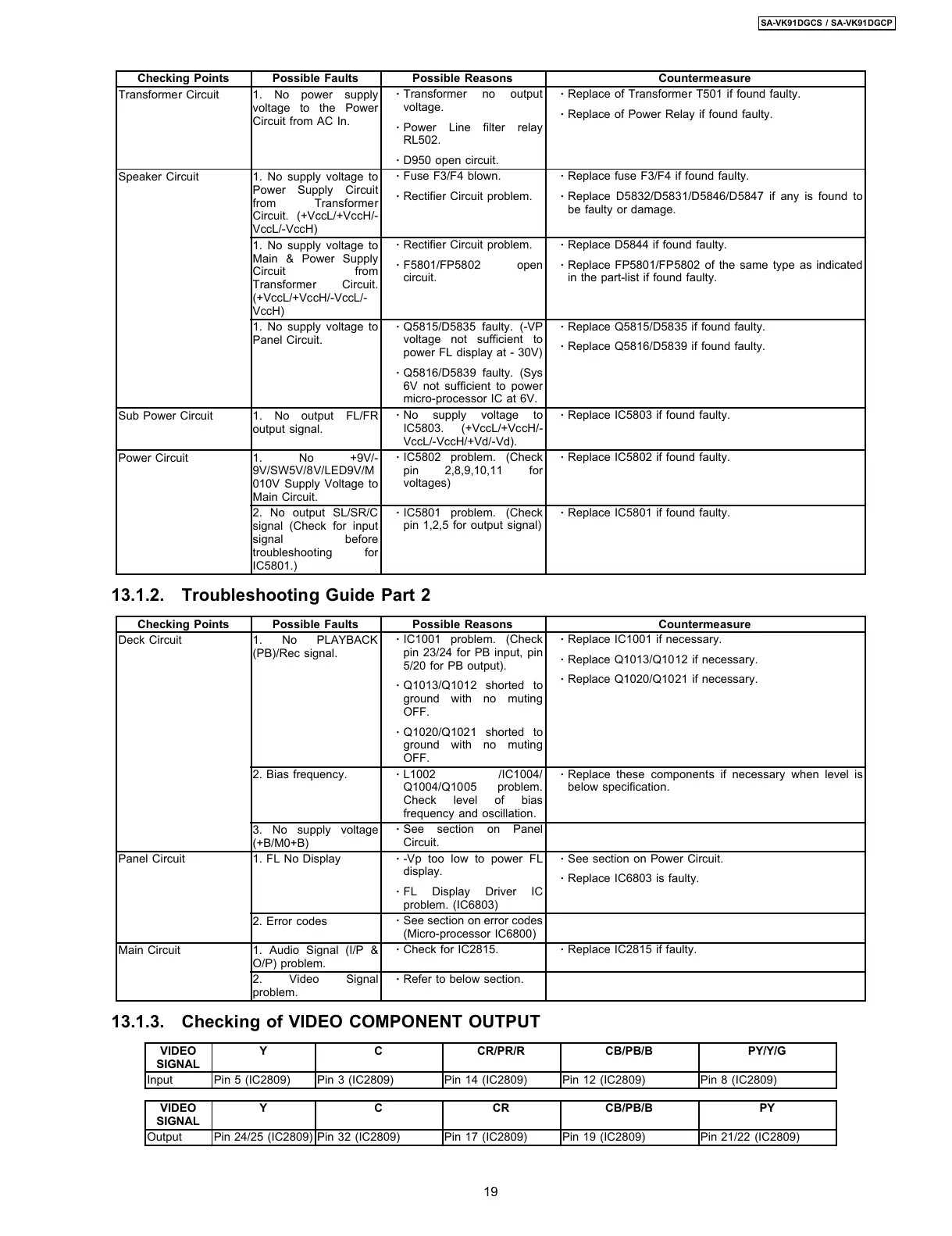
Checking Points Possible Faults Possible Reasons Countermeasure
Transformer Circuit 1. No power supply
voltage to the Power
Circuit from AC In.
·
Transformer no output
voltage.
·
Power Line filter relay
RL502.
·
D950 open circuit.
·
Replace of Transformer T501 if found faulty.
·
Replace of Power Relay if found faulty.
Speaker Circuit 1. No supply voltage to
Power Supply Circuit
from Transformer
Circuit. (+VccL/+VccH/-
VccL/-VccH)
·
Fuse F3/F4 blown.
·
Rectifier Circuit problem.
·
Replace fuse F3/F4 if found faulty.
·
Replace D5832/D5831/D5846/D5847 if any is found to
be faulty or damage.
1. No supply voltage to
Main & Power Supply
Circuit from
Transformer Circuit.
(+VccL/+VccH/-VccL/-
VccH)
·
Rectifier Circuit problem.
·
F5801/FP5802 open
circuit.
·
Replace D5844 if found faulty.
·
Replace FP5801/FP5802 of the same type as indicated
in the part-list if found faulty.
1. No supply voltage to
Panel Circuit.
·
Q5815/D5835 faulty. (-VP
voltage not sufficient to
power FL display at - 30V)
·
Q5816/D5839 faulty. (Sys
6V not sufficient to power
micro-processor IC at 6V.
·
Replace Q5815/D5835 if found faulty.
·
Replace Q5816/D5839 if found faulty.
Sub Power Circuit 1. No output FL/FR
output signal.
·
No supply voltage to
IC5803. (+VccL/+VccH/-
VccL/-VccH/+Vd/-Vd).
·
Replace IC5803 if found faulty.
Power Circuit 1. No +9V/-
9V/SW5V/8V/LED9V/M
010V Supply Voltage to
Main Circuit.
·
IC5802 problem. (Check
pin 2,8,9,10,11 for
voltages)
·
Replace IC5802 if found faulty.
2. No output SL/SR/C
signal (Check for input
signal before
troubleshooting for
IC5801.)
·
IC5801 problem. (Check
pin 1,2,5 for output signal)
·
Replace IC5801 if found faulty.
13.1.2. Troubleshooting Guide Part 2
Checking Points Possible Faults Possible Reasons Countermeasure
Deck Circuit 1. No PLAYBACK
(PB)/Rec signal.
·
IC1001 problem. (Check
pin 23/24 for PB input, pin
5/20 for PB output).
·
Q1013/Q1012 shorted to
ground with no muting
OFF.
·
Q1020/Q1021 shorted to
ground with no muting
OFF.
·
Replace IC1001 if necessary.
·
Replace Q1013/Q1012 if necessary.
·
Replace Q1020/Q1021 if necessary.
2. Bias frequency.
·
L1002 /IC1004/
Q1004/Q1005 problem.
Check level of bias
frequency and oscillation.
·
Replace these components if necessary when level is
below specification.
3. No supply voltage
(+B/M0+B)
·
See section on Panel
Circuit.
Panel Circuit 1. FL No Display
·
-Vp too low to power FL
display.
·
FL Display Driver IC
problem. (IC6803)
·
See section on Power Circuit.
·
Replace IC6803 is faulty.
2. Error codes
·
See section on error codes
(Micro-processor IC6800)
Main Circuit 1. Audio Signal (I/P &
O/P) problem.
·
Check for IC2815.
·
Replace IC2815 if faulty.
2. Video Signal
problem.
·
Refer to below section.
13.1.3. Checking of VIDEO COMPONENT OUTPUT
VIDEO
SIGNAL
Y C CR/PR/R CB/PB/B PY/Y/G
Input Pin 5 (IC2809) Pin 3 (IC2809) Pin 14 (IC2809) Pin 12 (IC2809) Pin 8 (IC2809)
VIDEO
SIGNAL
Y C CR CB/PB/B PY
Output Pin 24/25 (IC2809) Pin 32 (IC2809) Pin 17 (IC2809) Pin 19 (IC2809) Pin 21/22 (IC2809)
19
SA-VK91DGCS / SA-VK91DGCP








 To Next Page