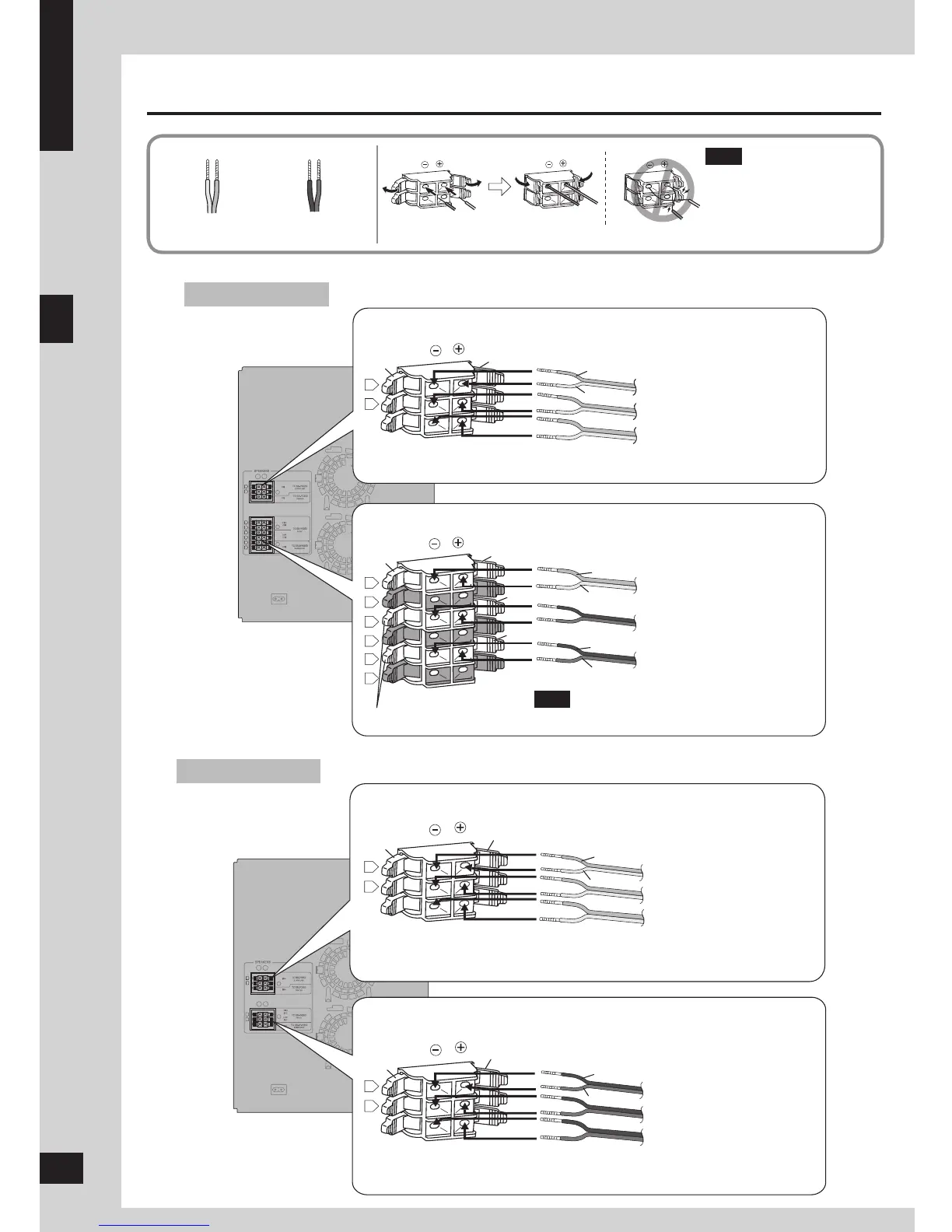
Never short-circuit positive
(+) and negative (–)
speaker wires.
Incorrect connection can
damage the speakers.
•
Note
VK950
VK850
Connecting center and surround speakers
Connecting front speakers and subwoofers
Surround speaker (left)
Surround speaker (right)
Center speaker
Front speaker (left)
(High frequency)
Front speaker (left)
(Low frequency)
Subwoofer (left)
Note
Connect the right (R) side in the same way.
Connecting front speakers and subwoofers
Surround speaker (left)
Surround speaker (right)
Center speaker
Front speaker (left)
Front speaker (right)
Subwoofer
Connecting center and surround speakers
Gray (+)
Blue (–)
Gray
Blue
Gray
Red
Blue
Red
Black
Black (–)
Blue (–)
Red (+)
Gray (+)
Blue (–)
Gray (+)
Blue
Gray
Red (+)
Black (–)
Red
Black
Connecting
Gray (+)
Blue (–)
Black (–)
Red (+)
Connect so cord colors match the terminal colors.
6









 To Next Page