Simple setup
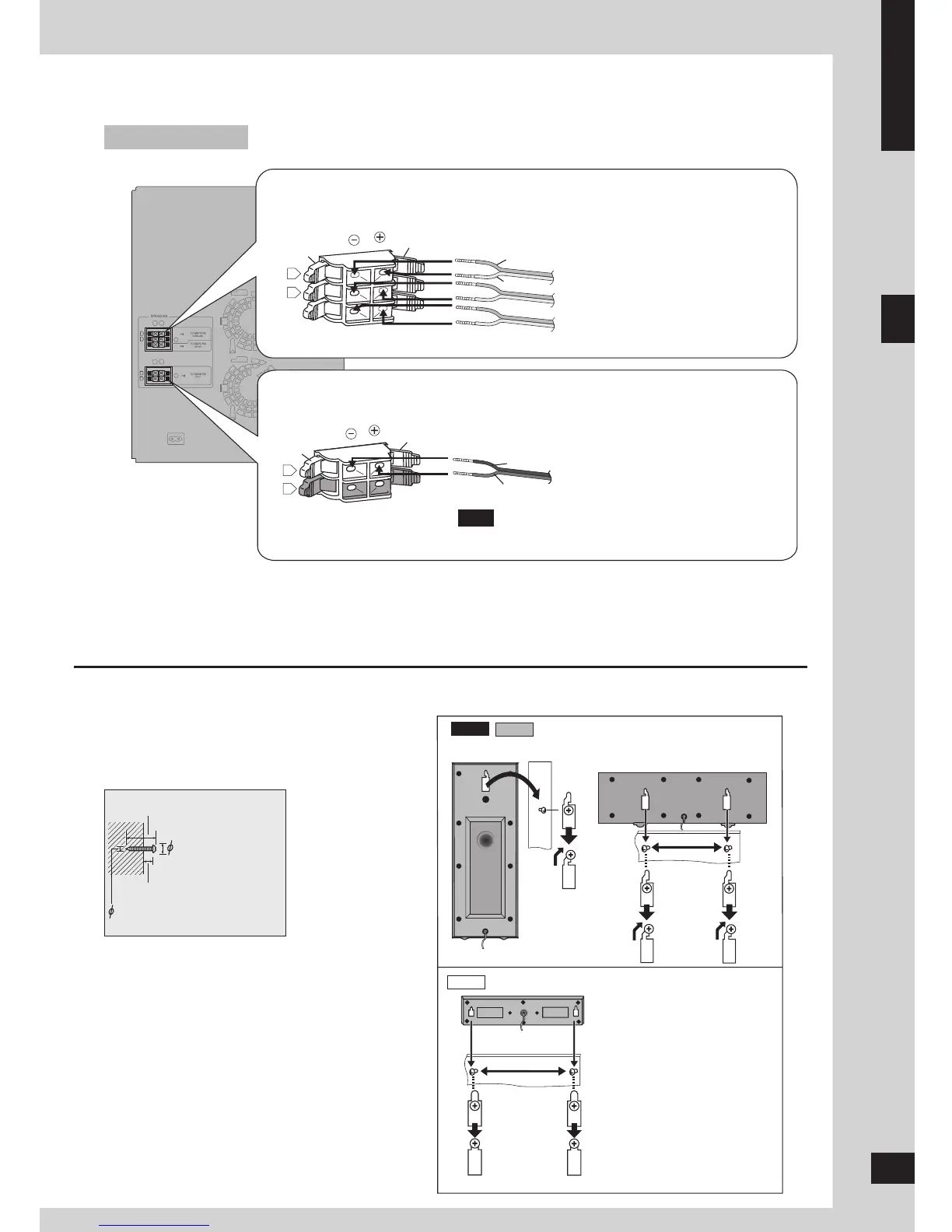
Step 1: Positioning and connecting the speakers
1 Drive a screw (not included) into the wall.
2 Fit the hole securely onto the screw(s).
The wall or pillar on which the speakers are to be
attached should be capable of supporting 10 kg per
screw. Consult a qualified building contractor when
attaching the speakers to a wall. Improper attachment
may result in damage to the wall and speakers.
30 - 35 mm
7 - 9 mm
3.0 - 4.0 mm
7.5 - 9.4 mm
VK750
Note
Connect the right (R) side in the same way.
Connecting front speakers
Connecting center and surround speakers
Black (–)
Red (+)
Black
Red
Gray (+)
Blue (–)
Gray
Blue
Other speaker setup options – attaching to a wall
You can attach the surround and center speakers to a wall.
Surround speaker (right)
Center speaker
Surround speaker (left)
Front speaker (left)
Surround speaker
Center and Surround speakers
Center speaker








 To Next Page