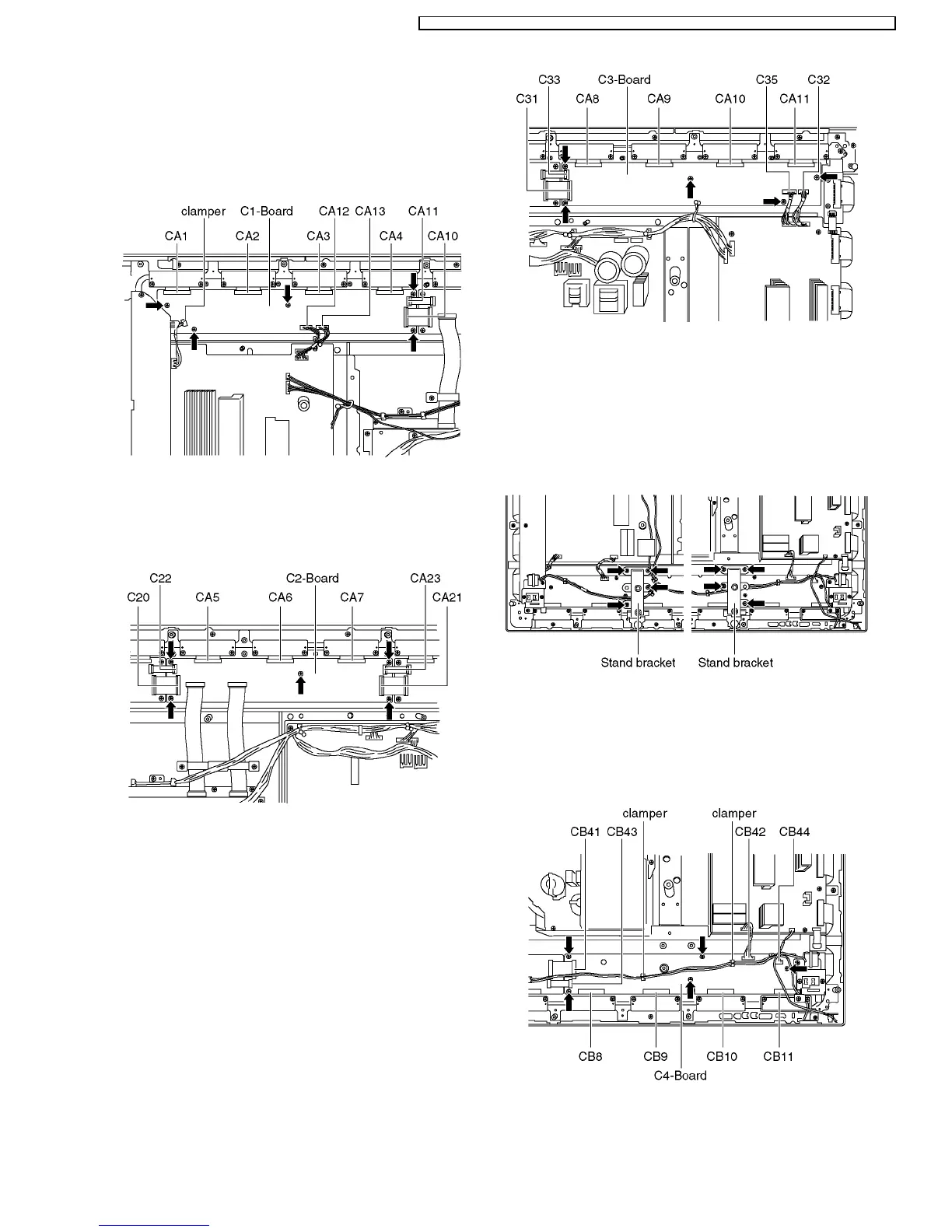
8.17. Removal of the C1-Board
a. Disconnect the flexible cables (CA1, CA2, CA3, CA4, C10,
C11).
b. Disconnect the couplers (C12, C13) release the SC45-SU45
cable from the clamper on the C1-Board.
c. Unscrew the screws (×5) and remove the C1-Board.
8.18. Removal of the C2-Board
a. Disconnect the flexible cables (CA5, CA6, CA7, C20, C21,
C22, C23, C24, C25).
b. Unscrew the screws (×5) and remove the C2-Board.
8.19. Removal of the C3-Board
a. Disconnect the flexible cables (CA8, CA9, CA10, CA11, C31,
C33).
b. Disconnect the couplers (C32, C35).
c. Unscrew the screws (×5) and remove the C3-Board.
8.20. Removal of stand brackets
a. Lay on a table (covered), with the plasma panel surface
facing downward.
Spread a soft cloth for protection, to prevent panel surface from
scratching.
b. Unscrew the stand bracket (left, right) fastening screws (×4
each) and remove the stand brackets (left, right).
8.21. Removal of the C4-Board
a. Disconnect the cables (CB8, CB9, CB10, CB11, C41, C43).
b. Disconnect the couplers (C42, C44) and release the speaker
cables from the clampers (×2) on the C4-Board.
c. Unscrew the screws (×5), and remove the C4-Board.
15
TH-50PHW7BX / TH-50PHW7EX / TH-50PHD7EK / TH-50PHD7ES / TH-50PHD7BK / TH-50PHD7BS / TH-50PHD7UY






 To Next Page