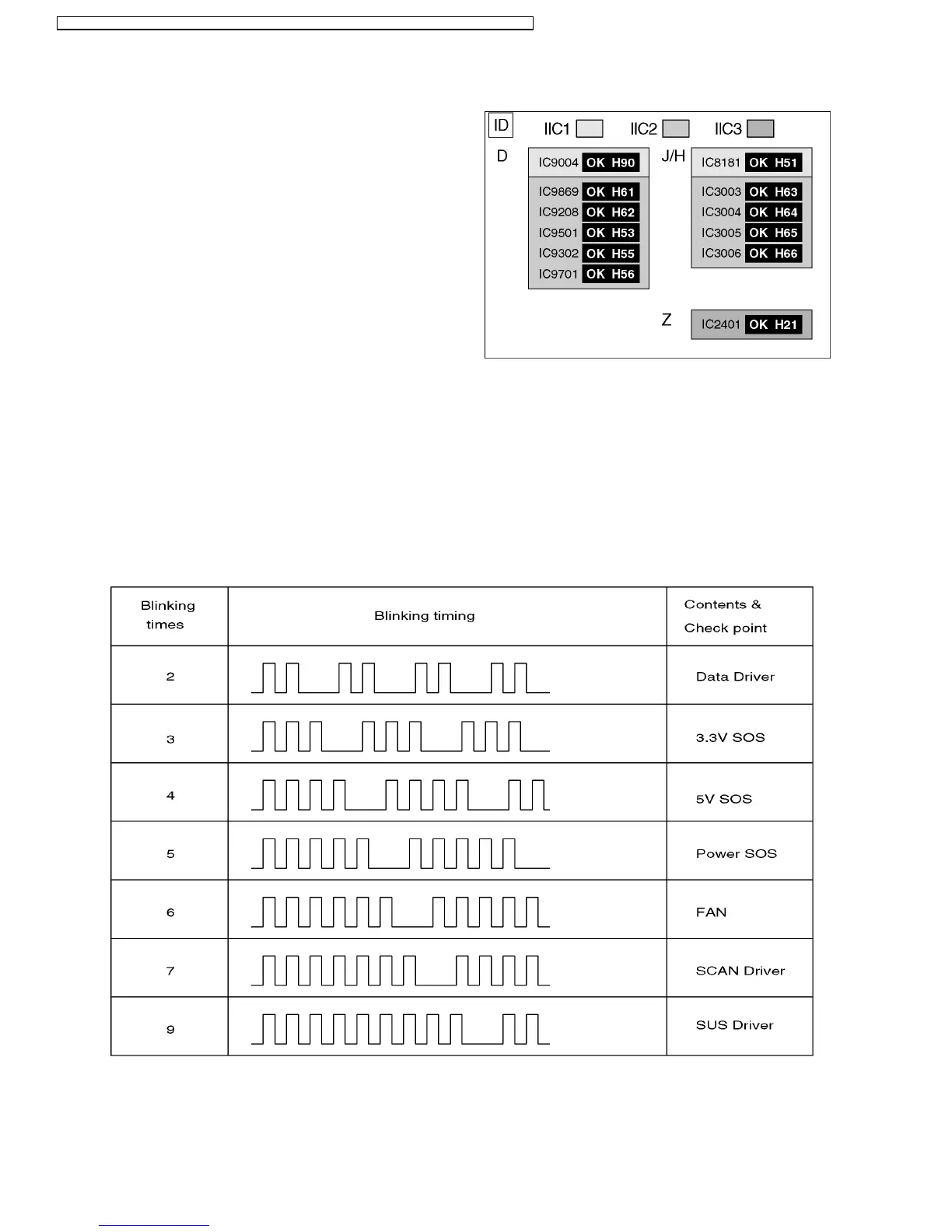
12.1. Self Check
1. Self-check is used to automatically check the bus line
controlled circuit of the Plasma display.
2. To get into the Self-check mode, press the volume down
button on the customer controls at the front of the set, at the
same time pressing the OFF-TIMER button on the remote
control, and the screen will show :-
If the CCU ports have been checked and found to be incorrect
Or not located then " - - " will appear in place of " OK "
12 Trouble shooting guide
12.2. No Power
12.2.1. Power LED Blinking timing chart
1. Subject
Information of LED Flashing timing chart.
2. Contents
When an abnormality has occurred the unit, the protection circuit operates and reset to the stand by mode. At this time, the
defective block can be identified by the number of blinkes of the Power LED on the front panel of the unit.
3. Remarks
Above Fan function is operated during the fans are installed.
28
TH-50PHW7BX / TH-50PHW7EX / TH-50PHD7EK / TH-50PHD7ES / TH-50PHD7BK / TH-50PHD7BS / TH-50PHD7UY






 To Next Page