,
,
'" ~"""A""~..'m Page II Tuesday, January 11,2005 J2:20PM ~ 8
~ ( Picture menu) ~
_c...c_~ ,_.-
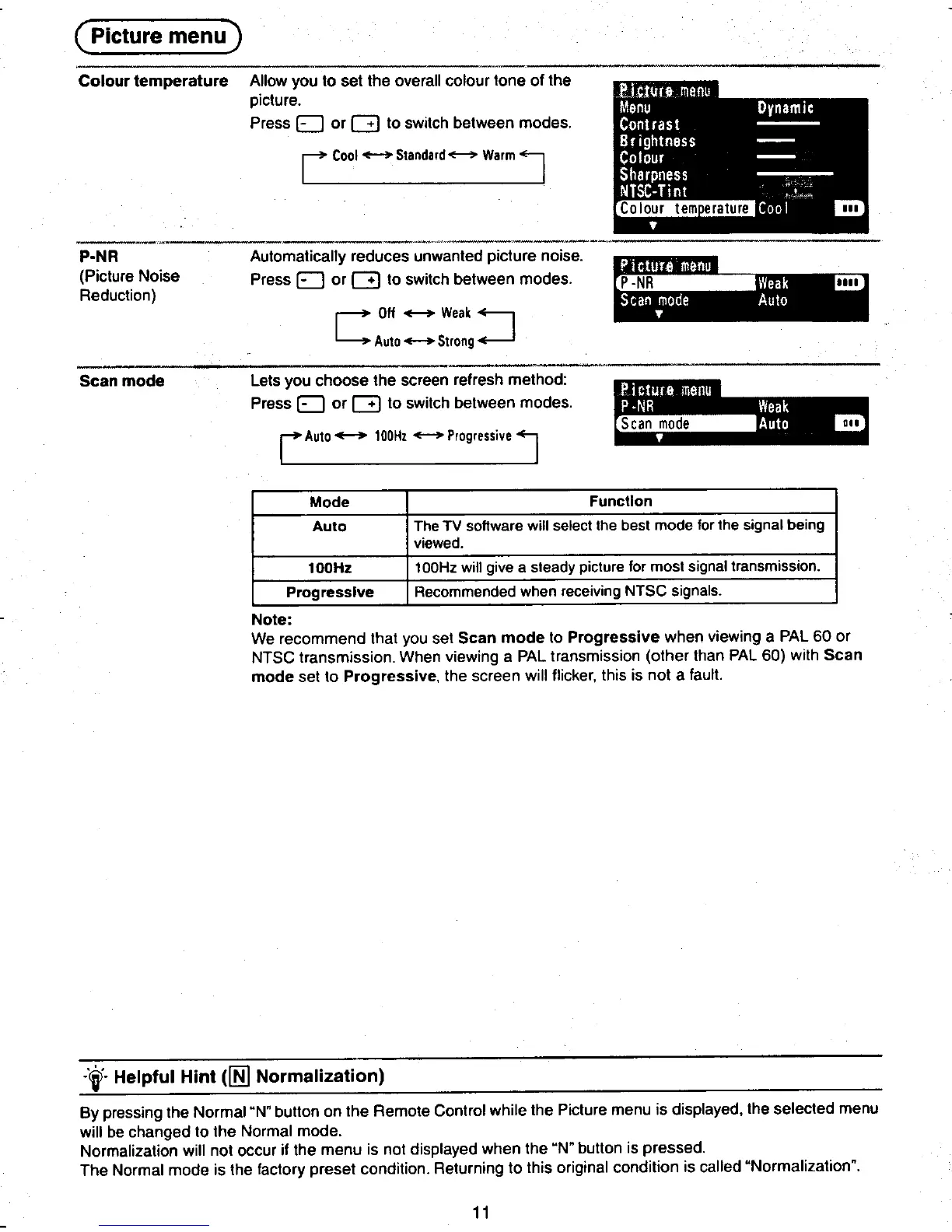
Colour temperature Allow you to set the overall colour tone of the
picture.
Press EJ or G to switch between modes.
r Coo! Standard = Warm J
~ ~,c P-NR Automatically reduces unwanted picture noise. ,
(Picture Noise Press EJ or G to switch between modes.
~~Hil.~-NR" .
Reduction) .IIII
.00' .0
C Off--"Weak~
Auto -Strong ~
--.c_-~ ",."."..."
Scan mode Lets you choose the screen refresh method:
! ~!I~!~~II.I~" Press EJ or G to switch between modes. Scan mode'. ,..
rAuto- 100Hz -Progressive 1
Mode Function
Auto The TV software will select the best mode lor the signal being
viewed.
~ 100Hz 100Hz will give a steady picture for most SignaltransmiSSion.
tProgressive Recommended when receiving NTSC signals.
Note:
We recommend that you set Scan mode to Progressive when viewing a PAL 60 or
NTSC transmission. When viewing a PAL transmission (other than PAL 60) with Scan
mode set to Progressive, the screen will flicker, this is not a fault.
.,. Helpful Hint (lffi Normalization)
-
By pressing the Normal"N" button on the Remote Control while the Picture menu is displayed. the selected menu
will be changed to the Normal mode.
Normalization will not occur if the menu is not displayed when the "N" button is pressed.
~ The Normal mode is the factory preset condition. Retur~~ng to this original condition is called "Normalization". ~
.~ -~-- ~8
T T T











 To Next Page