8 ~2F250A.2831_E.tin Pagc6 Tucsday.January 11.2005 12:20PM -.$c 8
~ (General Operation) ~
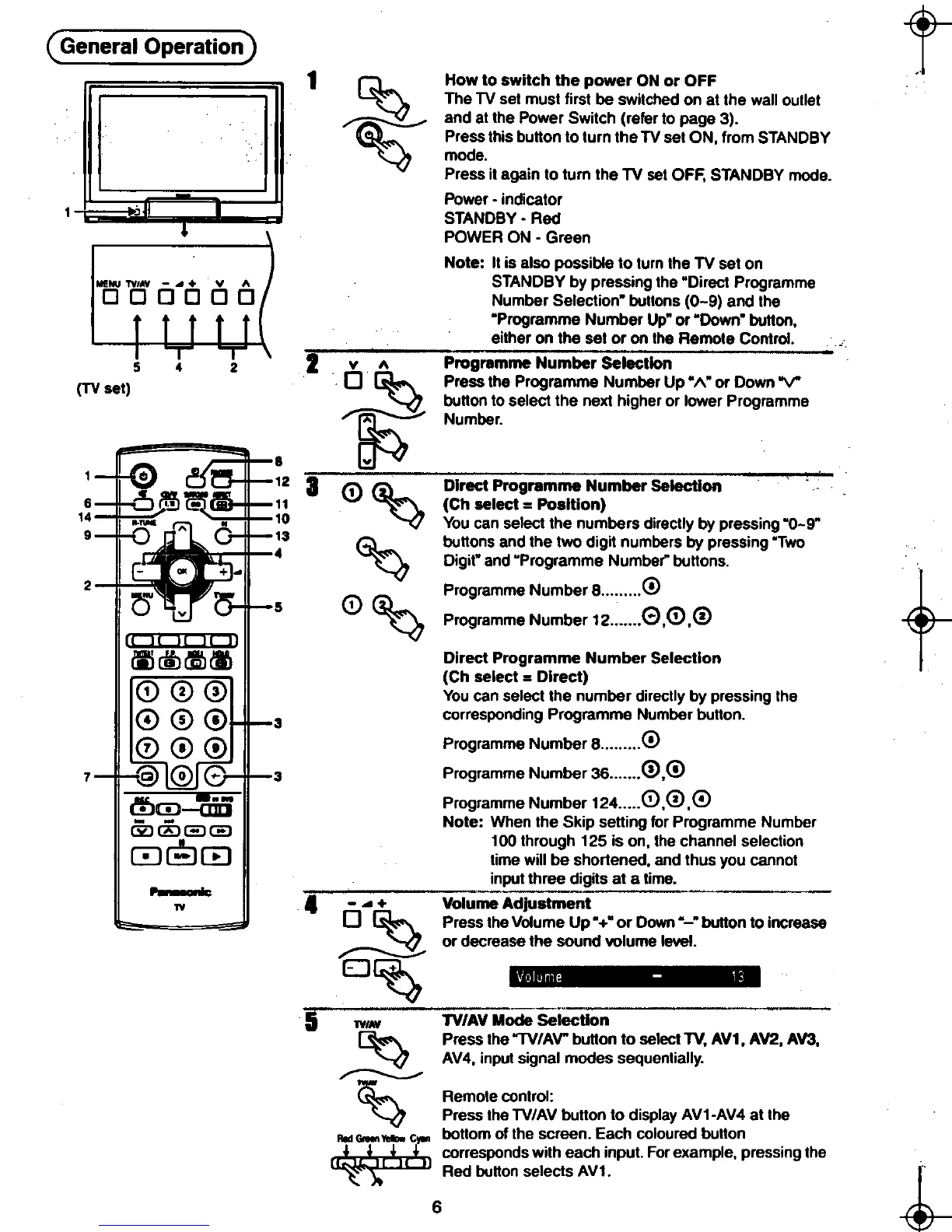
~ How to switch the power ON or OFF
EJ The TV set must first be switched on at the wall outlet
~ and at the Power Switch (refer to page 3).
@::::" Press this button to turn the TV set ON, from STANDBY
-\:...?J mode.
Press it again to turn the TV set OFF, STANDBY mode.
-Power. indicator
1 STANDBY-Red
E!Uill POWER ON .Green Note: It is also possible to turn the TV set on
MENU TV"V -~ + v ~ STANDBY by pressing the "Direct Programme
0 0 0 0 0 0 Number Selection" buttons (0-9) and the
"Programme Number Up" or "Down" button,
either on the set or on the Remote Control.
s 4 2 2 v~ Programme Number"Sei"e~tion
(TV set) 0 ~ Press the Programme Number Up "1\" or Down "V"
-~ button to select the next higher or lower Programme
/~~ Number.
8 ~
12 3-0 ~ Direct Progra;;;;e-N~;;;ber Seiection
(Ch select = Position)
You can select the numbers directly by pressing "0-9"
~ buttons and the two digit numbers by pressing "Two
'-<7 Digit" and "Programme Number" buttons.
2 0 ~ ProgrammeNumberB 0
~ Programme Number 12 0,0,0
Direct Programme Number Selection
(Ch select = Direct)
You can select the number directly by pressing the
corresponding Programme Number button.
Programme Number B 0
Programme Number 36 0,@
Programme Number 124 0,0,@
Note: When the Skip setting for Programme Number
100 through 125 is on, the channel selection
time will be shonened, and thus you cannot
input three digits at a time.
TV 4 -..+ Volume Adjustment
0 ~ Press the Volume Up" +" or Down "-" button to increase
-~ or decrease the sound volume level..
~
EJ ~ .'IiI""". K-
&"\ Press the "TV/AV" button to select TV, AV1. AV2, AV3.
-~ AV4, input signal modes sequentially.
~
,.,.
~ Remote control:
~ Press the TV/AV button to display AV1-AV4 at the
RId Goee..- CII" bottom of the screen. Each coloured button
rr! lL ~l r ~lr ~11 corresponds with each input.. For example, pressing the
~ '""\~ 6Red button selects AV1. ~
.~ ~.













 To Next Page